If your website is slow, hard to use on mobile, or not secure, your 2026 marketing campaigns will underperform—no matter how good your ads or offers are. Before you increase budget, launch new campaigns, or redesign landing pages, you need a clear Website Performance Checklist that makes sure your site is fast, stable, and ready to convert.
This 2026 Website Performance Checklist is built for service-based and local businesses that rely on leads, bookings, and phone calls. It focuses on what actually moves the needle: speed, user experience, technical health, and tracking. With each improvement, you protect your ad spend, raise your lead quality, and create a better path from click to customer.
Why Website Performance Drives 2026 Growth
Website performance is not a “tech issue”—it is a revenue issue. When your pages load slowly or behave poorly on mobile, high-intent visitors leave before they even see your offer. That wasted traffic shows up as low conversion rates, higher cost per lead, and campaigns that never hit their targets.
Imagine you generate $500,000 a year online. A 1-second delay in page load can cost you 7% in conversions. That’s $35,000 or more lost because your pages don’t load fast enough. Now add rising ad costs and more competition. A slow website doesn’t just hurt—it compounds every other marketing problem.
Performance affects every channel at once. SEO rankings drop when Google sees poor user experience. Google Ads cost more when landing pages underperform. Social and email clicks don’t turn into leads when forms and CTAs are slow or hidden. Fixing performance is one of the most direct ways to improve ROI across your entire marketing mix.
If you’re planning new campaigns in 2026, Tools ’N Tactics can review your site’s performance before you scale your spend—so you invest in traffic that actually converts.
2026 Website Performance Checklist Overview
A strong Website Performance Checklist needs to be simple enough to act on, but strategic enough to impact revenue. The goal is not to chase perfect scores—it’s to create a website that supports growth all year long.
This checklist is organized into four pillars:
- Core Web Vitals and page speed – how fast and stable your site feels.
- User experience and mobile design – how easily users move toward action.
- Technical readiness and security – how safe, stable, and compliant your site is.
- Measurement and monitoring – how you track, maintain, and fix performance over time.
Each section gives you benchmarks, practical changes, and the business impact behind them. You can work through them one by one or prioritize the areas where your performance is clearly weak.
1. Master Your Core Web Vitals
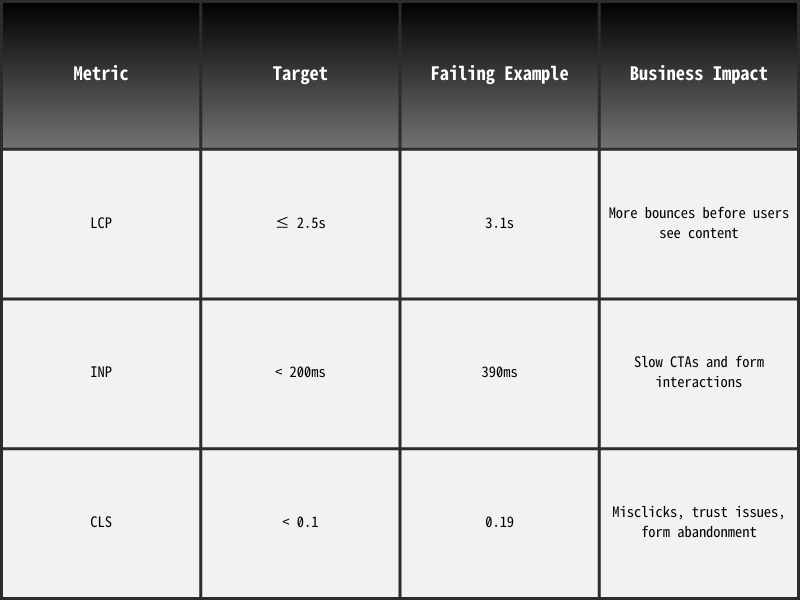
Core Web Vitals are Google’s way of measuring real-world experience on your site. They focus on how quickly content appears, how fast the page responds, and how stable everything feels as it loads. For business owners, these metrics tell you one simple thing: do users stay and act, or do they leave?
If your Core Web Vitals are poor, your website becomes harder to rank, more expensive to advertise, and less likely to convert. Fixing them is one of the most efficient moves you can make before starting New Year campaigns.
The Three Core Web Vitals You Must Meet in 2026
Core Web Vitals can feel technical, but the idea is simple. You’re measuring how quickly people see your content, how fast they can interact, and whether anything jumps around on the screen.
Largest Contentful Paint (LCP)
Goal: ≤ 2.5 seconds
LCP measures how long it takes the main content on the page to load. This is usually your hero headline, main image, or top section that explains who you are and what you do. If this loads slowly, users think your site is stuck or broken.
A poor LCP leads to high bounce rates, especially on mobile. Users may never scroll, call, or click anything. For local services, that means lost leads—even when your offer is strong and your ads are relevant.
Interaction to Next Paint (INP)
Goal: < 200 milliseconds
INP tracks how quickly your site responds when someone taps, clicks, or types. This is critical for forms, menu clicks, and “Book Now” or “Call Now” buttons. If there’s a delay after a user interacts, they often tap twice, reload, or leave.
In 2026, INP will matter even more as websites rely on dynamic forms, chat widgets, and interactive elements. A fast INP makes your site feel “snappy” and professional. A slow INP makes it feel broken.
Cumulative Layout Shift (CLS)
Goal: < 0.1
CLS checks whether your layout shifts while the page loads. If buttons, fields, or links jump around, users misclick or lose trust. Think about tapping “Call” and ending up on a random page instead. That’s a friction point that kills conversions.
Stable layouts show users that your site is well-built and reliable. Unstable layouts feel cheap and frustrating, even if your design looks nice.
Why Poor Web Vitals Kill Conversions
Bad Core Web Vitals don’t just hurt rankings—they hurt your bottom line. Slow load times and unstable layouts cause visitors to leave early, which increases bounce rate and lowers the number of people reaching your forms, phone numbers, or booking tools.
As bounce rates rise, Google sees your site as less useful and lowers your visibility. Ads also perform worse because users abandon the landing page. Everything becomes more expensive.
Tools ’N Tactics can run a Core Web Vitals audit and provide prioritized fixes so your site meets Google’s expectations before you boost traffic.
2. Speed Optimization Techniques That Actually Work
Speed is the part of your Website Performance Checklist that most directly affects user behavior. If your site takes longer than three seconds to load, many visitors will never see your message. The good news: you can often fix speed issues without a complete redesign.
When you improve speed, you improve every stage of the funnel. More visitors stay, more people reach your CTAs, and more leads convert. You also strengthen your SEO and lower your ad costs at the same time.
High-Impact Speed Fixes for 2026
Not all optimizations give the same result. Some changes are technical but low-impact. Others are simple and powerful. Focus first on the moves that cut seconds off load time across the whole site.
- Use modern image formats (WebP): Images are one of the biggest sources of slow pages. Converting PNG and JPEG files to WebP can dramatically reduce file size. For industries like dental, landscaping, or real estate that use many photos, this can cut load time in half without hurting visual quality.
- Enable browser and server caching: Caching lets your site “remember” key resources so returning visitors load pages much faster. Server-side caching reduces repeated work on your hosting platform. Both steps lower load times and improve user experience, especially during busy periods.
- Minify and compress your code: Minifying CSS, JavaScript, and HTML removes unnecessary characters and spaces. This reduces file sizes and helps browsers load your site faster. Most CMS platforms have plugins or build tools that automate this step.
- Upgrade to performance-optimized hosting: Shared hosting often struggles once your traffic grows or you run campaigns. A performance-focused host with CDN support, better caching, and faster response times improves speed across every page. For businesses that rely on local SEO and PPC, this is often a high-ROI upgrade.
Before-and-After Example
Here’s how speed optimization can change user behavior and revenue outcomes:
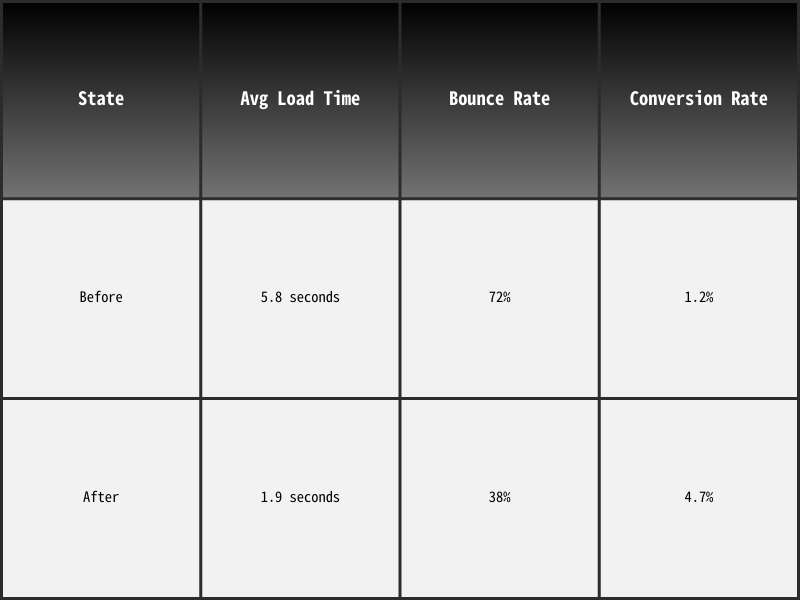
A faster site doesn’t just “feel better.” It becomes a stronger sales engine. You need fewer clicks to produce the same number of leads, which means your marketing dollars stretch further.
Tools ’N Tactics can review your hosting, images, and code structure to identify fast wins for speed—before your next campaign goes live.
3. Build a User Experience Designed for Conversions
Speed gets people in the door. User experience (UX) guides them to the outcome you want. If your site loads quickly but confuses visitors, hides CTAs, or forces people to hunt for details, they will still leave without taking action.
This part of your Website Performance Checklist helps you design pages that are clear, simple, and focused on conversions—especially on mobile.
Design Clear, Simple Paths to Action
Good UX is about reducing friction. Your visitors should always know where they are, what you offer, and what to do next. Confusing layouts, weak copy, or crowded pages slow down decisions.
Start by reviewing how a new user experiences your pages:
- Can they tell what you do within three seconds?
- Is there a clear primary call to action above the fold?
- Are key service details easy to scan?
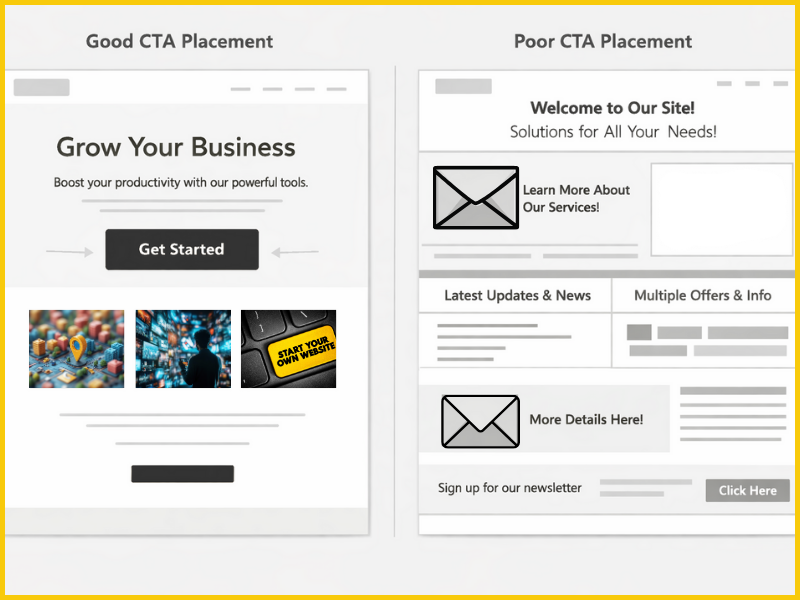
Key CTA Placement Zones
Your calls-to-action should appear in predictable, helpful places. Instead of hiding a single “Contact” link in the header, place CTAs in multiple strategic zones so users can act when they’re ready.
Explain to your team why CTA placement matters: some users are ready to act immediately, while others want to read more first. Good UX design supports both types of visitors without making either group work too hard.
Place CTAs in three key areas:
- Above the fold – for users ready to contact you immediately.
- Mid-scroll – for users who need a bit more detail.
- Near the footer – for users who read the whole page before deciding.
Use action-focused copy like “Book Your Appointment,” “Request a Quote,” or “Schedule a Free Consultation.” Pair buttons with short, benefit-led text that reinforces why someone should click now.
Make Mobile Your Priority, Not an Afterthought
Mobile is where most people experience your brand first. For many local services, urgent searches happen entirely on phones. If your mobile experience is clunky, cramped, or slow, you lose those leads.
A mobile-first approach means designing for small screens and thumb use from the start, not just shrinking your desktop layout.
Key mobile UX principles include:
- Large, tappable buttons with enough space around them
- Short forms with only essential fields
- Clear, vertical layouts instead of multi-column designs
- Scroll-sticky contact buttons for quick calls or messages
- No aggressive pop-ups that hide content or CTAs
Mobile visitors scan fast. They want answers and actions, not long blocks of dense text. Short sections, clear headings, and fixed bottom CTAs help them act quickly.
Tools ’N Tactics can analyze your mobile experience and rebuild key pages to drive more calls and form submissions from mobile traffic.
4. Technical Readiness, Security & Site Health
A high-performing website also needs to be secure, stable, and accessible. Technical readiness is the part of your Website Performance Checklist that protects you from cracks under pressure—like traffic spikes, attacks, or major updates.
Ignoring technical health can undo all your work on speed and UX. It can also lead to SEO penalties, security incidents, or legal risk.
Security Essentials for 2026
Security is now part of user experience. Browsers warn visitors when a site is “not secure,” and most users will leave immediately. That means security gaps directly affect revenue.
Start with these must-haves:
- Use HTTPS everywhere: Make sure your SSL certificate is active and enforced across the entire site. Redirect all HTTP versions to HTTPS. This supports SEO, user trust, and data protection.
- Clean up unused plugins and themes: Old or inactive tools can create vulnerabilities and slow down your site. Remove anything you no longer use and stick to trusted, actively maintained plugins.
- Keep your CMS and tools updated: Out-of-date software leads to security issues and unexpected bugs. Set a regular update schedule and test key features after each update.
- Control admin access: Limit who has admin rights. Use strong passwords and two-factor authentication to protect your site from unauthorized changes.
These actions keep your site safer and more stable, especially when you drive heavy campaign traffic.
Accessibility Standards and Site Health
Accessibility is about making your website usable for everyone, including people with disabilities. It also improves clarity for all visitors and sends positive signals to search engines.
Building accessibility into your Website Performance Checklist helps you:
- Avoid legal risks
- Improve user experience
- Increase engagement and conversions
Focus on basic but powerful changes:
- Use a minimum 16px font size for body copy.
- Add descriptive ALT text to all key images.
- Use proper ARIA labels for forms and interactive elements.
- Maintain strong contrast between text and background.
- Ensure all navigation and buttons work with a keyboard.
These updates are often easy to implement but have a lasting positive impact.
Tools ’N Tactics can run a technical and accessibility audit to flag security gaps, performance risks, and compliance issues before they disrupt your campaigns.
5. Tracking, Measurement & Real-Time Monitoring
Performance is not a “set it and forget it” task. Websites change. Plugins update. Traffic surges. Without monitoring, your site can go from fast to slow overnight—and you might not notice until your leads drop.
This final part of your Website Performance Checklist ensures you keep what you’ve gained. It combines tools, alerts, and regular check-ins so you can respond before problems cost you money.
Essential Speed & Performance Tools
You don’t need a large team to stay on top of performance. A few core tools give you enough visibility to act quickly.
- GTmetrix: GTmetrix helps you see exactly which page elements slow down your site. It shows a waterfall chart of load behavior and highlights heavy scripts, slow images, or server delays. Set test locations close to your audience for realistic results.
- Google PageSpeed Insights: PageSpeed Insights focuses on Core Web Vitals and real-user experience. It breaks down mobile and desktop scores and points out specific opportunities, like reducing unused JavaScript or optimizing images.
Use both tools together: GTmetrix for technical depth, PageSpeed Insights for Google-aligned guidance.
Automated Monitoring Alerts
Manual checks are not enough when your site is live and campaigns are running. Automation helps you catch issues early, often before customers feel them.
Set alerts for:
- Page load time above your target (e.g., over 3 seconds)
- Downtime or server errors
- High error rates on key pages (contact, quote, booking)
- Sudden drops in Core Web Vitals scores
- Security alerts or unusual login attempts
When something breaks, you want to know right away—not at the end of the month when your reporting shows a drop in leads.
Tools ’N Tactics offers ongoing performance monitoring and optimization so your site stays fast, secure, and conversion-ready throughout 2026.
Partner With Tools ’N Tactics for a High-Performance 2026
Your website is the engine behind every marketing campaign you run. If it’s slow, confusing, or unstable, your ad spend and SEO efforts will never reach their full potential. Fixing performance before you ramp up 2026 campaigns is one of the smartest investments you can make.
Tools ’N Tactics specializes in building and optimizing performance-focused websites for service-based businesses. We connect technical improvements directly to business outcomes: more qualified leads, higher conversion rates, lower cost per acquisition, and stronger authority in your market.
We help you:
- Improve Core Web Vitals and page speed
- Design UX and mobile layouts that drive action
- Tighten security and ensure technical readiness
- Monitor and maintain performance all year long
You don’t need to become a developer to have a fast, reliable website. You just need a partner who understands how performance, SEO, and revenue work together.
Start 2026 with a website that supports your growth instead of blocking it. Partner with Tools ’N Tactics to implement this Website Performance Checklist and turn more clicks into paying customers.