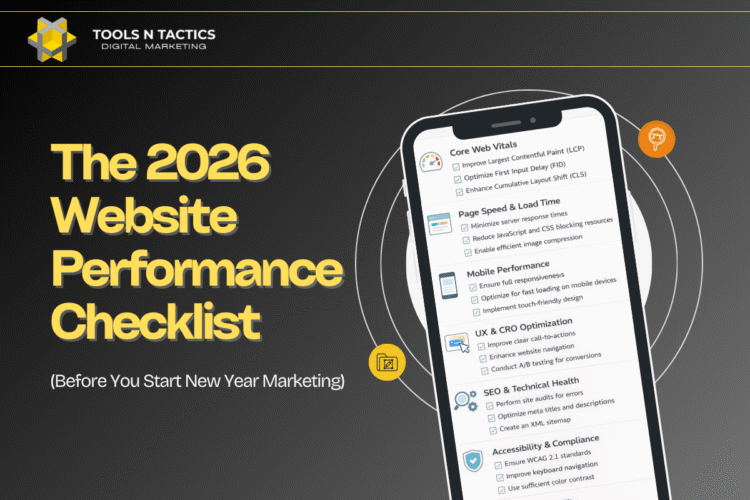
A fast, stable, responsive website isn’t optional anymore—it’s the foundation of modern SEO. If your site doesn’t meet Google’s Core Web Vitals benchmarks, you’re losing visibility, conversions, and user trust. Core Web Vitals directly measure how users experience your pages, which means improving them isn’t just “good for SEO”—it’s essential for business growth.
When you focus on the right technical SEO strategies, you can dramatically enhance page speed, loading efficiency, interactivity, and visual stability. These improvements help your site climb the rankings, reduce bounce rates, and boost engagement—all while creating a smoother experience for your visitors.
Let’s break down the key Core Web Vitals metrics and the most effective technical SEO strategies to elevate your website’s performance and position your brand as the leader in your industry.
Core Web Vitals and Their SEO Impact
Core Web Vitals are critical metrics that directly affect user experience and, consequently, your SEO performance. Focusing on these specific elements can lead to improved rankings and enhanced user satisfaction.
Largest Contentful Paint Explained
Largest Contentful Paint (LCP) assesses loading performance by measuring the time it takes for the largest visible content element on your page to load. A good LCP score is under 2.5 seconds.
To improve LCP, consider optimizing server response times, utilizing a Content Delivery Network (CDN), and implementing lazy loading for images. Prioritizing visible content during initial loading can also make a noticeable difference. When you ensure that users see substantial content quickly, you create a more engaging experience, reducing bounce rates.
Understanding Interaction to Next Paint
Interaction to Next Paint (INP) evaluates how quickly your site responds after a user interacts with it. Unlike First Input Delay (FID), which only measures the first interaction, INP includes all subsequent responses. An optimal score indicates that your content reacts seamlessly to user actions.
You can enhance INP by optimizing JavaScript execution and reducing input delays. Code that is well-structured allows for faster computations and better handling of user engagements. This results in a smooth browsing experience that keeps users engaged longer and encourages explorations of your content.
Cumulative Layout Shift Overview
Cumulative Layout Shift (CLS) measures visual stability by quantifying how much content shifts on the page during its loading process. A CLS score of less than 0.1 is ideal. High CLS can frustrate users, especially if buttons or links move unexpectedly.
To minimize layout shifts, always specify size attributes for images and video elements, and avoid inserting new content above existing content without user interaction. By stabilizing your layout, you improve user experience, which positively influences your SEO rankings. Reducing unexpected shifts keeps your audience focused, improving retention and interaction rates.
Optimizing Loading Performance for LCP
Focusing on loading performance is critical for improving Largest Contentful Paint (LCP). Enhancements in this area can significantly reduce loading times and enhance user experience. Key techniques include image optimization, lazy loading, and server-side rendering.
Image Optimization Techniques
Optimizing images is essential for enhancing LCP. Large image files can slow down your page speed, negatively affecting user experience. To optimize images effectively, consider the following:
- Use modern formats: Switching to formats like WebP can dramatically reduce file sizes without compromising quality.
- Resize images: Ensure images are not larger than necessary. Use responsive design techniques to serve appropriately sized images based on the user’s device.
- Compress images: Utilize tools to compress images, retaining quality while reducing their size.
Regularly check your website with tools like Pagespeed Insights to identify any issues. Optimizing images can cut down loading times significantly, fostering a better overall experience.
Utilizing Lazy Loading
Implementing lazy loading is a practical strategy for improving LCP. This technique defers loading images and videos until they are visible in the viewport, which conserves bandwidth and speeds up initial page load times.
- JavaScript Libraries: Use libraries to help manage lazy loading easily. They can automate the process without overwhelming your code.
- Image Tags: Use the
loading="lazy"attribute in your<img>tags to enable native lazy loading. This can significantly improve loading performance for content below the fold. - Test impact: Analyze how lazy loading affects your LCP using performance tools to ensure it provides the intended benefits.
By reducing the load on your page initially, lazy loading enhances perceived performance and boosts user satisfaction.
Implementing Server-Side Rendering
Server-side rendering (SSR) can dramatically impact LCP by serving pre-rendered HTML to the client. This allows users to view content immediately rather than waiting for JavaScript to render it.
- Improved Performance: SSR reduces the time it takes for the largest contentful element to appear, directly enhancing LCP scores.
- SEO Benefits: Search engines can index pre-rendered content more efficiently, which can also help improve ranking.
- Frameworks: Utilize frameworks like Next.js or Nuxt.js, which support SSR out of the box, making implementation straightforward.
Embracing SSR can lead to faster load times, improving user experience and boosting your website’s performance metrics.
Enhancing Interactivity and Responsiveness
Improving interactivity and responsiveness is critical for boosting Core Web Vitals, especially First Input Delay (FID) and Interaction to Next Paint (INP). These strategies will help create a smoother user experience by reducing delays and enhancing the overall responsiveness of your website.
Reducing JavaScript Execution Time
JavaScript execution can significantly impact your site’s interactivity. Long execution times may lead to high FID scores, where users experience delays in responding to their inputs. To reduce execution time, consider optimizing your JavaScript by eliminating unnecessary code, using code-splitting, and deferring non-essential scripts.
Evaluate which scripts are crucial for initial page load and defer the rest until after user interaction. Using tools like Lighthouse can help identify heavy scripts, allowing targeted optimizations that directly improve user experience.
Leveraging Web Workers
Web Workers allow you to run scripts in the background, separate from the main thread. This method prevents blocking the UI, thereby enhancing responsiveness. You can offload complex calculations or data fetching tasks to Web Workers, ensuring that your main thread remains available for user interactions.
Implementing Web Workers can reduce delays in Input to Next Paint metrics and enhance the overall feel of the site, as users will experience smoother interactions. Remember to evaluate workload distribution effectively to maximize the benefits of this approach without overloading background processes.
Optimizing Critical Resource Loading
Optimizing how critical resources load is essential to improving user experience. You should prioritize loading CSS and JavaScript essential for first rendering while deferring others to improve responsiveness. Use techniques like lazy loading for images and non-critical JavaScript to ensure the first paint is swift.
By minimizing blocking resources, you can significantly enhance FID scores. Tools like Google PageSpeed Insights can guide you in identifying critical resources that should be loaded first. Implementing effective resource strategies will lead to a more responsive and interactive user experience on your site.
Ensuring Visual Stability and Minimizing CLS
Optimizing the visual stability of your webpage is essential for enhancing user experience and improving your Core Web Vitals score. By minimizing Cumulative Layout Shift (CLS), you ensure that content remains fixed during loading, reducing user frustration and improving engagement. Here’s how you can achieve this.
Defining Media Dimensions
To avoid unexpected shifts, always define your media dimensions. Assign explicit width and height attributes to images and videos in your HTML or CSS. This practice reserves space in the layout, preventing content from moving around as the page loads.
When images lack defined dimensions, browsers must calculate their size dynamically, which can lead to CLS. Utilize responsive design principles by adjusting size attributes to ensure that media elements scale properly on different devices, enhancing the user experience.
Preloading Fonts
Fonts can contribute significantly to visual instability if not handled correctly. Use the rel="preload" attribute in your <link> tags to prioritize critical font files. This technique ensures that your text is displayed using the intended fonts as quickly as possible.
By preloading fonts, you reduce the chances of text jumping around as different font files load. Additionally, employing font-display: swap; in your CSS ensures that fallback fonts are used initially and replaced swiftly once your desired font is available.
Managing Dynamic Content
Dynamic content, such as ads or user-generated inputs, can introduce layout shifts. Manage these elements by reserving adequate space on the page. Implement sticky components that maintain their positions to minimize disruption.
You can deploy tools like placeholders for ads until they fully load or even configure them to load asynchronously. Ensure that any dynamic changes are gradual to prevent abrupt shifts that could negatively impact your CLS score.
By incorporating these strategies, you can enhance your webpage’s visual stability and optimize for a lower CLS, significantly improving user experience and Core Web Vitals metrics.

Monitoring Core Web Vitals with Technical SEO Tools
Monitoring Core Web Vitals is essential for optimizing site performance and enhancing user experience. Various technical SEO tools provide insights that enable effective assessment and improvements.
Using Google Search Console Reports
Google Search Console is a crucial tool for monitoring Core Web Vitals. It offers reports that highlight your site’s performance based on real-user data. You can view metrics like Largest Contentful Paint (LCP), First Input Delay (FID), and Cumulative Layout Shift (CLS).
These metrics reveal how quickly your pages load, how responsive they are, and how stable they appear during loading. By accessing the Core Web Vitals report, you can identify pages needing urgent attention. Prioritize fixing issues on pages with high traffic to maximize the impact of your optimizations. Using these reports regularly ensures you stay on top of performance issues.
Analyzing with PageSpeed Insights
PageSpeed Insights provides a comprehensive analysis of your website’s performance. Input your URL to receive a score that reflects its Core Web Vitals. The tool breaks down LCP, FID, and CLS, offering detailed recommendations for improvement.
It highlights specific areas, such as image optimization or JavaScript execution, that may slow down your site. Implementing these suggestions can dramatically enhance user experience. The analysis is segmented into mobile and desktop views, allowing you to tailor improvements to your audience’s primary devices. Regularly using PageSpeed Insights keeps your site performing optimally and user-friendly.
Real-Time Performance Monitoring
Real-time performance monitoring is vital for maintaining optimal Core Web Vitals. Tools like DebugBear or Sematext enable ongoing tracking of your web page performance. These tools provide alerts on performance drops, allowing for quick action.
You can set thresholds to monitor LCP, FID, and CLS consistently. This proactive approach helps identify issues before they escalate, ensuring a seamless user experience. With monthly reports and visual data insights, you can evaluate the effectiveness of your SEO strategies over time. Using dedicated monitoring tools aids in sustaining high performance and improving your site’s overall health.

Advanced Strategies and Best Practices
Enhancing your website’s Core Web Vitals is essential for improving overall user experience and search rankings. Focus on securing your site, optimizing content delivery, and conducting regular performance audits to ensure continuous improvement.
Migrating to HTTPS for Site Security
Switching to HTTPS is critical for enhancing site security and trust. This protocol encrypts user data, protecting it from vulnerabilities. Search engines prioritize HTTPS sites, improving rankings and providing better visibility.
Steps to Migrate:
- Obtain an SSL Certificate: Choose a reliable certificate authority.
- Update Links: Change all internal links to HTTPS.
- Redirect HTTP to HTTPS: Use 301 redirects to point users to the secure version.
- Update Search Console: Inform search engines of the change.
This strategy not only secures your site but boosts your SEO efforts.
Optimizing JavaScript Rendering
JavaScript can significantly affect your site’s loading speed and performance. Optimizing how JavaScript is rendered ensures that content is accessible quickly, enhancing Core Web Vitals metrics like Largest Contentful Paint (LCP).
Optimization Techniques:
- Defer Unused JavaScript: Identify and defer scripts not immediately needed.
- Minify JavaScript Files: Reduce file size to improve loading time.
- Asynchronous Loading: Load JavaScript files asynchronously to prevent blocking the rendering of the page.
Implementing these techniques can lead to faster page loads and, ultimately, a better user experience.
Continuous SEO Audits
Regular SEO audits are essential for maintaining optimal website performance. Conducting these assessments allows you to identify and rectify issues that may hinder your site’s Core Web Vitals.
Audit Checklist:
- Check Site Speed: Use tools like Google PageSpeed Insights to evaluate loading performance.
- Analyze Mobile Responsiveness: Ensure your site provides a seamless experience on mobile devices.
- Review Technical SEO Factors: Assess for elements like broken links, sitemap integrity, and indexing issues.
By consistently monitoring and updating your site, you maintain a robust online presence that adapts to changing algorithms and user expectations.
Frequently Asked Questions
Understanding the critical aspects of Core Web Vitals can significantly influence your website’s performance and SEO rankings. Below are some common inquiries regarding these metrics and how you can improve them.
What are the key metrics to monitor in a Core Web Vitals report?
The main metrics to track are Largest Contentful Paint (LCP), First Input Delay (FID), and Cumulative Layout Shift (CLS). LCP measures loading performance, FID assesses interactivity, and CLS evaluates visual stability. Monitoring these metrics ensures your site offers a good user experience.
How does PageSpeed Insights help with improving Core Web Vitals?
PageSpeed Insights provides detailed reports on how well your website performs regarding Core Web Vitals. It identifies areas of improvement and offers suggestions to enhance loading times, interactivity, and visual stability. Utilizing this tool allows you to prioritize changes that will have the most significant impact on performance.
What are the best practices for optimizing First Input Delay (FID)?
To optimize FID, minimize JavaScript execution time and use a Content Delivery Network (CDN). Defer unused JavaScript and employ code-splitting techniques to reduce the initial load. Ensuring your server responds quickly is also crucial; consider optimizing server resources for enhanced performance.
Can you explain the significance of Largest Contentful Paint (LCP) in SEO rankings?
LCP is essential because it reflects how quickly the main content of a page loads, impacting user experience. A fast LCP improves search engine rankings, as search engines prefer sites that provide users with timely access to content. Optimizing LCP can enhance both user satisfaction and visibility in search results.
What steps can be taken to enhance Cumulative Layout Shift (CLS) for better user experience?
To improve CLS, ensure that images and videos include dimensions in your code. Use placeholders for dynamic content, and avoid inserting new content above existing content. By providing a stable layout, you can reduce frustrating shifts that negatively impact the user experience.
How often should Core Web Vitals be tested to ensure continuous site performance improvement?
Regular testing is recommended, ideally every month or following significant updates or changes to the website. Continuous monitoring helps you stay ahead of potential issues and maintain optimal user experience and SEO performance. Using automated tools can streamline the testing process and provide timely feedback.
Conclusion: Boost Your Core Web Vitals and Elevate Your SEO Performance
Improving Core Web Vitals is no longer an optional SEO enhancement—it’s a competitive necessity. By optimizing load times, eliminating layout shifts, and improving interactivity, you create a website that users love and Google rewards.
If you want a faster, more stable, higher-ranking website, TOOLS N TACTICS is here to help. Our team specializes in technical SEO, Core Web Vitals optimization, and performance-driven digital strategies that elevate your brand.
Ready to enhance your website’s performance and dominate the rankings?
Partner with TOOLS N TACTICS today and let’s build a high-performing site that converts.