
A CRM won’t become part of the workday just because it’s installed. Getting your team to adopt a new CRM takes clear goals, familiar terminology, useful metrics, responsive support, aligned incentives, and a shared reason to use the system. Adoption improves when the CRM helps employees do their jobs, not just report on them.
If your team sees the system as extra data entry or a way to monitor activity, resistance is understandable. Make the purpose clear, connect CRM use to real workflows, and show how reliable information helps the business serve customers and follow up on leads.
This article covers five practical ways to build that foundation, from setting role-specific training goals to recognizing consistent use. You’ll learn how to measure progress without reducing adoption to logins, address friction before it becomes a habit, and explain the value in terms that matter to each team member. The aim is a system people use because it makes their work clearer and more effective.
Key Takeaways
- Use pipeline stages and CRM terms that match your team’s real sales process, then train each role on the tasks they handle.
- Track meaningful usage and business outcomes in dashboards, and use the data to coach rather than simply monitor.
- Ask employees where the system adds friction, then simplify workflows and automate repetitive entry where possible.
- Align recognition with accurate CRM records and customer-focused work so the right habits are rewarded.
- Explain how consistent CRM use helps employees serve customers and follow up on opportunities more effectively.
1. Training employees on CRM terminology
A sales team can’t use a CRM properly if everyone interprets its stages differently. One salesperson may mark a lead “qualified” after a phone call, while another waits until the prospect books an estimate. Define each stage using your actual sales process, then show the team where a new lead, active opportunity, proposal, and closed deal belong. A shared glossary prevents inconsistent records and gives managers a clearer view of the pipeline.
Build the glossary around real work, not software jargon. For example, a roofing company might define “estimate scheduled” as a confirmed appointment, not a request for a callback. Explain which fields employees must complete, what each status means, and what action moves a record forward. Ask salespeople to walk through a recent customer interaction in the CRM, then clarify any confusing terms together. This hands-on practice makes training useful before the first live customer record is entered.
To implement a CRM across a team, first map the sales process and agree on terminology. Then configure stages, migrate records, and train users for their roles. Set a firm deadline for moving accounts and records from the legacy system, and schedule when the old system will be retired. This sequence reduces duplicate recordkeeping and gives employees one clear place to update customer activity.
Tailor training to each role and skill level by focusing on the features people use in daily tasks. A salesperson can practice adding a lead, logging a call, and updating a proposal; a manager can practice reviewing pipeline records and coaching from them. Pair short group sessions with one-on-one coaching and self-paced guides. A quick reference sheet with your team’s stage definitions can help new or less confident users choose the right next step.
Use training and support from the CRM provider where available, then adapt the materials to your workflows. A generic tutorial may show how to create a contact, but your team also needs to know which fields matter for an HVAC service request or construction estimate. Build a shared knowledge base with short videos, FAQs, and workflow examples. Identify an experienced salesperson as a CRM champion who can answer routine questions and flag confusing steps.
Training should continue after launch. Set regular check-ins to review common errors, answer questions, and practice the tasks employees find difficult. If a team member enters a customer under the wrong pipeline stage, use that record as a teaching example and clarify the glossary. One habit-change guideline allows 21 days to drop a bad habit, but consistent CRM routines need ongoing reinforcement, not a single training session.
CRM implementation, training, and onboarding costs depend on data migration, integrations, workflow customization, and provider support; pricing is provided after a quote request.
2. Using dashboards and metrics to support adoption
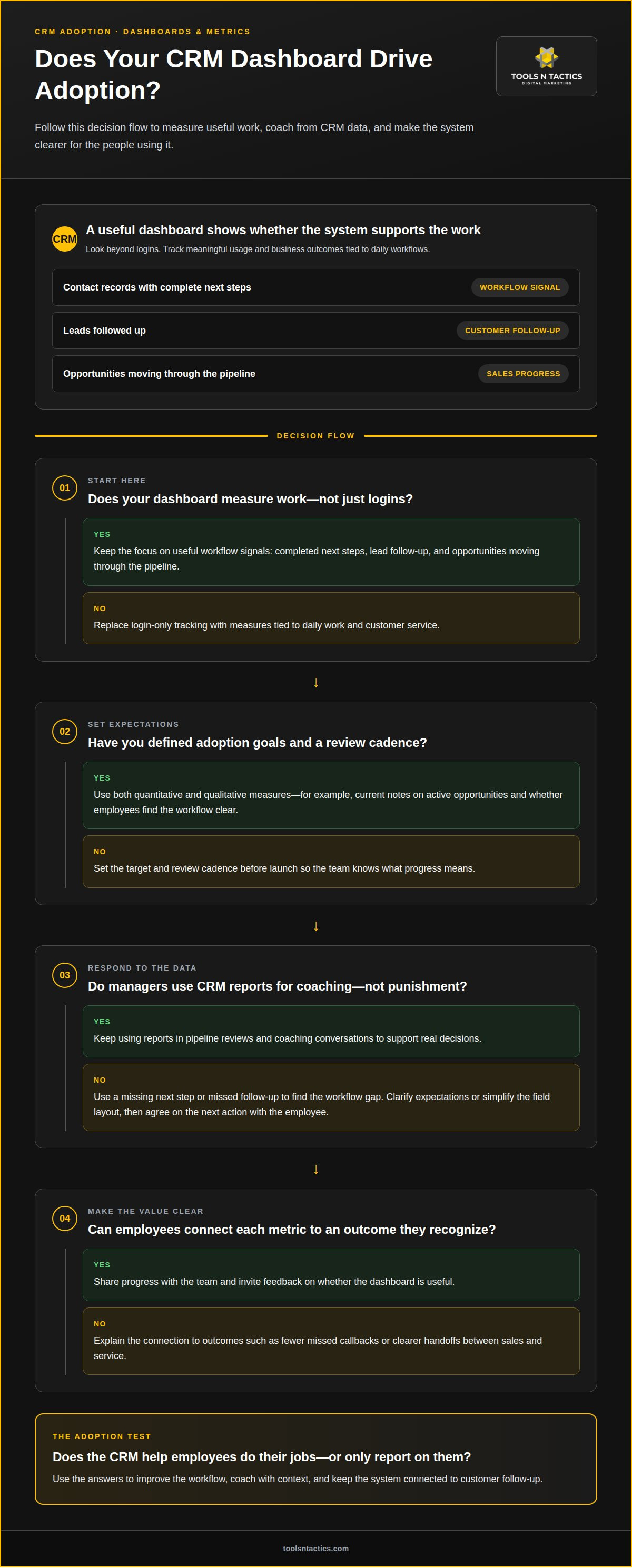
A CRM dashboard should show whether the system supports the work, not just who logged in. Choose metrics tied to daily workflows, such as contact records with complete next steps, leads followed up, and opportunities moving through the pipeline. For a home-service sales team, a manager might check whether every open estimate has an owner and a scheduled follow-up. These measures connect CRM use to customer service and sales progress.
Set adoption goals using both quantitative and qualitative measures. A quantitative measure could track the share of active opportunities with current notes; a qualitative measure could capture whether salespeople find the workflow clear. Define the target and review cadence before launch, then use CRM reports to spot patterns. If records lack next steps, investigate whether employees need clearer expectations or a simpler field layout. A dashboard is useful when it points to a practical change.
Leaders set the standard. When managers use the CRM to prepare for pipeline reviews and discuss customer follow-up, the team sees that the system informs real decisions. Make those behaviors visible in a shared dashboard, and use reports during coaching rather than as a scorecard for punishment. For example, a manager can review a missed follow-up with an employee, identify the workflow gap, and agree on how to record the next action.
Give CRM support a clear owner. Assign an internal champion to collect questions, document recurring issues, and coordinate help with the CRM provider. Experienced adopters can support peers by demonstrating tasks in context, such as locating a record or correcting an incomplete opportunity. Peer coaching works best when it solves a specific problem, not when it substitutes for clear process design. Keep a shared list of questions and resolutions so answers stay consistent.
Use platform updates as a reason to review workflows and training materials. CRM platform updates can be an opportunity for administrators to review changed features, test key workflows, and explain relevant changes to users. Avoid changing a process simply because a feature exists. First determine whether it removes friction or improves reporting. If a change affects customer handoffs, tell the sales team what changes and where to get help.
To encourage adoption, connect each metric to an outcome employees recognize, such as fewer missed callbacks or clearer handoffs between sales and service. Share progress with the team and invite feedback on dashboard usefulness. If reporting and CRM workflows remain disconnected, discuss your CRM adoption challenges and the processes you want to improve.
3. Addressing user concerns about time, complexity, and oversight
Employees may resist a CRM implementation if it feels like extra paperwork or managerial surveillance. A field technician may worry that updating a customer record takes time away from a job, while a salesperson may fear every call will be judged by a dashboard. Address these concerns early. Explain what information the system needs, who can see it, and how it supports customer handoffs. Clear boundaries reduce suspicion and keep the rollout focused on useful work.
Build a change management plan by involving team members before launch, mapping current workflows, and explaining what will change. Identify each role’s needs, assign owners for training and questions, and set a process for gathering feedback once employees start using the CRM. Keep the plan visible so everyone understands the purpose, milestones, and available support.
CRM implementation and team adoption take as long as the work requires. The timeline depends on record migration, integrations, workflow changes, training needs, and how quickly employees can use the system in real customer tasks. A straightforward setup with clean records differs from a rollout involving several tools and complex handoffs. Plan for post-launch support rather than treating launch day as the finish line.
Gather feedback through short check-ins, team discussions, and a simple way to report problems. Ask specific questions: Which step takes longer than the old process? Which customer detail is hard to find? Where does a handoff break? For example, if an HVAC salesperson must enter the same address in multiple places, that friction may point to a workflow or integration issue. Concrete examples make feedback easier to act on.
Respond visibly. Group reports into issues the team can resolve through training, workflow adjustments, or automation. If employees say a form asks for details they don’t use, compare those fields with the information needed for reporting and customer follow-up. Keep only necessary data entry, and automate repetitive tasks where practical. Tell the team what changed and why; otherwise, feedback can feel like a request that disappeared into a queue.
Encourage CRM use through clear expectations and useful coaching, not constant activity checks. Review whether customer records support follow-up and smooth handoffs, then discuss gaps in regular one-on-one conversations. A manager can ask why a lead lacks a next step, listen for a process barrier, and help remove it. This keeps accountability tied to the work instead of treating every click as proof of effort.
During rollout, review the process with employees as they use it. If a new status or required field creates confusion, clarify its purpose or revise the workflow. A CRM should make customer work easier to coordinate, not add steps without a clear operational reason.
4. Aligning rewards with CRM data capture
Rewards can reinforce CRM habits, but incentives should recognize useful records, not empty activity. If employees earn recognition for entering every call, they may create clutter instead of reliable customer history. Define what a complete record means, such as an accurate contact, deal stage, and next action. Then connect recognition to consistent use and customer-focused work.
Data entry can feel like a second job when the CRM asks for details employees already record elsewhere. In the cited CRM-adoption figures, 32% of sales representatives spend more than an hour each day on data entry. The estimate puts that time at 260 hours a year, or 10.8 days a year per person. Review each required field and remove information that doesn’t support follow-up, reporting, or service handoffs.
Make rewards achievable and clearly tied to sound CRM use. For example, recognize a salesperson who sends 20 or more quotes to prospects through the system, earns 10 or more electronically signed proposals, or sends 50 text follow-ups through the CRM. Pair individual recognition with team milestones, and check record quality before celebrating volume. This reduces pressure to enter incomplete or misleading data.
- Recognize accurate records and timely next steps.
- Celebrate team milestones alongside individual progress.
- Share examples that connect CRM use with better customer follow-up.
Use the new CRM in sales reviews from the start. Review active opportunities, follow-up dates, and deal outcomes in the system rather than relying on side spreadsheets. If a record is incomplete, ask what blocked the update and coach using that example. When the team sees that CRM data informs decisions, entering it becomes useful to salespeople, not just a management requirement.
Data migration also affects trust. Before relying on imported records, have employees review a sample of accounts they know. They can flag duplicate contacts, outdated details, or missing context that could disrupt a customer conversation. Resolve those issues through a clear correction process, then explain how records were checked. Confidence grows when employees see that the CRM contains useful information.
Compare CRM platforms by testing common tasks with the people who will use them. Have salespeople enter a lead, schedule follow-up, and update a deal; ask managers to review a pipeline. Evaluate ease of use, integration with existing tools, workflow customization, training, and support. Successful adoption depends less on the number of features than on whether the system solves your team’s main pain points without creating excessive data entry.
Reduce repetitive work with available workflow automation for routine updates, templates, or handoffs. Keep required fields focused on sound reporting and customer service. When the CRM captures reliable details without slowing customer conversations, rewards can reinforce a process employees can sustain.
5. Explaining why the team should use the CRM
A rollout needs more than instructions. Employees need a clear reason to change familiar routines. Explain what the CRM improves for customers and staff, then connect that purpose to daily work. For example, a home-service sales team can use one customer record to track an estimate, promised follow-up, and service handoff. This connection between accurate information and reliable customer care gives the system a practical purpose.
Make the reason relevant to each role. Salespeople need context for timely follow-up; service staff need accurate job details; managers need a dependable view of open opportunities. One announcement may not address all three concerns. At a team meeting, explain the shared goal, then use role-specific examples in follow-up messages and training. Everyone should understand what changes, what stays familiar, and how the new setup supports their responsibilities.
Explain the business impact without framing the CRM as a surveillance tool. Show how complete customer histories help a salesperson avoid asking someone to repeat information. Show how clear lead status helps a service coordinator route a request to the right person. Then connect accurate records to stronger analytics: leaders can identify where follow-up stalls, which sources bring qualified inquiries, and where a workflow needs attention.
Keep communicating after launch. Repeat the reason through team discussions, short written updates, and examples from actual work. If a seller closes a project after using CRM reminders to follow up, share the sequence: the lead was recorded, the next action was set, and the conversation continued at the right time. Celebrate the outcome and name the CRM habit that supported it. This makes success specific, not abstract.
Invite questions before expectations turn into frustration. Ask employees what would make the system useful in their roles, then address practical barriers openly. If a technician says job notes are hard to find, show where those notes live or improve the handoff process. If a manager sees incomplete records, explain which decisions rely on that information. A successful CRM should improve workflows and productivity, not add steps without a clear reason.
Give leaders a short, repeatable message: the CRM is the shared record for customer work, follow-up, and team handoffs. Tie every request for consistent use to one of those outcomes. When priorities shift, explain the change and how the system supports it. Clear reasons help employees understand not only how to use the CRM, but why disciplined use matters.
If your rollout needs a clearer connection between team workflows and customer outcomes, talk with Tools N Tactics about your CRM goals.
Tools N Tactics | Local SEO & Digital Marketing Solutions: Growth Partner Program
Tools N Tactics | Local SEO & Digital Marketing Solutions helps service businesses connect growth priorities through its Growth Partner Program. If CRM adoption is part of a wider effort to improve lead handling, customer experience, and operational consistency, the program can help align the systems around those goals.
The Visibility Engine supports search presence, while the Conversion Engine focuses on turning qualified interest into action. The Authority Engine strengthens customer trust, and the Automation Engine helps streamline repeatable workflows. Together, these components support a more connected path from discovery to follow-up, rather than leaving customer information and marketing activity in separate silos.
If you’re ready to discuss how a more connected growth system could support your business, contact Tools N Tactics.
Make CRM adoption part of the way work gets done
Getting your team to adopt a new CRM is not a launch-day task. It’s an operating choice that should keep earning its place in everyday work. Start by choosing a workflow where better coordination matters, then assess whether the CRM makes that process clearer for employees and customers.
Start with a practical review: where do leads lose momentum, where do customer handoffs break, and which updates are still trapped in individual inboxes? Use the answers to decide what to improve first. A focused change gives your team a visible reason to keep using the system and gives leaders a clear way to judge whether it helps.
If your CRM goals need to connect with lead handling and broader business growth, talk with Tools N Tactics about your next step. Build the process around the work your team needs to do, and adoption can become a dependable part of serving customers well.
Tools N Tactics | Local SEO & Digital Marketing Solutions for CRM Adoption
Tools N Tactics | Local SEO & Digital Marketing Solutions offers CRM services, AI automations, and lead routing systems to support your team as it adopts a new CRM.
Turn to Tools N Tactics when you need help connecting CRM use with SMS or email follow-up automation, review automation, analytics and tracking setup, or AI consulting.
Frequently Asked Questions
How can you improve CRM adoption?
Improve adoption by defining what belongs in the CRM and what belongs in other systems. For example, keep customer relationships and sales opportunities in the CRM, while detailed job scheduling may remain in a field-service platform. Documenting those boundaries prevents employees from treating the CRM as a catchall. It also helps teams avoid duplicate records and confusion about which system holds the current information.
What are the key aspects of CRM adoption?
Key considerations include clear data definitions, suitable access permissions, dependable integrations, and agreed rules for handling customer records. Decide who can view or edit sensitive fields, and define how duplicate contacts should be resolved. For instance, two records for the same property manager can split account history and confuse reporting. A short data-governance policy gives employees consistent rules for keeping records organized.
What factors can influence CRM adoption?
Adoption is shaped by the length of the customer journey, team structure, and number of systems involved. A business with separate sales, estimating, and service teams needs clear account visibility across handoffs. A company serving repeat customers may also need a way to distinguish new opportunities from ongoing relationships. Review these realities before configuration so the CRM reflects how work and customer relationships develop.
Why do teams resist using a CRM?
Employees may hesitate if customer records seem unreliable or if the system conflicts with how the business actually sells. A salesperson who sees outdated contact details or an inaccurate account owner may keep personal notes instead. That workaround can fragment customer history further. Build trust by explaining how records are maintained and giving employees a clear way to report errors that affect customer conversations.
How do you get employees to adopt a new CRM system?
To get your team to adopt a new CRM, make its use part of role onboarding and performance expectations. Give each new salesperson a practical checklist for recording an opportunity, documenting customer preferences, and transferring an account. Managers can review those habits during regular coaching. This creates a consistent standard for current staff and new hires, even as responsibilities shift across the team.
What CRM adoption metrics and KPIs should teams track?
Track business measures that show whether CRM information supports better decisions, such as conversion rates between pipeline stages, opportunity age, forecast accuracy, and repeat-customer activity. Compare results by lead source or service line when those categories matter to your business. For example, long delays in one stage may point to a pricing or approval bottleneck, rather than a simple usage problem.
What are common reasons CRM adoption fails, and how can you prevent them?
Adoption can lose momentum when no one governs configuration changes or custom fields multiply without a clear purpose. Set a review process for proposed changes: identify the business problem, assess reporting effects, and document approved updates. A change log helps employees understand why a field or workflow changed. This keeps the CRM manageable as the business adds services or adjusts its sales process.