
Most North Texas service business owners believe that buying the most expensive software on the market is the fastest way to scale. You’ve likely seen the sleek demos for HubSpot and thought it was the missing piece for your roofing or HVAC company. However, the reality is often an expensive lesson in mismatched tools. Understanding the HubSpot limitations for service businesses is critical before you sink thousands into a platform built for software companies, not for contractors who work in the field.
It’s frustrating to pay for a Professional seat that costs $100 per month just to realize your sales team won’t even open the app. You need a system that drives revenue, not one that requires a full-time administrator to manage. This article will show you the specific operational and financial bottlenecks that HubSpot creates for local service companies and how you can bypass them to achieve real growth.
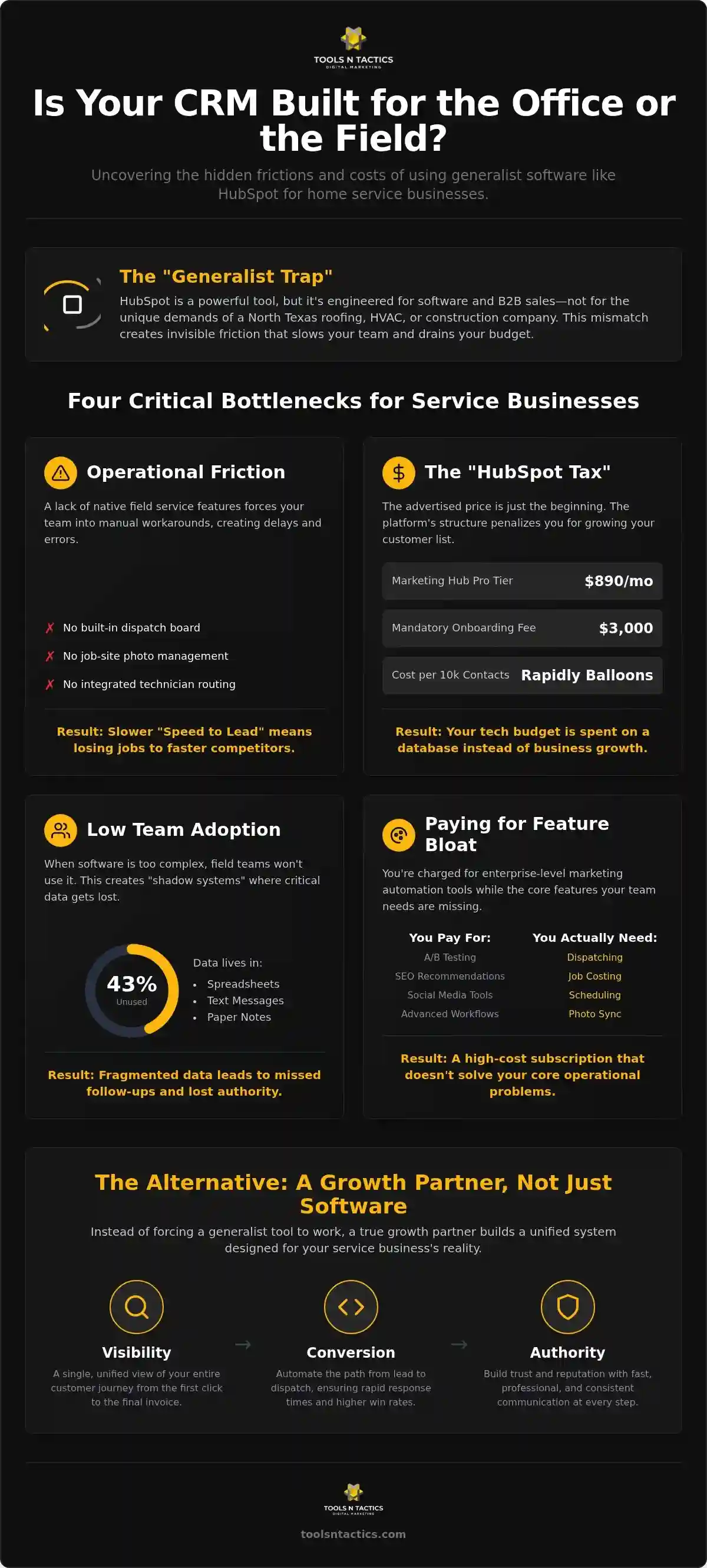
We will break down the rising subscription costs, the lack of native field-service features like dispatching, and the utilization gap that leaves 43% of CRM users paying for tools they never touch. You’ll discover how to build a leaner, faster lead-routing system that actually works for your team’s bottom line.
Key Takeaways
- Learn why the “all-in-one” software promise often creates more manual work for North Texas contractors instead of simplifying daily tasks.
- Calculate the real cost of your subscription by identifying hidden fees like mandatory onboarding and per-contact charges.
- Discover how to bypass HubSpot limitations for service businesses by focusing on field-specific features like dispatching and job-site photo management.
- Address the “utilization gap” to ensure your sales team actually uses your tools instead of relying on disorganized spreadsheets or paper notes.
- See how a strategic growth partner replaces fragmented software with a unified system for visibility, conversion, and authority.
The Hidden Friction in HubSpot’s “All-in-One” Promise
Operational friction is the invisible weight that slows down your business. For a roofing company in Plano or an HVAC contractor in Dallas, it looks like a technician sitting in a truck for twenty minutes trying to upload job photos to a system that wasn’t built for the field. HubSpot promises an “all-in-one” solution, but it often acts as a generalist tool. This is the “Generalist Trap.” Software designed to serve everyone, from software developers to flower shops, often fails to serve the specific mechanical needs of a high-volume service company.
At its core, a Customer Relationship Management (CRM) system should streamline your work. However, when you use a platform that lacks native field-service features, you’re actually adding more work. This leads to “feature bloat,” where you pay for high-end marketing tools while your team still uses paper notes because the software is too complex. You end up paying a premium for a database that doesn’t actually talk to your job-site reality.
Why Generalist Tools Struggle with Trade Specifics
One of the major HubSpot limitations for service businesses is the lack of native Field Service Management (FSM) features. Standard tiers don’t include job scheduling, technician routing, or dispatch boards. When your office staff has to manually move data from a lead form into a separate scheduling tool, your “Speed to Lead” suffers. In competitive North Texas markets, being the second person to call often means you’ve already lost the job. A database is just a list of names; a real growth engine automates the path from a click to a technician at the front door.
The Consequences of Ignoring CRM Friction
Ignoring these HubSpot limitations for service businesses leads to a specific type of sales team burnout. When your technicians find the software too cumbersome, they simply stop using it. This creates “shadow systems” where vital customer data lives in text messages or spreadsheets instead of your central system.
- Low Adoption: If the interface is hard to use, your team will ignore it, making your software investment a waste of capital.
- Fragmented Data: Missed follow-ups happen because the office doesn’t know what the field tech promised.
- Authority Loss: When a lead from Celina or Frisco doesn’t get a fast, professional response, your brand reputation takes a hit.
Instead of struggling to manage complex software, you should be focused on building a Growth Partner Program. This approach replaces fragmented tools with a unified system designed for visibility and conversion.
The Financial Friction: Calculating the Real “HubSpot Tax”
HubSpot often markets itself as a tool that grows with you. For a North Texas service business, the reality is often a series of expensive “gotchas” that trigger as soon as you find success. The entry-level price looks manageable, but the “HubSpot Tax” becomes clear once you look at the 2026 pricing tiers. For example, the Marketing Hub Professional tier starts at $890 per month, but it only includes 2,000 contacts. If you are a high-volume roofing or HVAC company in Plano with a database of 10,000 past customers and leads, your monthly bill will balloon rapidly. This pricing model is one of the most significant HubSpot limitations for service businesses; it effectively penalizes you for building a large local audience.
The costs don’t stop at the monthly subscription. Professional and Enterprise tiers come with mandatory onboarding fees that cannot be waived. You’ll pay $3,000 for Marketing Hub Professional or $1,500 for Sales Hub Professional just to get started. When you add the cost of third-party “bridge” apps needed to handle dispatching and job costing, your tech stack becomes a major overhead. This financial burden often leads to the high failure rate of CRM projects. Business owners find themselves paying for a Ferrari but only using it to drive to the mailbox.
The Escalating Cost of Lead Management
The “locked-in” effect makes it difficult to pivot once your data is trapped. As your lead list grows, you’ll face extra charges for API calls and technical integrations just to keep your systems talking. For a local contractor, this is capital that could be used for equipment or hiring. Instead, it’s sunk into a database that doesn’t generate its own leads. You end up paying more for the storage of a lead than the lead itself might be worth in profit margin.
Opportunity Cost: What Else Could That Budget Buy?
Every dollar spent on high-tier software seats is a dollar taken away from your Visibility Engine. While a CRM is essentially a digital filing cabinet, a visibility strategy is what actually makes your phone ring. The ROI gap is clear: a tool is a fixed monthly expense that exists regardless of your revenue, while a strategic partnership is designed to pay for itself through measurable growth. If your software bill is higher than your marketing results, it’s time to review your growth strategy. Investing in your local reputation and search authority will always yield a better return than paying for software features your team never uses.
Complexity vs. Efficiency: Why Your Sales Team Might Ignore the Tool
The most common objection we hear from North Texas business owners is simple: “My guys won’t use this.” You can invest thousands in a platform, but if your sales reps and technicians find it too complicated, they’ll simply ignore it. HubSpot limitations for service businesses often start with a user interface designed for desk-bound office workers. For a roofing salesperson in Plano or an HVAC tech in Dallas, navigating ten different screens just to log a lead is a waste of valuable field time.
When software becomes a chore, your team creates “shadow systems.” They’ll go back to using messy spreadsheets, paper notes, or even just keeping details in their head. This creates a massive gap in your data. You can’t manage what you can’t measure; if your team isn’t logging interactions, your CRM is just an expensive, empty filing cabinet. High-turnover industries like home services can’t afford a steep learning curve. Every hour spent training a new hire on a complex CRM is an hour they aren’t out closing deals.
The “Ghost CRM” Phenomenon
A “Ghost CRM” happens when you pay for a high-tier platform but your team only uses about 10% of its capabilities. You might see signs of this if your dashboard is filled with outdated information or if your North Texas sales team complains that “more data” is just slowing them down. In the trades, action beats analysis. You need lead routing systems that work in the background without requiring a manual login every time a phone rings. Relying on a tool that demands constant manual entry is a recipe for low adoption and missed opportunities.
Streamlining the Conversion Engine
Instead of forcing your team into a complex UI, you should focus on a system that supports their workflow. Our Automation Engine approach prioritizes speed and simplicity over manual data entry. By using AI voice agents and automated routing, you can bypass the need for your team to spend hours behind a screen. This makes the handoff from your Conversion Engine to your field team seamless. Reducing the number of clicks required to manage a lead directly increases your lead retention. When the system works for the technician, the technician will work for the system; this creates a repeatable cycle of growth rather than a source of daily frustration.
Field Service Gaps: Where General CRM Falls Short for Contractors
HubSpot was built for office-based sales, not for someone standing on a roof in Plano. This is where the HubSpot limitations for service businesses become physically obvious. A general CRM treats your data like a static file. It misses the critical links between project estimation and job-site photo management. If your technician has to use three different apps just to document a repair, your operational friction is costing you money. You need a system that bridges the gap between the office and the driveway.
Most general platforms treat locations as simple data fields. However, managing a service area that spans Dallas, Plano, and Celina requires more than a zip code. It requires an understanding of local market density. It also requires a deep integration with your Google Business Profile (GBP). In HubSpot, GBP is often treated as just another social media account. It isn’t. For a contractor, your GBP is the heart of your local presence. Treating it as an afterthought is a mistake that costs you calls every single day.
Local SEO and the Visibility Engine Gap
A CRM is a database; it isn’t a Visibility Engine. Storing a customer’s name won’t help you show up in the “Map Pack” when a homeowner searches for emergency repairs. You need a system that connects your field successes back to your search presence. This starts with a Google Business Profile audit to see where you’re losing ground to rivals. Generic automation often feels cold and corporate. It fails to capture the neighborly, professional tone that North Texas communities expect from their local tradespeople.
Reputation Management in the Field
Review automation is another area where general tools fall short. HubSpot’s standard feedback surveys are built for B2B software, not for trade reviews. To build real authority, you need to ask for a review the moment a job is completed in McKinney or Frisco. If you wait three days for an automated email to fire, the customer has already moved on. Building local authority requires localized content and immediate action, not just tracking email open rates. You don’t need more software; you need a system that captures your hard work in real-time.
If you’re tired of fighting with software that doesn’t understand the physical reality of your industry, it’s time to contact a partner who understands the North Texas market and can build a system that actually supports your field team.
Moving Beyond Software: Why a Growth Partner Beats a Subscription
A software vendor sells you a hammer and wishes you luck. A Growth Partner builds the house. This distinction is the difference between a North Texas business that struggles with technical debt and one that scales predictably. While you might have started with high hopes for your CRM, the HubSpot limitations for service businesses we’ve discussed often stem from a lack of a strategic blueprint. You don’t need more tools; you need a system that produces outcomes.
At Tools N Tactics, we replace the “software-first” headache with a results-oriented framework. We focus on three core engines: Visibility, Conversion, and Authority. This systematic approach resolves the friction created by generalist tools. Instead of forcing your Plano roofing team to become software experts, we provide the mechanical components that drive revenue. We move your business from paying for monthly seats to paying for measurable growth in your local market.
The Architect vs. The Tool Salesman
Your business needs a blueprint, not just a collection of expensive hammers. A tool salesman wants you to buy more features, even if you don’t have the staff to use them. An architect looks at the structural integrity of your entire lead-to-job process. Our Authority Engine is designed to build long-term asset value for your brand. It isn’t just about tracking emails; it’s about establishing your company as the top-tier choice in Dallas or Frisco. This shift from managed services to an integrated partnership ensures that your marketing spend actually builds equity in your business.
Your Next Steps for Scalable Growth
Transitioning away from a complex, underutilized CRM doesn’t have to be chaotic. You can start by identifying exactly where your current system is failing you. Most HubSpot limitations for service businesses hide in the gap between lead volume and actual job profitability. We recommend taking these practical steps to regain control of your operations:
- Identify Gaps: Start with a free SEO audit to see where your visibility is lagging behind local rivals.
- Audit Your Spend: Compare your total monthly CRM costs against your actual lead conversion rate. If the software costs more than the profit it generates, the system is broken.
- Evaluate Your Team: Ask your field technicians if they feel the current tools help them work faster or just add more data entry to their day.
Once you see the gaps, you can begin building a more reliable system. Contact Tools N Tactics today to see how our Growth Partner Program can fit your specific local service area and help you move beyond the subscription trap.
Build a Growth Engine That Works for Your Field Team
Software should be a tool that supports your work; it shouldn’t be the work itself. We’ve explored how high subscription costs and complex interfaces create significant HubSpot limitations for service businesses in the North Texas market. When your team relies on shadow systems or avoids data entry, you lose the visibility needed to scale. Success in the trades requires a system that prioritizes speed-to-lead and field efficiency over generalist marketing features.
Our Growth Partner Program replaces fragmented tools with a unified framework of Visibility, Conversion, and Authority Engines. We use AI-driven solutions to handle lead routing so your team can stay focused on the job site. This systematic approach ensures your brand grows in communities like Plano and Dallas without the burden of technical debt. You deserve a partner who understands the mechanical reality of your business and builds the blueprints for your long-term stability.
Frequently Asked Questions
Is HubSpot worth it for a small roofing or HVAC company?
HubSpot is often overkill for small trade companies because it lacks native field service tools. You pay for high-end marketing features that don’t help you dispatch a truck to Plano or Dallas. While the free version is tempting, it’s limited to 1,000 contacts and 2 users as of September 2024. Most contractors find that industry-specific software or a custom growth engine provides a better return on investment than a generic CRM.
What are the biggest hidden costs when scaling with HubSpot?
Mandatory onboarding fees are the first hurdle; Professional tiers require payments between $1,500 and $3,000 just to start. As you scale, the “marketing contact” model becomes a burden. If you hit 10,000 leads, your monthly bill can jump by thousands. You also have to pay for third-party integrations to connect your field work to the office, which adds another layer of monthly subscription costs to your overhead.
Can HubSpot handle my field service management needs natively?
No, HubSpot does not have native field service management (FSM) features. It cannot handle job scheduling, technician routing, or job costing out of the box. This is one of the primary HubSpot limitations for service businesses. You would need to pay for a separate FSM platform and then pay for an integration tool to sync the data. This creates a fragmented system that often leads to data errors.
How does HubSpot pricing change as my lead list grows?
HubSpot uses a tiered pricing model based on the number of marketing contacts in your database. Marketing Hub Professional starts at $890 per month for only 2,000 contacts. If you generate a high volume of leads in North Texas, you’ll quickly exceed this limit. Every additional block of contacts increases your monthly cost. This model penalizes successful lead generation, making your software more expensive the more your business actually grows.
Why do my service technicians struggle to use HubSpot in the field?
Technicians struggle because the interface is built for office workers, not professionals on a job site. The mobile app requires too many clicks to log simple tasks, which leads to low adoption. Only 28% of construction businesses successfully use a CRM, largely due to this complexity. When a tech is in a hot attic in Frisco, they won’t navigate complex menus. They need a streamlined system that works in the background.
What is the difference between a HubSpot Partner and a Growth Partner?
A HubSpot Partner is typically a reseller focused on implementing and maintaining the software. They are incentivized to keep you on the platform. A Growth Partner, like Tools N Tactics, focuses on your business outcomes like revenue and lead conversion. We don’t just sell you a seat; we build the Visibility, Conversion, and Authority Engines needed to dominate your local market. Our goal is a repeatable system, not just a software subscription.
How can I automate my lead follow-up without a complex CRM?
You can use an Automation Engine that leverages AI voice agents and chatbots to handle lead routing. These tools respond to inquiries instantly without requiring you to log into a complex dashboard. Since 78% of customers hire the first contractor who responds, speed is more important than a fancy database. Automated SMS and email follow-ups can be triggered by simple form fills, ensuring no lead from McKinney or Plano falls through the cracks.
What happens if I outgrow HubSpot’s Starter or Professional tiers?
Outgrowing these tiers leads to a massive financial jump. Moving to the Enterprise tier requires a mandatory $3,500 onboarding fee for Sales Hub or $7,000 for Marketing Hub. Monthly costs start at $3,600 for Marketing Hub Enterprise. These tiers include features like account-based marketing that most local contractors will never use. This mismatch is a core part of the HubSpot limitations for service businesses, forcing you to pay for bloat to keep your data.