
Imagine it is 2:00 AM on a Tuesday in Plano. A homeowner with a burst pipe lands on your site, shares their emergency with your bot, and waits for a response. If that data sits in a siloed chat log instead of triggering an immediate alert in your system, you have already lost the job to a faster rival. Integrating ai chatbot with crm is no longer a technical luxury; it is the essential wiring that connects your digital visibility to your actual revenue. You shouldn’t have to spend your morning copy-pasting customer details from a dashboard into a spreadsheet when you could be dispatching crews.
We understand the frustration of seeing hard-earned leads fall through the cracks of a fragmented system. You built your business on hard work and reliability, and your digital infrastructure should reflect that same structural integrity. This guide promises to show you how to build a “set it and forget it” system that captures every North Texas service lead 24/7. We will break down the blueprint for automatic lead routing and explain how a seamless data flow eliminates manual entry. By the end, you will have a clear path to turning your website into a high-performance Automation Engine that scales your revenue without adding to your workload.
Key Takeaways
- Stop lead leakage by ensuring every after-hours inquiry from Plano or Frisco flows directly into your sales database without human intervention.
- Master the structural blueprint for integrating ai chatbot with crm using APIs and webhooks to build a reliable digital handshake.
- Evaluate the performance gap between native software connections and custom builds for field-service platforms like ServiceTitan or Jobber.
- Execute a five-step synchronization plan to map customer data fields and establish automated triggers that eliminate manual data entry.
- Deploy the Automation Engine to transition from a fragmented DIY setup to a professional system that drives consistent, scalable revenue.
Why Disconnected AI Chatbots Are Costing Your Service Business Money
In the service industry, a missed call is a missed paycheck. When you deploy what are AI chatbots on your site, they act as your 24/7 digital receptionist. However, if that receptionist doesn’t talk to your sales team, the system breaks. Integration is the automated handshake between your website’s front end and your sales database. Without it, you aren’t running a system; you’re just running a chat widget.
Lead leakage occurs when valuable data is trapped in a chat dashboard instead of your dispatch software. For a Plano sales team, a lead buried in a log is invisible. It can’t be called, it can’t be tracked, and it certainly won’t be closed. You are essentially paying for visibility but throwing away the results. This friction creates a “leaky bucket” where marketing dollars go in, but revenue never comes out.
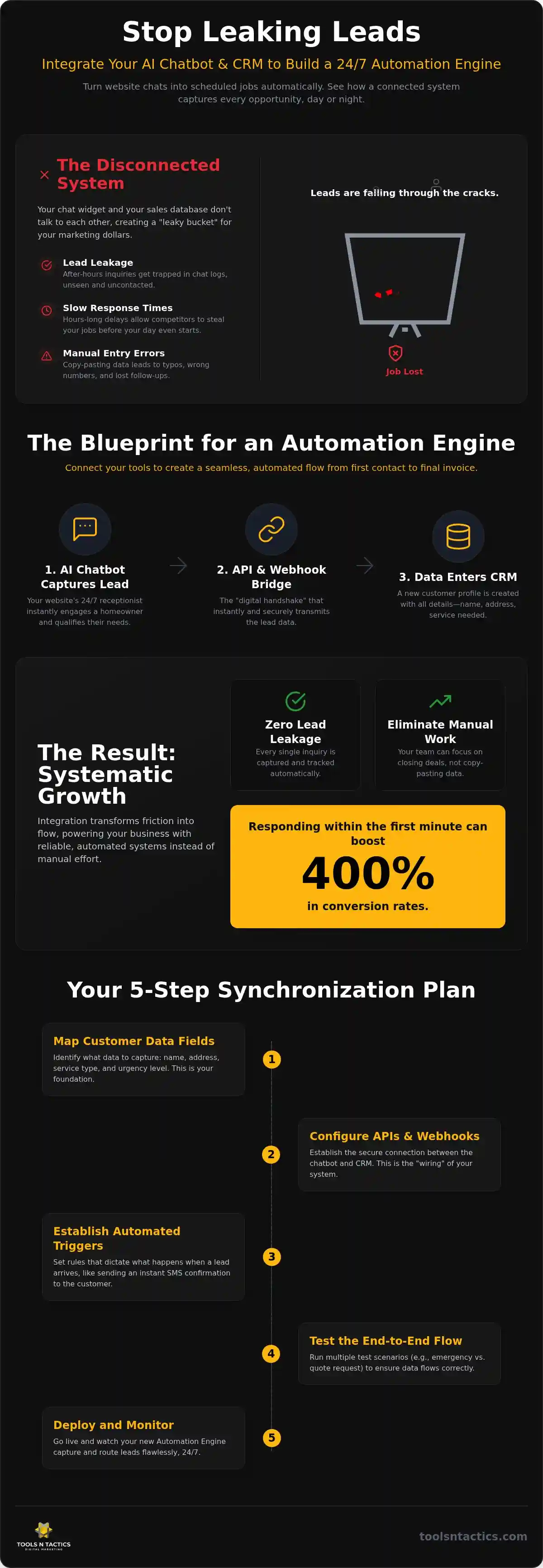
Speed is the only metric that matters in 2026. Data shows that responding to a lead within the first minute can increase conversion rates by up to 400%. Integrating ai chatbot with crm cuts your response time from hours to mere seconds. It moves the prospect from a casual browser to a scheduled service call before they can even click over to a competitor’s site. This creates a unified flow where data moves without human friction.
The Problem with Manual Data Entry
Relying on human staff to move data is a recipe for failure. Manual entry leads to transposed phone numbers, misspelled addresses, and forgotten follow-ups. A Frisco homeowner with an HVAC emergency won’t wait four hours for you to check your chat logs; they will call the next name on the list. A fragmented approach requires checking five different apps to piece together a customer’s history. A unified system ensures that every detail is captured accurately and instantly. It eliminates the typos and delays that kill deals before they even reach your technicians.
How Integration Powers Your Growth Engine
Integrating ai chatbot with crm serves as the critical bridge between digital visibility and bankable revenue. This data flow is the heartbeat of a high-performance Conversion Engine. Once the data enters the system, it triggers immediate actions like SMS follow-ups or email confirmations. This keeps the lead warm while your technicians are still on the road. By automating the intake process, you ensure that your business grows based on reliable systems rather than luck or manual effort.
The Architecture of a Connected AI Chatbot and CRM System
Every high-performing structure starts with a detailed blueprint. When integrating ai chatbot with crm, you must first identify the structural components of a lead. This process isn’t just about collecting a name and an email. It’s about capturing the specific service type, the customer’s zip code, and the urgency of the request. These data points are the raw materials your business needs to function. Without a clear plan for how this data moves, you’re just piling up information without a way to use it.
Think of APIs and Webhooks as the electrical wiring of your automation system. They are the invisible conduits that carry information from your website’s front door directly into the engine room of your sales database. APIs allow different software programs to speak the same language, while webhooks send real-time “pings” whenever a specific event occurs, such as a customer finishing a chat. Without this wiring, your chatbot is just a standalone generator with no connection to the house. It might produce power, but that power isn’t going anywhere useful. Setting up this architecture correctly ensures that your integrating ai chatbot with crm efforts result in a stable, scalable system.
Capturing High-Value Lead Data
Your chatbot shouldn’t just talk; it should qualify. By asking targeted questions, the AI can distinguish between a Frisco homeowner looking for a general quote and an emergency pipe burst in Plano. This allows the system to tag the lead automatically in your CRM based on intent. A raw lead is just a notification that someone was on your site. A qualified opportunity is a data-rich profile that tells your team exactly what tools to pack before they even leave the shop. This level of detail is also critical for your online reputation management, as it ensures you provide the precise service that earns a five-star review from the start.
Automated Lead Routing to Your Field Team
The real magic happens when data meets the road. A connected system eliminates the middleman friction that slows down your office operations. Instead of a receptionist manually checking an inbox and then texting a crew, the integration sends a notification directly to the technician closest to the job site in McKinney or Plano. The right person gets the right data at the right time. This automated lead routing ensures your team stays productive and your response times stay competitive against local rivals. If you’re ready to stop the manual data entry and start scaling, you can consult with our team to see how this architecture fits your current workflow.
Choosing the Right CRM Integration Path for Your Field Services
Selecting the right connection for your business requires a pragmatic look at your current stack. You have two primary paths: native integrations or custom-built automation bridges. A native integration is a built-in feature where the chatbot and CRM are designed by the same manufacturer or have a pre-existing “plug-and-play” relationship. While these are easy to deploy, they often lack the granular control required for complex field service workflows. Integrating ai chatbot with crm through a custom bridge, such as our Automation Engine, provides the structural flexibility to map data exactly how your dispatchers need it.
Service-specific platforms like ServiceTitan and Jobber require a different tactical approach than general tools like HubSpot or Salesforce. These industrial CRMs are built for job costing, dispatching, and equipment tracking. A generic chatbot often fails to “speak” the language of these platforms. As we move through 2026, the standard for AI Chatbots for Local Business Websites has shifted from simple Q&A to direct scheduling. If your bot can’t check your real-time availability in Jobber and book a call, you are leaving the door open for your Dallas competitors to win the job.
Native vs. Third-Party Connections
Native connections are convenient but often rigid. They function like a pre-poured concrete slab; you can’t easily move the plumbing once it’s set. If your business needs change or you want to add new lead-capture fields, you may find yourself hitting a “feature ceiling.” Using a Growth Partner to build a third-party bridge via APIs or tools like Zapier offers long-term scalability. This approach allows you to swap out components or upgrade your bot’s intelligence without rebuilding your entire database connection. Flexibility is the key to maintaining a high-performance system as you scale across North Texas.
Security and Data Privacy for Contractors
Reliability extends beyond just catching the lead; it includes protecting the customer’s data. Contractors handle sensitive information, including home addresses and personal phone numbers. A “leaky” or poorly secured integration can expose this data to spam or security breaches, destroying the trust you’ve spent years building. You must ensure that your integrating ai chatbot with crm strategy includes end-to-end encryption and clear data ownership. Avoid “free” third-party chat apps that profit by selling your lead data. Your customer list is your most valuable asset. Keep it behind a secure, professional-grade firewall that you control.
5 Steps to Sync Your AI Chatbot with Your CRM Database
Building a connection between your website and your sales team requires a systematic approach. You aren’t just linking two apps; you’re building a pipeline for revenue. Follow these five tactical steps to ensure your integrating ai chatbot with crm project yields a high-performance result.
- Step 1: Map your data fields. Match the information collected by your bot to the specific fields in your CRM. Ensure “Chat Name” matches “Contact Name” and “Service Required” aligns with your “Job Type” categories.
- Step 2: Establish the trigger. Define exactly when the data should move. This typically happens when a chat ends, an appointment is booked, or a specific “Emergency” intent is detected.
- Step 3: Set up lead tagging. Categorize leads by North Texas service areas. Tagging inquiries as “Plano – HVAC” or “Frisco – Roofing” allows for precise reporting and territory management.
- Step 4: Configure “Speed to Lead” alerts. Set up an immediate SMS notification for your sales manager. When a high-intent lead hits the CRM, your team should know within seconds.
- Step 5: Test the workflow. Run a dummy lead through the entire system. Verify that the contact record is created, the tags are applied, and the alert is sent without any data leakage.
Mapping Your Data for Accuracy
Precision in your data mapping prevents the chaos of duplicate contacts and messy databases. If your bot doesn’t check for existing email addresses, you’ll end up with a fragmented view of your customers. Proper mapping ensures that a tag like “AC Repair” triggers the correct automated lead follow-up sequence. This keeps your messaging relevant and your sales pipeline clean. Integrating ai chatbot with crm only works if the information is organized enough for your team to act on it immediately.
Testing and Troubleshooting the Connection
A single broken wire can shut down an entire machine. Common errors in automation often stem from mismatched field types or expired API keys. You must monitor your Automation Engine regularly to catch these “silent failures” before they cost you a job. Regular audits of your lead flow are not optional; they are a critical component of your growth strategy. If a lead doesn’t sync, you need to know why and how to fix it before your Plano rivals pick up the slack. If you want a system that runs without constant babysitting, reach out to our architects to build a reliable connection for your business.
Scaling Your North Texas Business with the TNT Automation Engine
Tools N Tactics acts as the architect of your digital infrastructure. Building a service business in North Texas requires more than just showing up; it requires a system that works while you are on a roof or in a crawlspace. Integrating ai chatbot with crm is a structural necessity, but it shouldn’t be a DIY project that consumes your weekends. A fragmented setup leads to “silent failures” where leads disappear into the void. As your Growth Partner, we replace the DIY headache with a disciplined, analytical system that bridges the gap between a website click and a paid invoice.
This integration does more than just capture leads. It feeds your long-term market position. When a technician marks a job as complete in your CRM, the Automation Engine triggers the Authority Engine. This automatically sends a review request to the customer while the high-quality service is still fresh in their mind. You aren’t just automating data; you are automating the building of social proof. This creates a repeatable loop of visibility, conversion, and authority that scales without increasing your administrative overhead.
Beyond Chat: Integrating Voice and SMS
A true system is multi-channel. While chatbots handle text-based inquiries, AI voice agents can process phone calls and feed that same data into your sales database. This creates a unified Conversion Engine for your Dallas-area brand. Every interaction, whether it’s a text, a call, or a chat, lands in a unified inbox. Your team no longer has to hunt for information across different platforms. They have one source of truth; this allows them to focus on service delivery rather than data management. Integrating ai chatbot with crm is simply the first step in building a comprehensive communication hub.
Ready to Automate Your Growth?
The revenue potential of a fully integrated lead system is significant. By eliminating lead leakage and cutting response times to seconds, you maximize the value of every visitor to your site. It is time to stop managing software and start managing growth. You need a steady hand to guide your digital transition. We provide the blueprints, the wiring, and the ongoing support to ensure your business remains competitive in a crowded market. Get a custom automation blueprint for your business and start building a more secure bottom line today.
Secure Your Revenue Pipeline with Automated Systems
A disconnected website is a liability in a competitive North Texas market. By integrating ai chatbot with crm, you bridge the gap between a midnight inquiry and a scheduled service call. You have seen how a unified data flow eliminates the “lead leakage” that costs your rivals money. You also know that a proper blueprint ensures data accuracy and automated lead routing directly to your technicians. This isn’t just about technology; it’s about building a structural foundation for your business.
Tools N Tactics specializes in contractor growth for HVAC and roofing businesses. We use our proprietary Automation Engine framework to build systems that work while you’re on the job site. Our local expertise in Plano and Frisco ensures you have a partner who is accountable for your long-term stability. It’s time to stop fighting with fragmented software and start scaling your bottom line with a steady, systematic hand. Your business deserves a foundation that supports consistent, repeatable outcomes.
Build Your Integrated Growth Engine Today
Common Questions About AI Chatbot and CRM Syncing
How much does it cost to integrate an AI chatbot with a CRM?
Integration costs vary based on the complexity of your current software stack and the level of customization required. You should account for monthly subscription seats, consumption-based AI credits, and the initial structural setup. While some basic tools appear free, they often lack the “wiring” needed for a professional field service workflow. Investing in a robust system prevents the high financial cost of lead leakage and manual data entry errors.
Do I need to know how to code to sync my chatbot with Salesforce or HubSpot?
You don’t need to be a developer to use native “plug-and-play” connections, but these often have rigid functional limits. For a more sophisticated setup, integrating ai chatbot with crm usually involves APIs and webhooks that require professional configuration. A Growth Partner manages this technical architecture so you don’t have to learn code. This approach ensures your system remains stable and scalable as your North Texas business grows.
Can a chatbot schedule appointments directly in my CRM calendar?
Yes, modern AI agents can check real-time availability and book jobs directly into service-specific calendars like ServiceTitan or Jobber. This removes the middleman friction in your office operations. By the time you check your dashboard, the lead is already a confirmed appointment on your schedule. This seamless flow is a core component of a high-performance Automation Engine that keeps your technicians busy without manual coordination.
What happens if the chatbot captures the wrong information?
A well-designed system includes validation steps to confirm phone numbers and addresses before they hit your database. If a customer providing an address in Plano makes a typo, the AI can ask for clarification in real-time. Regular audits of your lead flow help identify these minor friction points. You should always have a “safety valve” in your workflow where a human can intervene if the data doesn’t map correctly.
Will integrating an AI chatbot slow down my website?
A professionally installed chatbot uses asynchronous loading to ensure your site’s speed remains high. This means the chat widget loads separately from your main content, protecting your search visibility and user experience. Integrating ai chatbot with crm at the server level ensures that data processing happens in the background. Your website stays fast while your lead capture system stays productive and reliable 24/7.
Which CRM is best for a North Texas HVAC or roofing company in 2026?
Specialized platforms like ServiceTitan and Jobber remain the top choice for trades because they handle job costing and dispatching natively. For smaller teams, GoHighLevel or HubSpot provide excellent marketing automation and lead nurturing features. The “best” choice depends on whether you prioritize field management or sales follow-up. We architect systems that work with whichever platform fits your current operational blueprint and revenue goals.
Is my customer data safe when using an AI chatbot integration?
Data security is a structural priority that requires end-to-end encryption and compliance with 2026 state-level AI regulations. Professional integrations ensure that sensitive homeowner information moves directly into your secure CRM without being stored on vulnerable third-party servers. You should avoid basic “free” bots that may profit by selling your lead data. Owning your data pipeline is the only way to maintain long-term trust with your local community.
Can I route leads to different team members based on their location in Dallas?
Yes, you can configure lead routing systems to send notifications based on the customer’s zip code or service area. An inquiry from McKinney can go to one technician while a Frisco lead goes to another. This maximizes your team’s efficiency and reduces travel time across the Metroplex. It creates a disciplined, analytical approach to dispatching that keeps your crews productive and your response times competitive.