
What good is a traffic spike if you can’t tell whether it brought in a qualified customer? For Dallas service businesses, a website analytics and tracking setup Dallas teams can rely on should connect local discovery, website activity, calls, forms, and follow-up. A traffic report alone won’t show which inquiries became booked work or whether they fit the business’s service area.
When website data, call records, and CRM notes live in separate systems, it’s harder to see which local search activity is producing useful leads, where prospects drop off, or what deserves attention next. A connected measurement system brings those pieces together so owners can make decisions with a clearer view of performance.
This article explains what a useful setup should track and how to compare implementation options. You’ll learn how to connect calls and forms with lead quality and outcomes, distinguish local visibility from other sources, and use reporting to guide marketing and operational decisions. The goal is not more dashboards. It’s better evidence for choosing your next move.
Key Takeaways
- Website visits are only a starting point. Separate local discovery, referrals, and direct traffic to understand where inquiries begin.
- A useful website analytics and tracking setup Dallas service businesses can rely on connects visitor activity with calls, forms, lead handling, and outcomes.
- Compare analytics options by what they measure, how clearly they’re implemented, and whether their reports support business decisions.
- Build tracking in a practical sequence: define outcomes, map inquiry paths, configure events, validate the data, and review it regularly.
- Connect visibility, website conversions, and lead quality so reporting points to a next step, not just another dashboard.
Why Dallas service businesses need website analytics that track more than traffic
A rise in website visits can look like progress, but it doesn’t tell you whether those visitors are likely to become customers. The useful question is what happened after someone found the site: Did they view a relevant service page, call, submit a form, and fit the business’s service area? A website analytics and tracking setup Dallas service businesses can trust connects those steps instead of treating traffic as the finish line.
Traffic sources need context. A visitor may arrive through local search, a direct visit, a referral link, or another channel. When sources are grouped together, it’s difficult to tell whether a change in local visibility brought relevant inquiries or another channel played a role. Web analytics provides a foundation for understanding how people use a site. For a service business, that information becomes more useful when connected to inquiry and lead records.
Disconnected records leave gaps. A website may record a form submission, a phone system may log a call, and a CRM may hold the follow-up status, but those entries may not clearly describe the same lead. Without consistent fields or a reliable way to match records, teams can’t easily tell which inquiries were qualified or what happened next. The problem is not necessarily that every inquiry is lost. It’s that decisions may rely on an incomplete picture.
Useful analytics connects visitor actions to qualified inquiries, follow-up, and business outcomes.
Which business questions should tracking answer?
Start with questions that can guide a decision. Which sources bring inquiries from people seeking services the business provides and within its service area? Which pages do those visitors use before contacting the company? What happens to an inquiry after it arrives?
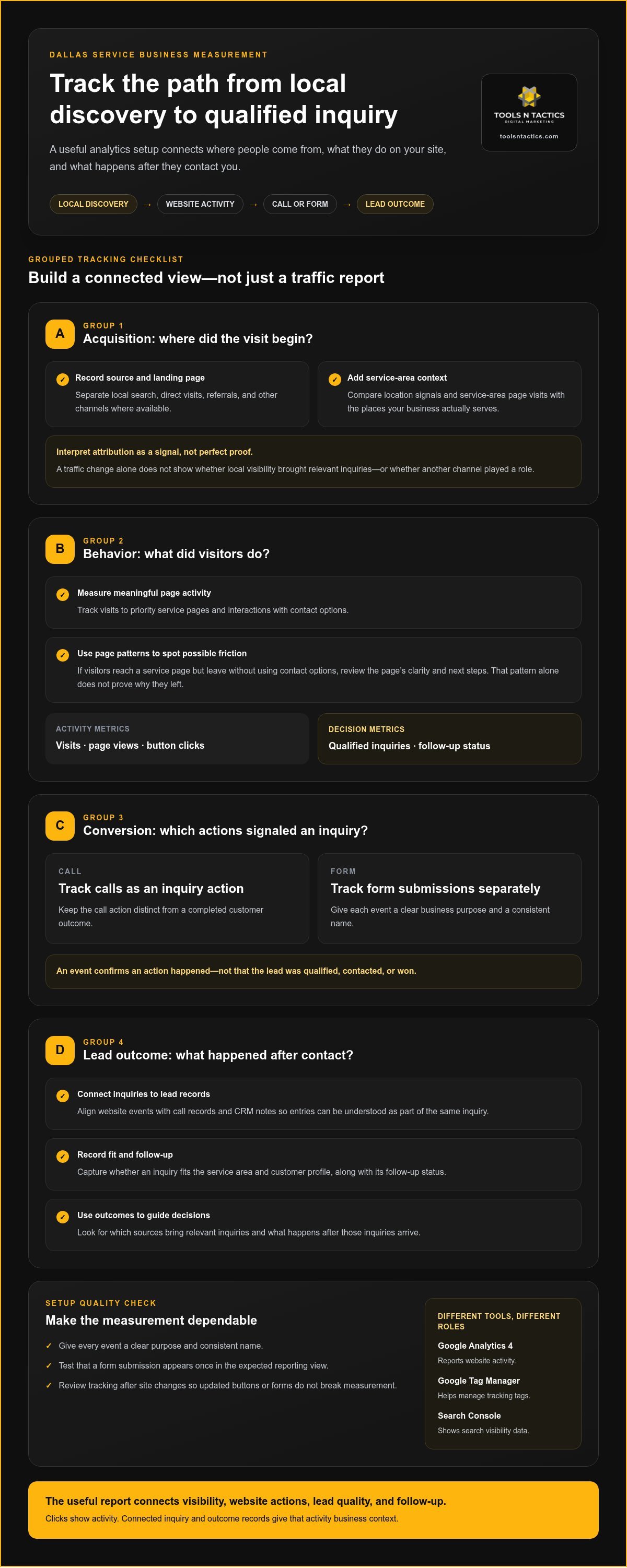
Page activity can also help identify friction. For example, visitors might reach a service page but leave without using its contact options. That pattern is a reason to review the page’s clarity and next steps, not proof by itself of why people leave. Visits, page views, and button clicks are activity metrics. Qualified inquiries and follow-up status are decision metrics.
Why Dallas location context changes interpretation
“Dallas” shouldn’t automatically be treated as one uniform audience. A service business may cover Dallas and other North Texas communities, while each service-area page speaks to a different part of that coverage. Local search visibility and the page a visitor lands on can shape the path to an inquiry.
Review location signals alongside service-page visits and lead records. For instance, compare inquiries associated with a service-area page with the company’s actual coverage and customer profile. This can help distinguish useful local discovery from visits that add volume but offer little direction for staffing, follow-up, or marketing priorities. A local visibility strategy for Dallas, Plano, Celina, Princeton, Melissa, Sherman, or Frisco should reflect the areas the business actually serves.
What a complete website analytics and tracking setup in Dallas should measure
A complete setup is more than a dashboard or a tag installed on a website. It brings together aligned measurement, correctly configured tools, useful reporting, and clear ownership of what happens next. For Dallas service businesses, a website analytics and tracking setup that teams can act on should show how a person moves from discovery to inquiry and how that inquiry is handled.
Map the journey in order: someone finds the business through local search or a referral, lands on a service page, reviews information, then calls or submits a form. The inquiry enters a follow-up process, where the team records whether it fits the service area and customer profile. Not every platform will capture every step, and source attribution is not perfectly precise. The goal is a consistent view, not false certainty.
A tracked website event shows that an action happened. It does not confirm that a customer was qualified, contacted, or won. That distinction keeps click counts from being mistaken for business results.
Core measurement layers: acquisition, behavior, and conversion
Organize measurement into three layers: where visitors came from, what they did on the site, and which actions signaled an inquiry. Depending on the business’s needs, Google Analytics 4 can report website activity, Google Tag Manager can help manage tracking tags, and Search Console can show search visibility data. These tools serve different roles. Top Website Statistics for 2025 offers broader context on website use, but your own reporting should answer business-specific questions.
- Acquisition: Record source and landing page where available. Treat attribution as a useful signal, not perfect proof.
- Behavior: Measure meaningful interactions, such as viewing a priority service page or using a contact option.
- Conversion: Track calls and form submissions as distinct inquiry actions.
Connecting website inquiries to lead quality
Give each event a clear business purpose, a consistent name, and a validation step. For example, confirm that a test form submission appears once in the expected reporting view. Make sure a call action is not counted as a completed customer outcome. Review tracking after site changes so an updated button or form doesn’t quietly break the measurement chain.
Then connect inquiry records to CRM stages that reflect the actual workflow, such as new, qualified, and progressed. Keep call and form records distinct, but use consistent fields for source, service interest, and follow-up status. Platform choices and integrations should fit how the team already handles leads. If you’re aligning analytics with CRM and follow-up, discuss your tracking needs with Tools N Tactics.
How to compare Dallas analytics setups, tools, and reporting
Two analytics proposals can name similar tools but offer different levels of value. Compare the work behind the dashboard: what gets measured, how tracking is implemented, how results are explained, and who maintains the setup. For a website analytics and tracking setup Dallas businesses can use to make decisions, the scope should connect local search and landing pages with calls, forms, and relevant CRM stages.
Tool access is only one part of the picture. Make sure account access, event definitions, and reporting responsibilities are clear. The business should know where its data lives and how to access it. The implementation partner should explain what the data means and what action it may support. A report without interpretation can leave the team with numbers but no next step.
Use this comparison to judge how far a setup takes you:
| Reporting level | What it shows | What it helps you decide |
|---|---|---|
| Disconnected metrics | Sessions, rankings, calls, and forms appear in separate reports. | Shows activity, but makes it hard to connect sources with lead progress. |
| Connected lead tracking | Sources and landing pages are compared with calls, forms, and CRM stages. | Helps identify which channels and pages bring inquiries that fit the business. |
| Decision-ready reporting | Connected measures are reviewed for changes, data quality, and lead outcomes. | Helps prioritize a practical next step, such as reviewing a page or follow-up process. |
Questions that reveal whether a setup is decision-ready
Ask how each event maps to a customer action or business question. A form submission should mean a form was successfully sent, not merely that someone clicked the submit button. Look for a documented way to test tags, check for duplicate events, and review data quality after site updates. Reports should explain what changed, what may have contributed, and what action the business could consider, without presenting a correlation as proof of cause.
Warning signs in analytics proposals
Be cautious of reports centered on sessions, impressions, or rankings with no connection to inquiries or lead handling. Unclear account access, event definitions, or maintenance duties can also create gaps over time. No tool is automatically right for every business. Judge whether the proposed system works with the team’s actual inquiry process and gives people clear responsibility for keeping measurements reliable.
Before choosing a setup, write down the business questions the reporting must answer, then compare each proposal against them. If calls, forms, landing pages, local search, or CRM stages are missing, identify how that gap affects the decisions you want to make. Tools N Tactics connects measurement to visibility, conversion, and follow-up through its analytics and tracking setup support.
How to plan a website tracking setup for a Dallas service business
Start with the business, not the software. A useful website analytics and tracking setup for Dallas service businesses begins with what the company wants to learn: which services attract suitable inquiries, which areas it serves, and how leads move from first visit to follow-up. That plan keeps measurement focused on decisions instead of collecting data simply because a tool can.
Build the setup in a clear sequence:
- Define outcomes: Decide what counts as a meaningful inquiry and what makes it qualified for the business.
- Map inquiry paths: Note how people move from local search or referrals to service-area pages, calls, forms, and follow-up.
- Configure events: Track priority actions using clear names tied to the measurement plan.
- Validate: Test that tracking records actions correctly across key devices and pages.
- Review: Compare the data with lead records and use the findings to choose what to improve.
Include the company’s actual service area and priority services in the plan. Dallas-area coverage may extend beyond the city itself, so reporting should help distinguish relevant inquiries from activity outside the business’s reach. For a business serving Dallas, Plano, Celina, Princeton, Melissa, Sherman, Frisco, or elsewhere in North Texas, location pages can be assessed by reviewing their traffic sources, engagement, and inquiry activity. These measures help evaluate whether pages support the customer journey, but they don’t promise search rankings.
Prepare the measurement plan before configuring tools
Keep the first version focused. List the actions that matter, such as a relevant phone call, a successfully submitted form, or another genuine inquiry. For each, record the source and page when available, the event name, and the downstream CRM status. Choose a small set of decision metrics, such as qualified inquiries by source, rather than tracking every scroll or click by default.
Connect the plan to the way the team works. If staff record lead status in a CRM, use those stages to understand what happens after an inquiry arrives. If follow-up happens elsewhere, clarify how its status will be reviewed alongside website data. Tracking should reflect the real process, not an idealized workflow no one uses.
Validate the setup and make reporting actionable
Test key actions on desktop and mobile before relying on reports. Check that forms submit, calls are recorded as intended, and important events aren’t missing or counted twice. Review source labels for consistency, especially after website or campaign changes. A baseline report gives the team a starting point for comparing future activity without confusing a change in tracking with a change in demand.
Set a recurring review schedule that fits the business. A monthly review may suit routine decisions, while a major site or process change calls for an additional check. Look for patterns, confirm them against lead handling, then assign a clear next step. The Conversion Engine connects website actions with the path from visitor to inquiry. To build a measurement plan around your business workflow, talk with Tools N Tactics about analytics and tracking setup.
Choose an analytics partner in Dallas that connects tracking to growth
The right analytics approach connects four parts of the growth process: how people find the business, what they do on the website, whether their inquiries fit, and what the team does next. A dashboard can show activity. An integrated implementation helps turn that activity into decisions about visibility, website performance, and lead handling.
Tools N Tactics connects measurement with its Visibility, Conversion, and Authority Engines. The Visibility Engine supports understanding how local search activity brings people to the site. The Conversion Engine focuses on how website journeys turn into inquiries, while the Authority Engine connects trust and reputation to growth. CRM stages and follow-up belong in the measurement workflow when they help clarify whether inquiries are qualified and what happened after contact.
What an integrated implementation partner should bring
Good implementation starts with the business’s service areas, priority services, lead process, and growth goals. Technical tracking choices should support those needs, not add tools without a clear purpose. Event definitions, account access, reporting responsibilities, and review steps should be explained in plain language, so the team knows what is measured and who keeps it useful.
The same principle applies to follow-up. The Automation Engine can connect lead routing and follow-up processes to the broader system, while analytics helps show where inquiries begin and how they progress. These functions should work together without confusing a recorded form submission with a qualified opportunity or a completed sale.
Turn the tracking plan into a clear next step
Before discussing an implementation, identify the lead-generation question that matters most. For example: “Which service pages bring inquiries that fit our coverage?” or “Are calls and form submissions being handled consistently?” A focused question helps shape the measurement plan and keeps the conversation grounded in decisions the business can act on.
Gather a simple inventory of the website, current analytics accounts, call-tracking process, and CRM workflow. You don’t need to solve every data gap in advance. A clear picture of the existing setup helps identify what is connected, what is missing, and where validation should begin.
Tools N Tactics serves service businesses in Dallas and North Texas, including Plano, Celina, Princeton, Melissa, Sherman, and Frisco, with analytics and tracking setup as part of an integrated growth approach. If you’re ready to connect visibility, inquiries, and lead follow-up, discuss a Dallas analytics setup.
Make your next marketing decision with confidence
Your next step doesn’t need to be a full rebuild. Start with one unanswered question about lead generation, then use it to set the priority for your measurement plan. That keeps your website analytics and tracking setup Dallas focused on a business decision instead of a growing list of metrics.
Tools N Tactics includes analytics and tracking setup in its work with service-based businesses. Through the Growth Partner Program, visibility, conversion, authority, and automation capabilities can work together, so measurement supports more than reporting. It can help your team decide where to improve the customer journey and how to make follow-up more consistent.
Bring your key question and a picture of your current systems to the next conversation. Discuss your analytics and tracking setup with Tools N Tactics and take a clear first step toward reporting that helps guide your growth.
Frequently Asked Questions
What should website analytics track for a Dallas service business?
Track actions that help the business judge whether its website supports useful inquiries. For example, a roofing company might measure visits to roof replacement pages, taps on the phone number, and completed estimate request forms. Add details that help interpret each inquiry, such as the service requested and whether the customer is within the company’s coverage area. Avoid treating repeated page views or casual clicks as customer demand.
Is Google Analytics 4 enough to measure website leads?
Google Analytics 4 can report website activity and configured conversion events, but it may not show whether an inquiry became a qualified lead or customer by itself. A service team can use GA4 to see that a form was submitted, then compare that event with its CRM records to understand the lead’s status. The right setup depends on the questions the business needs answered and how its tools and team handle inquiries.
How do you track calls and form submissions from a website?
Set up call and form tracking as separate actions, then test each path. For calls, decide whether measurement should record a phone-number click, a tracked call connection, or both. For forms, confirm the event fires only after successful submission, not when someone starts filling out a form. A test inquiry should also appear in the team’s normal lead-handling process, so tracking can be checked against what staff actually receive.
Can website analytics show which Dallas marketing channel generates customers?
Analytics can help connect reported sources with website visits and recorded inquiries, but it may not prove that one channel caused a sale. A customer might discover a company through local search, return later by typing its web address, then call. For businesses serving Dallas, Plano, Celina, Princeton, Melissa, Sherman, Frisco, and nearby North Texas communities, compare source data with lead records and customer conversations for a more complete view.
How often should a Dallas business review its website analytics?
Assign one person to lead the review and invite whoever handles incoming inquiries to add context. That person can keep a brief decision log with the date, the pattern noticed, the action agreed on, and who owns it. For example, if a service page draws inquiries outside the company’s coverage area, the team can note whether to clarify service boundaries on the page and later record what changed.
What is the difference between website analytics and conversion tracking?
Website analytics provides a broad view of site use, such as which pages visitors view and how they arrive. Conversion tracking focuses on selected actions that matter to the business. For example, a company could compare which service page visitors view before they use its estimate request form. Analytics helps describe the journey; conversion tracking highlights the chosen action within it.
Do small service businesses in Dallas need a CRM connected to website tracking?
A CRM connection can help if the team needs to follow an inquiry from first contact through qualification and follow-up. It’s not the starting point for every business; a smaller operation may first need a reliable way to record calls, forms, and their outcomes. As inquiry volume or handoffs grow, connecting website records with CRM stages can reduce manual matching and make lead quality easier to review.