
A homeowner calls your HVAC company while the crew is on a job. No one answers, and the caller moves on. An AI voice agent for small business can answer routine calls, capture useful details, and guide callers to a clear next step. Whether it improves your call handling depends on how well it fits your workflow and when it hands the conversation to a person.
If you’re balancing customer calls, job-site work, and follow-up, it’s reasonable to ask which conversations are suitable for automation. The goal isn’t to replace human judgment. It’s to respond consistently when staff can’t pick up and make it easy for callers to reach a person when they need one.
This article covers the calls a voice agent can handle, where human support matters, and how to assess whether the workflow fits your business. It also explains why call routing, CRM records, and follow-up need to work together. Start by defining what the caller needs to do next, then automate only the steps that make that outcome clearer.
Key Takeaways
- Set clear boundaries between routine requests a voice agent can handle and conversations that need a person.
- An AI voice agent for small business follows configured instructions and connected systems, so define what it can do before launch.
- Compare voice agents, touch-tone IVR, chatbots, and receptionists based on caller needs, handoffs, and operational fit.
- Start with one low-risk call workflow, test it, and review outcomes and caller feedback before expanding.
- Connect call records to lead routing, your CRM, and follow-up workflows so staff can act on the information and track results.
What an AI Voice Agent for a Small Business Can Actually Handle
A phone rings while an HVAC technician is diagnosing a system or a roofer is meeting a customer. If the team can’t answer, a potential customer may hang up and call another company. A clear call-handling process can capture the inquiry and give the caller a useful next step, even when staff are busy.
An AI voice agent for small business is software that responds to spoken requests and can take actions defined by the business. Depending on its instructions and connected systems, it can collect contact details, answer approved questions, or route a call to a team member. Unlike a touch-tone menu, it can respond to spoken requests, but it still needs clear boundaries and a reliable handoff.
A touch-tone phone menu sends callers through fixed keypad choices. A voice agent listens to spoken requests and responds according to its configured instructions. For a broader overview of virtual assistants and their uses, see What is a Virtual Assistant?
Which small-business calls are suitable for automation?
Start with calls that follow a clear, repeatable path. A plumbing company, for example, could use an agent to capture a new service inquiry, ask where the job is located, and record the issue for follow-up. A roofing business could use approved answers to handle routine questions about its services.
Appointment requests and basic intake may also suit automation when the steps are defined. Decide what information to collect, what the agent can say, and what should happen after the call. It might gather a name, callback number, and preferred appointment window, then send the details into a lead-handling workflow. Tools N Tactics’ Automation Engine connects customer interactions with lead routing and follow-up workflows.
The process matters as much as the technology. Automating a consistent first step can help staff manage inquiries while they’re occupied. If the next step is unclear, callers may have to repeat themselves or leave without knowing whether anyone will follow up.
What should remain a human conversation?
Some calls require judgment, empathy, or a detailed discussion. Complaints, urgent situations, and complex estimate requests should have a clear path to a person. An agent can gather basic context, but it should not make commitments or answer beyond its approved scope.
Define that scope and the situations that require a handoff. If the agent can’t understand a caller or answer confidently, it should offer a transfer, take a message for a team member, or explain the next step. Avoid call flows that leave people stuck in a loop or at a dead end.
A practical rule is to automate predictable steps, keep people available for exceptions, and make the handoff easy to follow. That lets the system handle routine work without forcing every caller through the same script.
How an AI Voice Agent Moves a Call From Greeting to Next Step
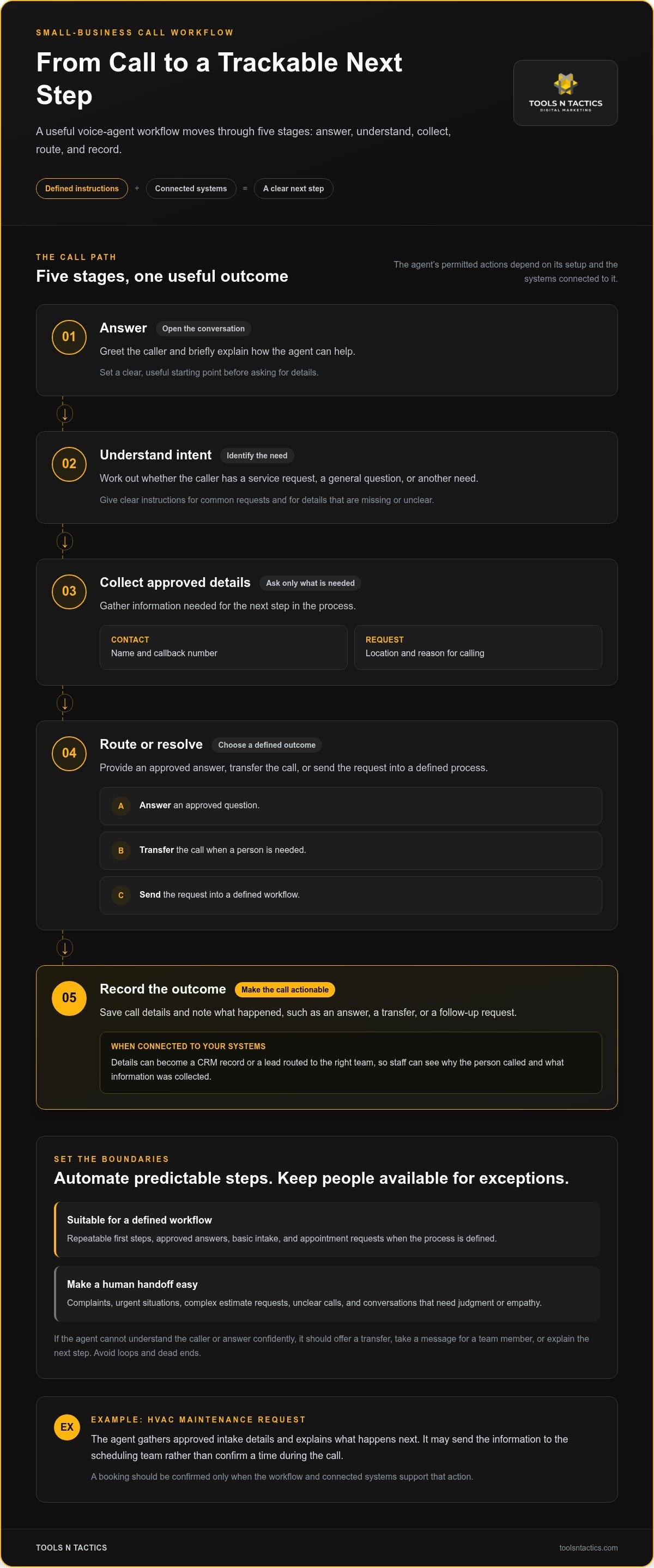
A useful call workflow turns a conversation into an action the business can track. A voice agent might answer an approved question, collect details for a service request, or pass the call to a team member. What it can do depends on its instructions and the systems connected to it.
A useful agent needs a defined next step, not just a realistic voice. A smooth-sounding conversation can still fail if the caller doesn’t know what happens next. Map common requests to a clear answer, handoff, or record before building the workflow.
A typical call can move through five stages:
- Answer: Greet the caller and briefly explain how the agent can help.
- Understand intent: Identify whether the caller has a service request, a general question, or another need. In simple terms, the software interprets the caller’s words to determine what they are asking for.
- Collect approved details: Ask only for information needed for the next step, such as a name, callback number, location, and reason for calling.
- Route or resolve: Provide an approved answer, transfer the call, or send the request into a defined process.
- Record the outcome: Save the call details and note what happened, such as an answer, a transfer, or a follow-up request.
From spoken request to useful action
Imagine someone calls an HVAC company to request a routine maintenance appointment. The agent can ask for approved intake details and explain what happens next. That may mean sending the information to the scheduling team rather than confirming a time during the call. The agent should confirm a booking only when its workflow and connected systems support that action.
Callers won’t all describe the same need in the same way. One may ask directly about maintenance; another may begin by explaining a problem. Give the agent clear instructions for recognizing common requests and handling missing or unclear details. For a basic explanation of traditional keypad-based routing, Understanding Interactive Voice Response (IVR) offers useful context. A conversational agent may interpret spoken intent, but its permitted actions still depend on its setup.
Where CRM, routing, and follow-up fit
After a call, captured details can become a CRM record or a lead routed to the appropriate team. Staff can then see why the person called and what information the agent collected. The workflow can also send an SMS or email when appropriate, such as a message confirming that the request was received. Automated lead follow-up for service businesses works best when it supports the caller’s next step without replacing a conversation that needs a person.
Tools N Tactics connects voice agents with lead routing, CRM workflows, and follow-up through its Automation Engine. To plan how those pieces fit together, talk with Tools N Tactics about a connected call-handling workflow.
AI Voice Agent vs. IVR, Chatbot, or Human Receptionist
These options handle customer communication in different ways. A touch-tone menu guides callers through fixed choices. A conversational voice agent responds to spoken requests. A website chatbot handles typed questions, while a receptionist brings human judgment to a live conversation. Choose based on the calls you receive, the tasks your team can support, and how callers can reach a person.
| Option | Interaction style | Suitable requests | Escalation and operational fit |
|---|---|---|---|
| Conversational voice agent | Caller speaks naturally; the agent responds according to its setup. | Routine questions, basic intake, or clear requests with defined steps. | Can transfer a call or capture a callback request if the workflow allows. Useful when repeatable phone tasks need a consistent process. |
| Touch-tone IVR | Caller listens to a menu and presses keypad numbers. | Simple routing, such as choosing sales, service, or billing. | Routes callers through preset options. A practical fit when menu choices cover common needs. |
| Website chatbot | Visitor types questions and receives written responses. | Website questions, basic service information, or online inquiry intake. | Can direct a visitor to a form or human follow-up. It serves website visitors, not callers on the phone. |
| Human receptionist | Caller speaks directly with a person. | Complex questions, complaints, exceptions, or conversations needing judgment. | Can respond to context and adjust in real time. Fit depends on staffing and how calls are covered. |
An AI voice agent for small business can support a receptionist rather than replace one. It can handle defined routine steps while people manage calls that need empathy, judgment, or an exception to the usual process. The goal is a reliable handoff, not a system that forces every caller down the same path.
When does a voice agent make more sense than IVR?
A voice agent may suit callers who describe what they need in their own words, especially when a short exchange can identify the right next step. IVR can be a good fit when callers can choose from a few clear options, such as service or billing. Review your call patterns: if requests are predictable and menu choices cover them, a menu may be enough. If callers need a brief conversation to explain their needs, a voice workflow may fit better. Some callers will still prefer a person.
When should a person take over?
Set handoff rules before launch. Repeated misunderstandings, caller frustration, unusual requests, and situations requiring judgment are good reasons to bring in a person. A warm transfer can connect the caller directly. If no one is available, capturing a callback request can preserve the inquiry and give the team a way to respond.
Website chat and phone calls are separate channels, even when both answer customer questions. A chatbot can guide visitors through typed questions on a local business website; a voice agent handles spoken phone requests. Give each channel a clear scope and a sensible path to human help.
How to Evaluate and Introduce an AI Voice Agent Without Disrupting Service
Start with your actual call patterns, not a long list of features. An AI voice agent for small business should make call handling easier without creating confusion for callers or staff. Begin with one defined task, decide what should happen if the agent can’t complete it, and review whether the workflow is working as intended.
Choose the first workflow using real call patterns
Review recent call records, missed calls, and questions staff answer repeatedly. Look for a task with clear steps and a useful outcome, such as collecting complete details from new service inquiries for follow-up. Avoid starting with every call type at once. A limited first workflow is easier to test and adjust without changing how all your calls are handled.
Use this rollout sequence:
- Map call types. Group common requests, such as new inquiries, appointment requests, routine questions, and calls that need a person.
- Choose one low-risk workflow. Select a repeatable task with a clear finish, such as capturing details for a callback.
- Define handoffs. Decide when to transfer a caller, take a message, or direct the request to another team member.
- Test before broader use. Try realistic calls and confirm that responses and actions follow the intended path.
- Review and refine. Check call outcomes and staff feedback, then adjust instructions or boundaries before expanding.
Write down the fallback, too. If the agent can’t identify what the caller needs, a call is interrupted, or a connected system is unavailable, the caller still needs a clear next step. That might be a transfer when someone is available or a callback request that captures the right contact details. A defined fallback helps prevent dead ends and promises the business can’t keep.
Test caller experience and operating results
Test more than the ideal call. Try common questions, vague requests, interruptions, and direct requests to speak with a person. Check whether the agent asks for information clearly, handles corrections, and uses the agreed fallback when it is uncertain. Then review call records with the staff who handle inquiries. They can spot missing details or handoffs that create extra work in practice.
Track a focused set of indicators: calls answered, complete lead details captured, successful transfers, unresolved calls, and caller feedback. Look for patterns. Are callers reaching the right person? Do staff have enough context to follow up? Are calls getting stuck on the same question? These measures can show whether the workflow supports lead handling and operational efficiency. Automation alone can’t guarantee more revenue. Results still depend on the service, the next steps, and follow-up.
Tools N Tactics connects call handling with lead routing, CRM workflows, and follow-up through its Automation Engine. Discuss a connected automation workflow for your business and identify a practical starting point.
How Tools N Tactics Connects AI Voice Agents to a Small-Business Growth System
A voice agent works best as part of a lead-handling system. The caller’s request should connect to a useful next step, whether that means routing an inquiry, creating a record for the team, or sending appropriate follow-up. Without those connections, a call may be answered but leave staff without the context they need to respond.
Tools N Tactics helps service businesses connect call workflows with team handoffs and business goals. Its Automation Engine links customer interactions with lead routing, CRM workflows, and SMS or email follow-up. The Growth Partner Program takes a broader view, connecting customer engagement with the systems that support visibility, conversion, and long-term growth.
Connect voice handling to the wider lead journey
Consider a homeowner who calls after finding a contractor online. The call can capture the service they need and the job location. From there, the inquiry can go to the appropriate team member, be recorded for follow-up, and move toward a clear next action. If the homeowner starts with a website chatbot, that channel should also offer a straightforward way to continue the conversation.
Visibility, conversion, and follow-up are connected business processes. Visibility helps people find a business. A clear call or chat experience gives interested prospects a way to act. Organized follow-up helps the team respond with context. Reviewing these steps together can show where inquiries stall, rather than judging a voice agent only by whether it answered.
Decide whether the business is ready for a voice-agent workflow
Look for practical signs of readiness: recurring call types, routing rules your team can explain, and someone who can review outcomes and improve the process. If staff disagree about who owns an inquiry or what information to collect, clarify those steps before automating them.
Implementation still requires oversight. Call patterns can change, instructions may need adjustment, and some requests will require human judgment. Keep people involved in reviewing outcomes and handling exceptions. Their feedback can help keep the workflow aligned with how the business serves customers.
A well-designed AI voice agent for small business should make the path from first contact to team follow-up easier to manage, not add a disconnected tool. Tools N Tactics can help assess how voice handling, routing, CRM, and follow-up fit together for service businesses in North Texas, including Plano, Dallas, Celina, Princeton, Melissa, Sherman, and Frisco. Discuss a practical voice-agent workflow and next steps for your business.
Make Your Next Call Workflow a Measurable Step Forward
Every customer conversation shapes what people expect from your business. As your services and team change, your call process may need to change too. Treat it as part of the customer experience, not just a way to answer the phone. A well-planned AI voice agent for small business can help make that experience more consistent while keeping a clear route to human support.
Tools N Tactics works with service businesses to connect AI voice agents with lead routing, CRM, and follow-up. Discuss an AI voice workflow for your business and choose a practical first step.
Frequently Asked Questions
Can an AI voice agent answer calls for a small business after hours?
Yes, if the call flow is set up to answer when your team is unavailable. Decide what the agent should say about when staff will review a request, and don’t imply someone is monitoring calls if they aren’t. For example, it could tell callers that their message has been recorded for the next business day. Clear expectations help prevent confusion.
Can an AI voice agent transfer a caller to a real person?
Yes, when the phone setup supports transfers. Choose a destination for each type of transfer and decide what callers should hear if no one answers. A useful handoff also gives staff the reason for the call and any details already collected. That context can help the employee continue the conversation without asking the caller to repeat everything.
Is an AI voice agent the same as an automated phone menu?
No. A phone menu typically guides callers through fixed choices, while a voice agent responds to spoken requests within its configured limits. A menu can suit a business with a few stable departments and simple routing. A voice agent may fit better when callers describe requests in different ways. Review call records to see whether most callers choose a known option or need a more flexible exchange.
How much does an AI voice agent for a small business cost?
Costs vary based on pricing and the scope of the workflow. Call handling, CRM connections, routing, and ongoing management can all affect what is included. When comparing options, review the features and how usage is billed. Define the workflow first so you can compare setups designed to do similar work.
Can an AI voice agent book appointments or capture leads?
It can when the workflow and connected scheduling process support the task. For appointment booking, define how the system handles unavailable times, changes, and confirmations so callers don’t mistake a request for a confirmed booking. For lead capture, decide which details staff need to assess an inquiry. Collecting only useful information makes records easier to act on and avoids unnecessary questions.
Will customers know they are speaking with an AI voice agent?
A clear, brief opening can set expectations before callers share details. Use plain language to identify the automated assistant and explain how it can help. Keep the greeting consistent with your business’s tone, then test it with people unfamiliar with the workflow. Their reactions can show whether the introduction is easy to understand or makes it harder to get help.
What happens if an AI voice agent does not understand a caller?
A well-planned workflow should avoid guessing. The agent can ask the caller to repeat or rephrase the request, then offer another way forward if it still can’t understand. Record these cases and group them by request type or point of confusion. Reviewing the patterns can reveal unclear instructions, words the agent often misses, or topics better handled by staff.