What good is an AI chatbot for lead generation if it collects a visitor’s details but leaves your team unsure who should follow up? A website conversation can help a potential customer take the next step, but only when the right information reaches the right person with enough context to act.
It’s understandable to want more visitors to call or submit a form. But adding a chatbot without a clear purpose, handoff, and follow-up process can create another disconnected system instead of a useful source of opportunities. A homeowner asking about a roof repair, for example, needs a clear path to the person who can respond, not another unanswered inbox.
This article explains how to plan, compare, and improve a chatbot that captures relevant details without making the conversation feel like a long form. You’ll learn what to ask, how to route inquiries with clear ownership, and how to measure whether chatbot conversations contribute to qualified leads and business goals. The aim is a connected process: capture, qualify, route, and follow up.
Key Takeaways
- Define what a useful chatbot should accomplish, then connect each conversation to a clear next step in your sales process.
- Design the AI chatbot for lead generation to ask only relevant questions, capture helpful context, and make follow-up easier.
- Choose between a chatbot, form, live chat, or voice agent based on what visitors need and how your team handles inquiries.
- Test real-world scenarios, including unclear requests and inquiries that need a person, before launch.
- Connect chatbot conversations to your CRM and follow-up workflows, then review performance to find where the process needs improvement.
How an AI Chatbot for Lead Generation Fits Into Your Sales Process
An AI chatbot for lead generation asks website visitors relevant questions, captures details about their needs, and helps qualify inquiries for follow-up. Its job is not simply to collect a name and email. It can connect a visitor’s question to useful context, create or update a lead record, and guide the inquiry toward an appropriate next action.
Think of the process as a handoff. A visitor asks about a service. The chatbot gathers information that helps the business understand the request. That context is recorded and used to guide what happens next, such as routing the inquiry to a team member or adding it to a follow-up workflow. If the conversation stops at collecting contact details, the business still has to figure out what the visitor needs and who should respond.
A static form can work well when someone knows what they want and can describe it in a few fields. A chatbot can offer a guided conversation when a visitor has questions or needs help choosing a next step. Neither format is automatically better. Choose based on the visitor’s needs, the information your team uses to respond, and how each inquiry will be handled.
What a chatbot can contribute before a visitor leaves
A focused opening prompt gives visitors a clear starting point, such as, “What kind of help are you looking for?” From there, the chatbot can ask a few follow-up questions tied to the service. For a contractor, useful context might include the type of work, the property location, when the work is needed, and the visitor’s preferred contact method.
That information can help the team distinguish a roofing repair request from a new roof estimate, or identify an inquiry from outside the business’s service area. Keep the questions purposeful. Asking for details that don’t affect routing, preparation, or follow-up adds effort without making the lead record more useful.
Each conversation should lead somewhere clear. The next step might be a human follow-up, a request for more details, or a link to a relevant service page. The collected details matter only if they help the business take an appropriate next step.
What a chatbot cannot fix by itself
Capturing an inquiry does not automatically make it a qualified lead, show that the person is ready to buy, or complete a booking. A visitor may be researching, need a service the business doesn’t provide, or give an unclear answer. The chatbot should not treat every conversation as a sales-ready opportunity.
Problems arise when an answer is misunderstood, the lead record lacks key context, or no one owns the next action. A useful setup defines where inquiries go and what information the receiving person needs. Connected tools, such as the Automation Engine for AI and CRM workflows, can support that handoff and follow-up process.
Clear expectations matter, too. A chatbot can capture and organize an inquiry, but it can’t guarantee a response, appointment, or sale. If a question needs judgment or the visitor wants a person, make that path clear. Without a workable handoff, even a polished conversation can leave a potential customer waiting.
Design the AI Chatbot Conversation Around Lead Qualification
A useful qualification flow feels like a short, focused conversation, not an intake form broken into chat bubbles. Each question should help the visitor move forward or help your team decide what to do next. For an AI chatbot for lead generation, collect enough context for a useful handoff without asking for details that won’t affect follow-up.
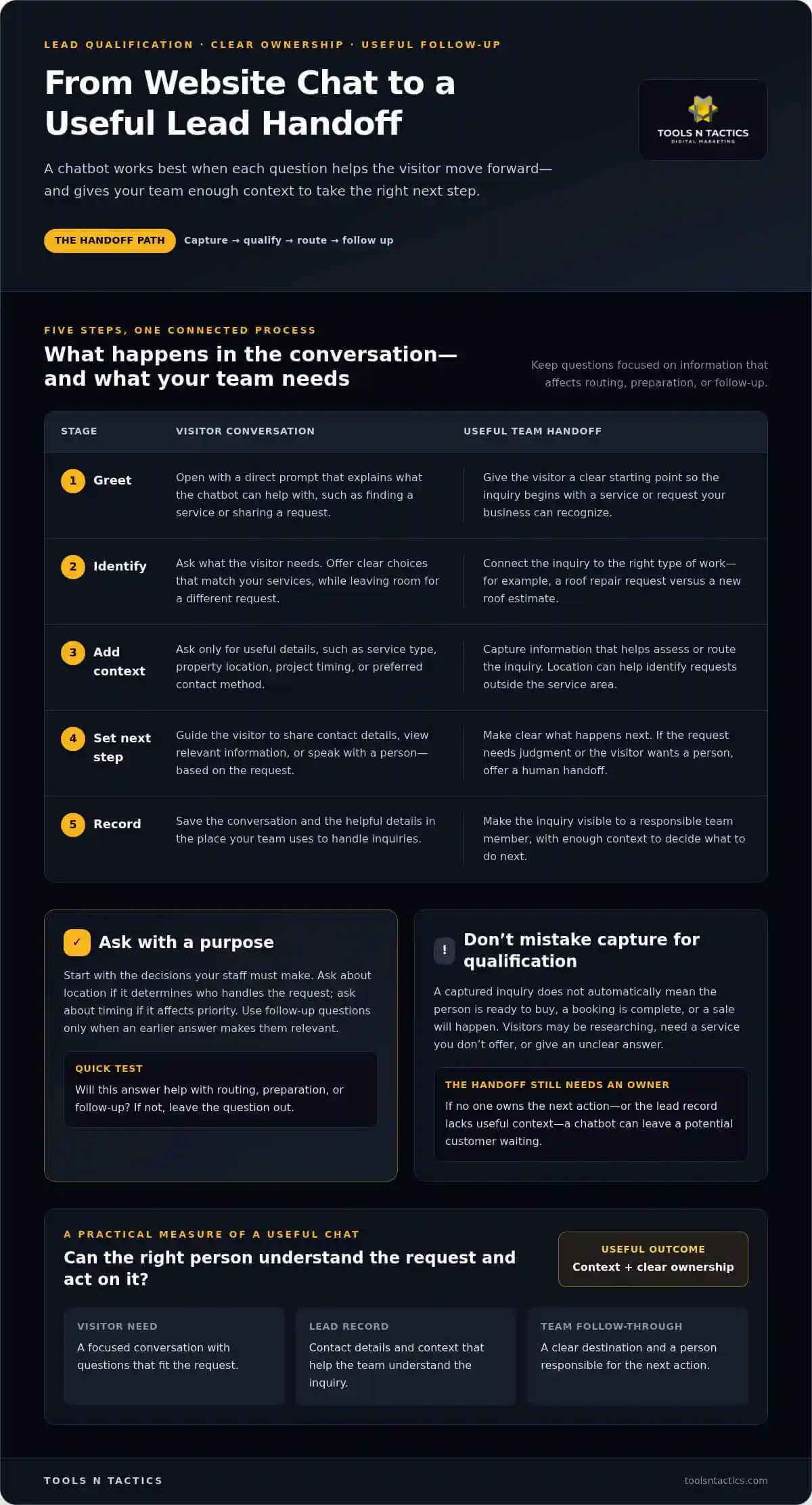
A strong chatbot flow greets the visitor, understands the need, gathers essential context, offers a clear next step, and records the conversation for follow-up.
- Greet the visitor. Use a direct, welcoming prompt that explains what the chatbot can help with, such as finding a service or sharing a request.
- Identify the need. Ask what the visitor is looking for. Offer a few clear choices when they match your services, while leaving room for a different request.
- Collect essential context. Ask only for details that help assess or route the inquiry, such as service type, service area, and project timing.
- Choose a next step. Depending on the request, guide the visitor toward sharing contact details, viewing relevant information, or speaking with a person.
- Record the conversation. Save the inquiry and its useful context where the responsible team can see it and act on it.
Choose questions that help the team act
Start with the decisions your staff must make after an inquiry arrives. If location determines which team handles a request, ask for the service area. If project timing affects priority, ask when the visitor hopes to begin. Avoid asking for a full project description before you know which service they need.
Use follow-up questions only when an earlier answer makes them relevant. For example, a visitor asking about a repair may need to explain what is damaged, while someone asking about a consultation may not. Request contact details when they’re needed for the next step, and explain what happens after the visitor shares them. Clear expectations make the exchange feel purposeful.
Make answers and handoffs useful
Keep responses grounded in accurate business information, including services, service areas, and next steps your team can support. If a request is unusual, unclear, or requires judgment, the chatbot should say so plainly and offer a human handoff. Don’t let it guess at a technical answer or imply that a booking is confirmed when it isn’t.
Decide what information the receiving person needs, where the conversation should be recorded, and who owns the next action. AI and CRM automation can connect chatbot details with lead records and follow-up workflows. If you’re mapping how those handoffs should work, talk through your workflow with Tools N Tactics.
AI Chatbot vs. Form, Live Chat, or Voice Agent: What Fits Your Leads?
The right lead-capture channel depends on what visitors need to explain and how your team handles the next step. A simple request may need only a short form. A complex inquiry may benefit from guided questions or a direct conversation. Choose the channel that makes it easy to share useful details and gives your team a clear way to follow up.
- Contact form: Best for straightforward requests, such as asking for an estimate on a clearly defined service. Visitors enter details at their own pace, and the team receives a written inquiry to review.
- Chatbot: Useful when visitors may need help describing their needs. It can ask follow-up questions based on earlier answers and collect context in a conversational format.
- Live chat: Suits visitors who want to exchange messages with a person. The workflow depends on who monitors incoming conversations and how unresolved chats are handed off.
- Voice agent: Offers a spoken interaction for people who prefer talking through a request. It still needs a defined process for recording details and directing inquiries to the right person or workflow.
These channels serve different preferences and workflows. An AI chatbot for lead generation can guide visitors through relevant questions, but it doesn’t make forms, live chat, or voice interactions unnecessary. Some visitors know exactly what they want. Others need clarification or prefer to speak with a person.
Match the channel to the type of inquiry
Suppose a customer wants a quote for a clearly described service and can provide the address and contact details. A short form may be enough. But a visitor asking about an HVAC issue might need to explain what’s happening, where the equipment is, and whether they’re seeking repair or replacement. A chatbot can collect those details through relevant prompts.
Give visitors a visible route to call or request a human response when their situation is complicated or they prefer a direct conversation. The goal isn’t to push everyone into one channel. It’s to make the next step clear and capture the information your team needs.
Compare the workflow, not just the interface
A polished chat window can still create a poor process if its information ends up in the wrong place. Before choosing a channel, map what happens after someone submits, chats, or calls. Does the inquiry reach the correct CRM record or team member? Who owns unanswered questions? How will the team know what was already discussed?
Consider the gaps, too. A form may arrive without enough context. A live chat may need a person to continue the exchange. A chatbot or voice agent may encounter a question it can’t answer. Define how each case is recorded, routed, and followed up. The website experience should make the next step clear and give the business a workable process behind it.
Launch and Measure an AI Lead-Generation Chatbot Without Guesswork
A reliable launch starts with a business goal, not a long list of chatbot features. Decide what the conversation should help your team do, such as identify service requests that need follow-up. Then build, test, and review the full path from visitor message to team action. An AI chatbot for lead generation is useful only when its questions, records, and handoffs support that path.
- Define the goal. Choose a clear outcome to measure, such as completed inquiries that meet your service and location criteria.
- Map the questions. List the details the team needs to handle that inquiry. Remove questions that won’t change routing or follow-up.
- Connect lead handling. Decide where each conversation is recorded, who owns each inquiry type, and what context they need.
- Test realistic scenarios. Try a clear request, an unclear request, an out-of-area inquiry, and a question that needs a human response. Check whether the chatbot gives an appropriate next step and whether the record reaches the right place.
- Review the results. Look at engagement, completed conversations, qualified inquiries, and conversions. Use those measures to find weak points in the flow.
Prepare the knowledge and workflow
Give the chatbot accurate service descriptions, service-area details, answers to common questions, and information about next steps your business can support. Keep these materials current. If service details change but the chatbot still shares old information, visitors may receive confusing guidance and staff may need to correct it later.
Set ownership before launch. For each lead type, identify the team member or workflow responsible for follow-up. Make sure the inquiry record includes the visitor’s relevant answers, not just contact details. Review what information the chatbot collects, where it is stored, and who can access it. Collect only what supports the business purpose and follow-up process.
Review performance and improve the flow
Metrics are signals, not proof that the chatbot caused every booking or sale. A rise or drop in conversions may have other contributing factors. Compare chatbot activity with CRM records and follow-up outcomes to see whether inquiries were relevant, reached the right person, and progressed through your normal sales process.
Look for patterns. If visitors often leave after one question, the prompt may be unclear or the conversation may ask too much too soon. If staff can’t act on common answers, adjust the questions or lead record. If qualified inquiries stall after capture, review who owns follow-up and what happens next. Connected AI and CRM workflows can help keep that handoff organized.
Tools N Tactics helps service businesses connect chatbot setup with lead handling and ongoing review. Discuss a chatbot workflow for your business to identify what to measure and where the handoffs should lead.
Connect Your AI Chatbot to a Lead System That Can Follow Through
A chatbot can capture an inquiry, but the work isn’t finished when a visitor shares their details. The lead still needs to reach the right place, carry enough context for useful action, and enter a follow-up process with clear ownership. Connecting these steps helps prevent chatbot activity from becoming another inbox for your team to monitor.
Think of the AI chatbot for lead generation as the entry point to a connected system. Chatbot integration moves conversation details into a lead record. CRM automation helps organize that record. Workflow automation can direct the inquiry to the responsible person or next step. Lead nurturing supports continued communication when the prospect isn’t ready to act yet. Each part has a job, and the handoffs between them need to be planned.
How the Automation Engine supports lead handling
The Tools N Tactics Automation Engine brings together AI agents, lead nurturing, CRM, and workflow automation. For a home service business, a chatbot might capture the service requested and location, then pass the details into a lead record. A workflow can direct that inquiry to the appropriate team member and place it in the relevant follow-up process. Staff can then review the visitor’s request and decide how to proceed.
This setup should reflect how the business actually works. Decide which inquiry types need a person to review them, what context staff need, and how to handle a lead that doesn’t fit the usual path. Automation can organize handoffs, but the workflow still needs clear ownership. Tools N Tactics can align those components with broader growth priorities through the Growth Partner Program.
Choose a practical next step for your business
Before changing tools or adding more questions, write down how inquiries currently arrive and move through your business. Note your main lead sources, common inquiry types, current CRM, and follow-up process. Mark where information gets lost, ownership is unclear, or staff have to repeat questions. That simple map gives implementation work a clear starting point.
Tools N Tactics works as an implementation partner, aligning personalized chatbots with CRM and follow-up workflows. The right configuration depends on your business goals, how your team handles inquiries, and the systems already in place. Treat the chatbot as part of a process to build and refine, not a promise of specific leads or sales.
A free SEO audit or consultation can help you assess how your website and lead-capture process fit together. Bring your inquiry map and current workflow to discuss your lead-generation goals and identify a practical path forward.
Build a Lead Process Your Team Can Improve
Your next move doesn’t need to be a full-scale rollout. Pick one type of inquiry that matters to your business and decide what a useful outcome looks like for the visitor and your team. Starting with a focused use case gives you room to learn from real conversations before expanding the chatbot to other services or pages.
An AI chatbot for lead generation should fit your business goals and the way your team works. Tools N Tactics provides personalized AI chatbots and chatbot integration as part of a broader approach to lead handling. Focus first on the opportunity you want to address and the process your team can support.
Ready to identify that first use case? Discuss your lead-generation goals with Tools N Tactics and explore a practical next step for your business in North Texas, including Plano, Dallas, Celina, Princeton, Melissa, Sherman, and Frisco.
Frequently Asked Questions
Can an AI chatbot generate leads for a small service business?
Yes, an AI chatbot can help a small service business capture inquiries from website visitors, including people who may not want to call right away. A Plano contractor, for example, could use a chatbot to help visitors describe a project and share contact details. The chatbot is one part of lead generation, not a guarantee of new business. Clear service information and a workable follow-up process still matter.
What questions should a lead-generation chatbot ask?
Ask questions that help your team decide whether and how to follow up. A roofing company might ask whether the visitor needs a repair, replacement, or inspection, then clarify the kind of property involved. A professional service firm in Dallas may need to know which service the visitor is interested in. Keep questions easy to answer, and avoid requesting sensitive or unnecessary details during an initial website conversation.
How does an AI chatbot qualify a lead?
A chatbot can compare an inquiry with criteria your business defines, such as service fit, location, and the type of help requested. For example, a home service business serving Melissa and Celina could flag a request that appears to be outside its coverage area. Qualification helps sort inquiries for review; it doesn’t prove a person is ready to buy. Staff should still assess fit and intent.
Is an AI chatbot better than a contact form for lead generation?
Not in every situation. A contact form may suit visitors who know what they need and want to send a brief request. A chatbot may help if a visitor needs to identify the right service or has details to explain. You can offer both, then compare the quality and handling of inquiries from each. For a straightforward quote request in Sherman, a concise form may be all that’s needed.
Can an AI chatbot connect to a CRM?
Yes. Chatbot integration can pass conversation details into a CRM record so the team has context alongside the visitor’s contact information. Plan which details belong in which fields, how duplicate records should be handled, and what happens when an answer is missing. A Frisco business, for instance, might want service interest and lead source visible to the person reviewing new inquiries. Test the connection before relying on it.
How do you measure whether a lead-generation chatbot is working?
Track whether visitors start a conversation, complete it, and become inquiries your team considers relevant. Then check CRM records and sales outcomes to see whether those inquiries progressed. A rise in completed chats alone doesn’t show that lead quality improved. Compare performance over time and note changes to the website, offer, or follow-up process that could also affect results.
Can a chatbot hand a conversation to a person?
Yes, a chatbot can be set up with a path for visitors who need human help. Make that option clear when the request is unusual, the answer is uncertain, or the visitor asks to speak with someone. The handoff should preserve the conversation details so the person can continue with context. Set expectations about what happens next, rather than suggesting a response or appointment is already confirmed.