
Google Business Profile Q&A has changed, so relying on a visible question-and-answer section may leave customers without clear answers. For Google Business Profile Q&A optimization Celina businesses should focus on making service information, contact details, and hours clear and consistent across their profile, website, and local directories.
Customers want to know whether you handle their job, serve their area, and are easy to reach. If an answer is missing or out of date, they may call just to confirm basic details, or choose a business that makes those details easier to find.
This checklist covers what to review on your profile, how to build useful website FAQs, and how to keep customer-facing information aligned. For service businesses in Celina and across North Texas, including Plano, Dallas, Princeton, Melissa, Sherman, and Frisco, a clear information system is more dependable than chasing a feature that may change.
Key Takeaways
- Traditional profile Q&A and newer AI-assisted local answers are different experiences. Build your process around accurate business facts, not assumptions about a specific feature.
- Use Google Business Profile Q&A optimization Celina as a prompt to align your services, service areas, and contact details across your profile, website, and directories.
- Give profile information, website FAQs, and customer reviews distinct roles, then keep each accurate and up to date.
- Record questions customers ask on calls and in sales conversations. Use recurring questions to improve your FAQs and service explanations.
- Connect profile updates with website checks and local directory accuracy so customers have a clear path to contact or book your business.
Google Business Profile Q&A in Celina: What Changed and Why It Matters
Customers still need straightforward answers before they call, request an estimate, or book a service, even as Google changes how business information appears. Traditional profile Q&A and newer AI-assisted local answers are different experiences. One relied on questions and responses attached to a profile. The other can present answers drawn from information about a business. For Google Business Profile Q&A optimization Celina, the practical priority is keeping those underlying facts clear and accurate.
The profile is one part of a broader local presence. For general background on Google’s business listing product, see this overview of Google Business Profile. Don’t assume every feature described in older advice will appear the same way on every profile. Google can change how customers view or interact with business information, and the experience may vary.
What did traditional Google Business Profile Q&A do?
Traditional Q&A let people post questions on a business profile and let the business or other users respond. A prospective customer could look for practical details before calling, such as whether a contractor handles a particular repair or serves a certain area. That gave businesses a chance to address common concerns where customers were already considering them.
Q&A wasn’t the same as a review, which shares a customer’s experience, or a profile attribute, which identifies a business detail or feature. It also wasn’t a website FAQ, where the business controls and maintains the published answers. Each has a separate job, so don’t treat one as a substitute for the others.
Why does the feature’s changing status matter to Celina businesses?
If customers can’t find an old answer, or the information conflicts with the current profile, they may hesitate or call to confirm basic details. For example, a home-service contractor might have an outdated answer suggesting they handle a job type they no longer take. A customer relying on that answer could waste time, while the business handles an avoidable inquiry.
Newer AI-assisted local experiences are not simply the old Q&A format with a new label. They may present answers differently and use information from business sources, but the exact behavior can evolve. Don’t assume an AI answer is a direct business response or that you can edit it like a profile field. Review what customers can currently see on your listing, and use Google’s current guidance when a feature change affects your next steps.
Keep location language accurate, too. Targeting Celina means clearly describing the local customers and service area your business actually serves. It doesn’t mean implying you have a Celina office if you don’t. Align your profile’s service-area details with your website and customer-facing explanations. Accurate service, hours, and location information reduce confusion and give potential customers a clear next step.
How Google’s Newer Local Answers Use Business Information
AI-assisted answers are changing how people may find and compare local businesses. Newer experiences can draw on profile details, website content, and customer reviews. But reported behavior isn’t a stable rule for every search or profile. Google’s features can evolve, and no website wording, markup, or profile edit can guarantee that an AI-generated answer will include or describe your business in a specific way.
Focus on what you can control: make your business facts clear, accurate, and consistent. If customers see different hours or service descriptions in different places, they may not know which information to trust. A sound Google Business Profile Q&A optimization Celina approach connects your profile and website without trying to force a particular AI result.
Which business facts should stay consistent across channels?
Check your business name, phone number, hours, service descriptions, and service-area wording across your profile and website. The wording doesn’t need to be identical, but the meaning should match. If your profile says you serve Celina, for example, your website should explain that service area plainly and avoid suggesting you have a local office unless you do.
Use language customers understand, not a string of search terms. A clear description of the work you handle helps people decide whether to call. Compare each channel and correct conflicts at their source instead of copying inaccurate details everywhere.
- Business identity: Keep your public-facing name and contact details accurate.
- Availability: Make sure posted hours reflect current business hours.
- Services: Describe the work you actually provide in plain terms.
- Service area: Name the communities you serve without implying an office location you don’t have.
How do reviews and website content support answer readiness?
Reviews can add useful customer context, such as what a project involved or how a customer describes the experience. They aren’t a reliable replacement for your own service details. If a review mentions a service you no longer offer, update your profile and website rather than relying on that review to explain your business.
Build website FAQs from real questions customers ask during calls, messages, and sales conversations. Answer each question directly, then add the details customers need to decide what to do. A service-area answer should name the communities you serve. A service answer should explain what the work includes. Avoid vague claims and keyword-heavy wording that doesn’t help customers make a decision.
Review responses also help keep public information clear. Correct misunderstandings politely, protect customer privacy, and don’t make promises that conflict with your actual service. A consistent review process supports customer trust while your website and profile carry the core facts.
If your profile and website tell different stories, a focused review can help identify what to fix first. Celina businesses can discuss a profile and website review with Tools N Tactics to connect accurate information with local visibility.
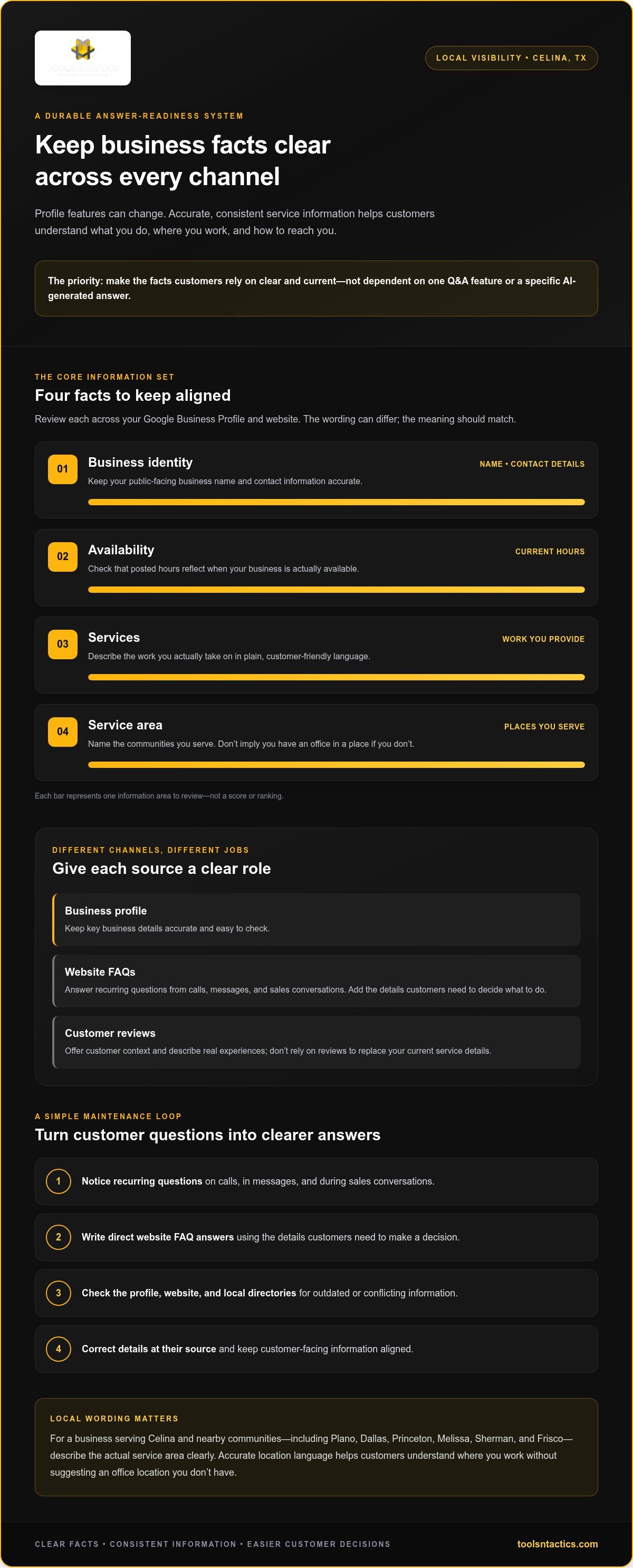
A Celina Business Checklist for Q&A, Website FAQs, and Local Visibility
Give each customer information source a clear job. Profile details help people quickly confirm who you are, what you do, and how to reach you. Website FAQs explain services and next steps in more depth. Reviews share customer experiences and need thoughtful monitoring and responses. Managing them as one system helps prevent gaps without assuming a particular Google feature will always be available.
For a Celina contractor, the goal is practical: a prospective customer should be able to tell whether the contractor handles the needed work, serves their area, and has a clear contact path. A Google Business Profile audit can help assess profile completeness and identify details that need attention.
What should you check on the profile first?
Start by viewing the profile as a customer would. Note whether Q&A or a related question feature appears and what options customers currently have. Feature behavior can change, so treat this check separately from verifying the core business information that customers need.
Check categories, listed services, hours, phone number, website link, and service-area information. Compare each item with the current details on your website. Record missing, outdated, or conflicting facts before editing. This makes changes deliberate and gives you a list of items to follow up on.
- Profile Q&A or related features: Record what customers can see. Don’t rely on old instructions for controls that may have changed.
- Core details: Check categories, services, hours, contact information, and service areas for accuracy.
- Customer path: Test the phone number and website link to make sure they lead to the right place.
- Review context: Note recurring questions or misunderstandings that may point to unclear service descriptions.
When should an answer live on the website instead?
Use a website FAQ when a customer needs more than a quick fact. A roofing contractor might explain what information helps prepare for an estimate or clarify which types of roofing work the business handles. Keep each answer direct and aligned with actual services and policies. Don’t imply a service area or promise the business can’t support.
Reviews have a different purpose. Customers write them to describe their experience. The business can respond to show it is listening and correct factual confusion with care. Don’t treat a review as the official source for hours, service coverage, or current offerings. Those details belong in places the business can maintain directly, such as its profile and website.
Use this simple division: profile for fast, current facts; website FAQs for fuller explanations; reviews for customer perspective and responsive follow-up. Then check that the three don’t contradict one another. This makes Google Business Profile Q&A optimization Celina a practical information-maintenance task, not a race to populate every available feature.
A Step-by-Step Google Profile Q&A Optimization Checklist for Celina
Keep this process simple and repeatable. The goal is to make your business information dependable, capture the questions customers actually ask, and check whether profile activity leads to useful next steps. Feature controls may change, but accurate facts and a working contact path remain practical priorities.
How should you collect and prioritize real customer questions?
Use questions from calls, messages, estimate requests, and sales conversations. Keep a shared log with the question, where it came from, and what information would help the customer decide. Group similar questions under services, scheduling, service areas, and next steps. Prioritize questions that prevent someone from knowing whether to contact you, such as whether you handle a certain type of work or serve their part of Celina.
Answer in plain language. Don’t plant questions, repeat keywords unnaturally, or suggest services you don’t provide. If a question comes up often, put the complete answer on your website FAQ and keep shorter business facts accurate on the profile.
- Inspect the customer view. Search for your business and open its profile as a customer would. Note whether Q&A or another question feature appears, what information is visible, and whether the contact options work. Don’t assume instructions written for an older version of the profile still apply.
- Verify the source facts. Compare the profile with your current business records and website. Confirm the business name, hours, phone number, services, service area, and website link. Record any mismatch before editing so you can correct the original source and avoid creating another conflicting version.
- Update with care. Make corrections using the controls currently available in your profile. If public information is inaccurate or outdated, document what you see and use Google’s current reporting or support options where appropriate. A report does not guarantee that Google will remove or change information, so don’t promise customers that it will disappear.
- Test the customer path. Follow the profile’s phone and website links. Check that customers can reach the right page or form and understand what to do next. If you track calls or form submissions, confirm that those routes are being recorded correctly.
- Review on a steady schedule. Recheck the profile, website, and question log periodically, especially after a change to services, hours, or coverage. Keep notes on what changed and when so your team can connect updates with later customer questions.
How can you measure whether the checklist is working?
Look at profile engagement alongside website visits, calls, form submissions, and booked work where measurement is available. These signals answer different questions: profile activity shows how people interact with the listing, while inquiry and booking records show what happens after they reach out. A rise in profile views alone doesn’t prove that you’re getting more qualified leads.
Use monthly reporting to spot missing information, changes in customer behavior, and gaps between inquiries and follow-up. A Celina business can also review whether inquiries are about services it actually offers and whether customers understand its service area. Clear handoffs matter: assign someone to respond, record the inquiry, and follow the established process. To connect profile checks with local visibility and reporting, discuss a profile review with Tools N Tactics.
How Tools N Tactics | Local SEO & Digital Marketing Solutions Helps Celina Businesses Maintain Profile Accuracy
A Google profile shouldn’t be managed in isolation. Its details need to make sense alongside your website and local directory listings, so customers can find consistent information and take a clear next step. Tools N Tactics helps North Texas businesses, including those in Celina, with Google Business Profile optimization and the Visibility Engine, which includes Local SEO and Google Business Profile services.
This connected approach matters when Google changes how customers view profile information. Instead of chasing one feature, keep the business facts behind it accurate and aligned. That gives your team a sound foundation for local visibility and customer trust without promising a particular ranking or lead result.
What does an integrated profile review cover?
A practical review looks at your profile alongside your website and local directories. It can identify mismatched contact details, unclear service descriptions, or service-area wording that could confuse potential customers. Then prioritize fixes based on what will help people understand your business and reach you.
The Visibility Engine connects Google Business Profile work with broader local search visibility. Monthly reports and regular check-ins help you review progress and open questions rather than treating profile maintenance as a one-time task. This also gives your business a chance to revisit priorities as its information or goals change.
For Google Business Profile Q&A optimization Celina businesses can benefit from focusing on the full information path: profile details, website explanations, local directory listings, and the customer’s route to call or submit an inquiry. Reviewing those connected pieces helps reveal gaps that may otherwise be missed.
What should a Celina business prepare before requesting help?
A little preparation makes a profile discussion more useful. Gather the details that explain what the business needs to accomplish and what customers should understand before contacting you. Be specific about the work you provide and the areas you actually serve. This keeps recommendations grounded in your operations.
- Business goals: Clarify whether the priority is accurate profile information, stronger local visibility, or a clearer path to contact.
- Target audience: Describe the customers and service needs your business is set up to serve.
- Current assets: Have your website URL, profile access details, and existing marketing materials ready to discuss.
- Service facts: List current services, service areas, hours, and the best contact routes.
Tools N Tactics offers a free SEO audit or consultation for businesses looking to discuss search visibility and next steps. Bring the information you’ve gathered to focus the conversation on practical priorities for your Celina business, without assuming a specific ranking, lead volume, or revenue outcome.
Make Local Visibility Part of Your Business Routine
Google’s features may shift, but your customers’ need for clear information won’t. Give someone on your team responsibility for noting changes to services, hours, or service areas and keeping public information aligned. When a customer question reveals confusion, use it as a signal to improve how your business explains the next step.
That steady ownership turns Google Business Profile Q&A optimization Celina into more than a one-time cleanup. It helps your business adapt without chasing every reported feature change, while keeping attention on the details customers use to decide whether to reach out.
To put a practical plan in place, contact Tools N Tactics about your Celina business’s Google profile and local visibility. A clear next step can make your local presence easier to maintain and easier for customers to act on.
Frequently Asked Questions
Is Google Business Profile Q&A still available in 2026?
The traditional public Q&A format was discontinued on November 3, 2025. Google has shifted toward AI-generated local answers, though it may test new ways for businesses to provide input. Don’t rely on older instructions for adding questions and answers. Review your live profile and Google’s current help information to see which controls and customer-facing features are available.
Can customers still ask questions about a business on Google Maps?
Customers can ask questions through newer AI-assisted experiences such as Ask Maps, which launched publicly on March 12, 2026. This is different from posting a question in a traditional public Q&A thread on a business profile. The experience may change as Google develops its products, so check what appears in Maps for your account and location rather than assuming every customer sees the same feature.
Does answering Google Business Profile questions improve local rankings?
There’s no established guarantee that answering a profile question directly improves local rankings. Treat questions as a chance to help customers understand your business, not as a ranking shortcut. Track useful outcomes, such as calls or completed inquiry forms, alongside profile activity. If those inquiries reveal that people misunderstand a service or coverage area, clarify the relevant information on your profile and website.
Should a business add questions and answers to its Google profile?
Use profile question-and-answer controls only if they’re currently available and permitted for your listing. Don’t create artificial customer questions or publish keyword-heavy answers to influence search. Instead, record genuine questions and turn the most useful ones into clear website content. A focused Google Business Profile Q&A optimization Celina effort should help customers make informed decisions, not imitate a feature that may have changed.
Can Google use a business website to answer local search questions?
Google’s AI-assisted local answers may draw on website information, along with profile details, reviews, and other sources. That doesn’t mean a page or a particular markup will control the answer or guarantee inclusion. Make service pages useful on their own: explain what the work involves, who it’s for, and what the customer should do next. Then check that these details match your current operations.
How often should a Celina business review its Google Business Profile?
Review it monthly as a practical routine, and sooner after changes to services, hours, contact details, or service coverage. For a North Texas business serving Celina, Plano, Dallas, Princeton, Melissa, Sherman, or Frisco, changes in coverage should prompt a check of customer-facing information across channels. Also review the profile after an inquiry exposes a confusing detail. This cadence is a business practice, not a Google ranking rule.