
Could AI clear your team’s admin backlog without making customer service feel impersonal? For a contractor, a new service request can get stuck between a voicemail, an inbox, and a busy schedule. AI for streamlining business operations works best when it fixes that handoff, not when it adds another disconnected tool.
It makes sense to look for help with repetitive data entry, lead follow-up, and customer questions. But automating a confusing process can create faster confusion. Start with a recurring task that has clear steps, a measurable outcome, and a person ready to step in when judgment matters.
This article explains how to identify a suitable first workflow, compare CRM automation, chatbots, and AI voice agents, and connect them to the tools your team already uses. You’ll also learn how to set human oversight and track whether a workflow improves response, customer experience, and operational efficiency. The goal is a repeatable system that supports growth without losing control of the customer relationship.
Key Takeaways
- Find repetitive handoffs in inquiry intake, lead routing, scheduling, and follow-up before choosing an AI tool.
- Match the task to the right approach: simple rules for predictable work, AI assistance for more variable requests, and human review when judgment matters.
- Use AI for streamlining business operations as part of a connected workflow, with clear ownership at each customer handoff.
- Document the current process and track a baseline, such as delays or missed follow-ups, before testing an automation.
- Connect lead routing with timely SMS or email follow-up to support customer engagement and create a more consistent path from inquiry to service.
Where AI can streamline business operations in a service business
Operational streamlining means removing avoidable manual steps while keeping responsibility clear and customer care intact. The aim isn’t to automate every task. It’s to help routine work move through a reliable process, so staff can focus on decisions, service, and situations that need a human response. AI for streamlining business operations is most useful when it supports that process instead of adding another disconnected tool.
AI-enabled workflow automation uses software to handle or assist with repeatable steps, while people retain ownership of decisions that affect the customer. This approach is related to Intelligent automation (IA), which combines AI with automation to carry out tasks. For a service business, the practical question is where a request slows down, gets handled more than once, or risks being overlooked.
Consider a roofing contractor receiving a request for an inspection. The request arrives through a website form, but the details still need to be reviewed, entered into a CRM, routed to the right team member, and followed up on. A connected workflow can organize those steps and bring the request to staff for review. An employee still confirms the next action, especially if the customer’s description is unclear or the job needs technical assessment.
- Inquiry intake: Capture customer details and the reason for the request.
- Appointment coordination: Share routine scheduling information or flag a request for staff coordination.
- Lead routing: Direct an inquiry to the team member responsible for the next step.
- Follow-up: Prompt or send an appropriate routine message, with a clear path to human help.
Which recurring tasks are suitable for AI support?
Start with tasks that happen often and follow a clear pattern. A system might acknowledge a missed call, sort an inquiry by service type, or send a routine follow-up after a request is received. These steps can reduce repeated handling, but they shouldn’t make judgment calls about a customer’s needs or the technical details of a job.
Suitability depends on how clearly the process is defined, how complete the information is, and what happens if the system makes a mistake. If a wrong classification could delay urgent service or confuse a customer, add human review before the request moves forward. Keep empathy, exceptions, and technical decisions with qualified staff.
How disconnected workflows create operational friction
Separate inboxes, spreadsheets, and CRM records can each hold part of the same customer story. An office coordinator might enter a request in a spreadsheet, while a technician checks a different system for job details. Someone then has to copy information, confirm which version is current, and tell the next person what to do.
That handoff becomes fragile when no one owns the next step. A service inquiry could wait while the office assumes a manager has replied and the manager assumes it is still being reviewed. Before adding AI, map where the request goes and who acts on it. Clear ownership gives automation a reliable process to follow.
How AI tools fit into a connected business workflow
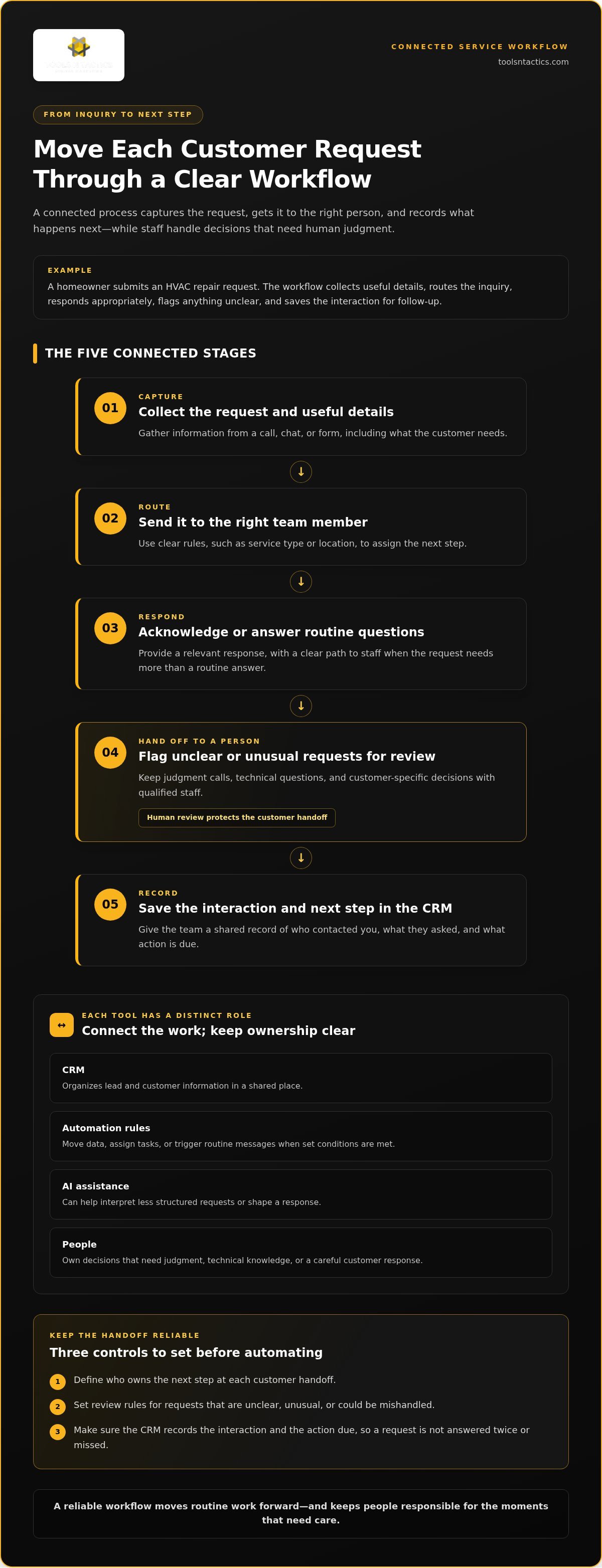
A useful workflow gives every customer request a clear path from arrival to action. For an HVAC company, a homeowner might submit a repair request, the system captures key details, and the inquiry is routed to the right person. The customer receives an appropriate response, a staff member steps in when needed, and the interaction is recorded for follow-up.
- Capture: Collect the request and useful details from a call, chat, or form.
- Route: Send it to the right team member using clear rules, such as service type or location.
- Respond: Provide a relevant acknowledgment or answer routine questions.
- Hand off: Flag unclear or unusual requests for staff review.
- Record: Save the interaction and next step in the CRM.
Each tool has a distinct role. A CRM organizes lead and customer information. Automation rules move data, assign tasks, or trigger routine messages when conditions are met. AI can help interpret a request or shape a response, while employees remain responsible for decisions that require judgment or technical knowledge. Integrated automation support can connect these steps and reduce the need for staff to copy details between tools.
What AI agents, chatbots, and workflow automations each do
A chatbot can handle defined questions and collect details, such as the service needed and the customer’s preferred way to respond. An AI voice agent can take part in customer conversations and help route a lead based on what the caller says. These tools can support communication, but they shouldn’t be treated as the final authority on complex requests.
Rule-based automation follows set instructions, such as assigning an inquiry to a team queue or creating a follow-up task. AI assistance can help interpret less structured information. The business still decides what happens next and where a person must review the request.
Why the CRM and handoff rules matter
A CRM gives the team a shared place to see who made contact, what they asked for, and what action is due. Without a reliable record, a message may be answered twice or not at all. Staff need to know which details to record and who owns the next step.
Set handoff rules before enabling customer-facing automation. Route unclear requests, exceptions, sensitive situations, and requests for staff intervention to a named employee or role. For routine lead follow-up, define which messages go out, when the sequence stops, and who handles replies. A clear automated lead follow-up framework helps keep outreach consistent while making responsibility visible.
AI for streamlining business operations should make accountability easier to see, not blur it. Tools N Tactics helps service businesses plan automation workflows around their existing tools and handoff needs. The workflow planning page explains how to get started.
How to compare AI options without overlooking trust or control
The right choice depends on the work, not the size of a vendor’s feature list. Compare the task’s complexity, how often exceptions occur, and what a mistake could mean for the customer. A predictable step may need only a fixed rule. A request written or spoken in many different ways may benefit from AI assistance, with staff review for uncertain cases.
Use this comparison as a practical scorecard. Apply it to one workflow, such as sorting incoming service inquiries, rather than comparing tools in the abstract.
Manual process
Workflow fit: Low-volume tasks or decisions that need judgment. Integration: Little setup, but staff move information by hand. Human review: Built in. Data access: Depends on what employees can see. Maintenance: A manager keeps the steps and ownership clear.
Rules-based automation
Workflow fit: Consistent triggers and predictable actions, such as assigning a form inquiry by service category. Integration: Needs connections between the relevant systems. Human review: Useful for exceptions. Data access: Limited to information used in the rule. Maintenance: An assigned owner updates rules when the process changes.
AI-assisted workflow
Workflow fit: Requests vary in wording or need categorization. Integration: Needs access to relevant request details and a path to the next system. Human review: Essential when context is incomplete or a decision affects service quality. Data access: Set boundaries around the information the tool uses. Maintenance: A named owner reviews outputs and adjusts the workflow.
When rules-based automation may be enough
If every web form with a selected service type goes to the same team queue, a simple rule may do the job. It’s easier to inspect than an AI-generated decision because the trigger and action are fixed. If exceptions are rare and the rule is easy to test, generative AI may add complexity without improving the process. Track misrouted inquiries and update the rule when categories or team responsibilities change.
When AI assistance may add value
A customer might describe the same plumbing concern as a leak, water under a sink, or a dripping pipe. AI may help group varied wording into a useful category before routing, but a staff member should review ambiguous requests or consequential next steps. For customer-facing use, connect the interaction to a defined handoff and set clear boundaries for what the system can say or do.
Vendor benchmarks need context. Ask what task was tested, what counted as success, how exceptions were handled, and whether the test resembles your own workflow and systems. A result from one company or use case doesn’t establish fit for yours. For AI for streamlining business operations, retain human approval wherever errors could undermine customer trust or service quality.
How to implement AI for streamlining business operations
A practical rollout starts with the work itself, not a software demo. Pick one customer or staff workflow, make its steps visible, and decide what improvement would matter to the team. For example, a home service company might examine how a new website inquiry gets reviewed, assigned, and followed up on. A focused test lets the team evaluate a clear change without putting the whole operation at risk.
A bounded pilot makes AI easier to evaluate because it ties a specific tool to a defined process, owner, and measure.
- Document the current workflow. Write down how a request enters, who handles it, what systems it passes through, and how the process ends. Include the usual path and common exceptions.
- Identify the friction. Look for repeated data entry, unclear ownership, delayed handoffs, or follow-up steps that are easy to miss. Ask the people doing the work where requests tend to stall.
- Choose a bounded use case. Select a frequent, well-defined task with a clear start and finish. Keep the pilot narrow, such as sorting one type of inquiry or prompting a follow-up after a request is logged.
- Record a baseline. Before making changes, track a measure that fits the workflow. This could be the time between a request arriving and a staff handoff, or whether required follow-up steps were completed.
- Test with guardrails. Limit the pilot to a defined team and specify what information the workflow can use. Require employee approval for customer-facing decisions or actions that could affect service quality.
- Review and refine. Compare pilot observations with the baseline, investigate exceptions, and adjust the process before expanding it.
Choose a first workflow and set guardrails
Prioritize work that happens often, follows a recognizable pattern, and creates visible friction when delayed. Define what the system should do, what it must not do, and who is responsible for reviewing unusual cases. Plan fallback steps for incomplete information, unexpected requests, or system interruptions. Staff should know how to take over and continue the customer conversation without relying on the automation.
As you move from a process map to a working pilot, an automated workflow can connect the chosen task with its tools and ownership rules. Keep the first version focused. Adding extra steps before the core handoff works can make it harder to identify what needs fixing.
Test performance and improve the process
Assign a review owner who can examine both workflow measures and individual exceptions. If handoffs appear faster but requests are being routed incorrectly, the process needs adjustment, not expansion. Check whether staff can find the right records, whether customers receive a clear next step, and whether the fallback path works as intended.
Use evidence from the pilot to decide what to change. Refine instructions, routing rules, or review points, then observe the updated workflow. Expand only when the process is understandable to the people who use it and its customer impact is clear. Tools N Tactics helps teams plan AI workflow pilots around their current systems and oversight needs, as outlined on the workflow planning page.
How Tools N Tactics | Local SEO & Digital Marketing Solutions connects AI automation to business growth
Operational automation works best when it supports the customer journey, from first inquiry to a clear next step. Tools N Tactics helps service businesses connect that work through AI voice agents, chatbots, CRM services, and custom automations. For a contractor, an inquiry might be captured during a customer conversation, passed into lead routing, and followed up through SMS or email. Staff can review the lead and take responsibility for exceptions.
Customer acquisition depends on more than receiving an inquiry. The business also needs a clear response, a reliable handoff, and a consistent way to track what happens next. Automation can support those steps, but it can’t replace the judgment and care involved in building customer trust.
Connect customer engagement with lead management
AI-supported intake can collect useful details and pass them into routing and follow-up processes. Employees remain responsible for judgment, exceptions, and relationship-sensitive decisions. Clear ownership helps customers understand what happens next and helps staff see which requests need their attention.
Operational systems can sit alongside work on visibility, conversion, and authority. The Growth Partner Program connects these areas as parts of a broader growth plan, rather than treating automation as a standalone tool. This approach supports consistent customer engagement and sustainable growth without promising a specific result.
Plan the next step with an implementation partner
Bring one workflow into the planning process. Describe how it works today, where requests stall or require repeated handling, and what business outcome you want to support. That outcome might be clearer ownership, fewer missed follow-up steps, or a smoother path from inquiry to the right team member.
An implementation partner can help map the process, identify a practical starting point, and define where staff approval belongs. A focused plan should fit the tools and responsibilities your team already uses, making it easier to review the workflow and decide what to refine before expanding it.
If a customer-facing or lead-management workflow is creating avoidable friction, start with the process rather than a platform. The Tools N Tactics contact page is the place to discuss a practical next step for your business.
Make your next workflow a foundation for growth
The first AI workflow you put in place can do more than address one bottleneck. It can help your team build a habit of reviewing how work moves, where customers need a clearer next step, and what should remain in human hands. Treat each improvement as part of a stronger operating foundation, not a reason to automate every task.
For service businesses across North Texas, including Plano, Dallas, Celina, Princeton, Melissa, Sherman, and Frisco, a practical starting point is a workflow your team can clearly describe and improve. Keep the customer experience at the center, then let evidence from real use guide what comes next. That steady approach gives you room to adapt as your business and customer needs change.
To explore a practical next step, talk with Tools N Tactics about AI for streamlining business operations. Start with one process that creates avoidable friction and build from there with purpose.
Frequently Asked Questions
Can AI streamline operations in a small service business?
Yes. A small service business can use AI to assist with a repeatable task, such as sorting maintenance requests by service type and sending details to the right dispatcher. For a North Texas HVAC contractor, that could mean grouping requests about heating or cooling before staff review them. Start with a process your team can explain clearly. If details are often missing or exceptions could affect customers, add a human check.
Does AI replace employees in business operations?
AI can support parts of a job, but that’s different from replacing an employee’s role. It might organize incoming notes or prepare a routine response, while a dispatcher decides how to handle a complicated service issue and a technician applies trade expertise. Keep an employee responsible for exceptions, customer concerns, and decisions that depend on context. Set that ownership before introducing automation, so support tasks don’t become unowned work.
Is AI safe to use with customer information?
AI use with customer information can be managed, but safety depends on data access, tool settings, and your business policies. Give a workflow only the information it needs, limit who can view its records, and avoid entering sensitive details without understanding the tool’s data controls. Review privacy obligations that apply to your business and customer interactions. Then document staff rules for handling, correcting, and sharing customer information.
Can AI work with the CRM and tools a business already uses?
Sometimes, but connections vary by CRM and other systems. Map which information needs to move, such as a customer’s requested service and assigned team, and decide where each record should be updated. Test with sample inquiries, including incomplete or duplicate entries. Confirm that staff can see the handoff and correct mistakes. A tool connection alone doesn’t ensure the workflow fits your process or gives employees the information they need.
What happens if an AI tool gives a customer the wrong answer?
Make it easy for the customer to reach a person, and give staff a way to correct the response and record. If a chatbot shares an inaccurate appointment detail, an employee should clarify it directly and update the information the workflow relies on. Log the error and look for a recurring cause. Then adjust or pause the affected step. Monitoring helps the team catch patterns instead of assuming every output is correct.
How should a business measure whether AI is improving operations?
Measure the task you changed, not AI in general. Before launch, record a baseline such as how long an inquiry waits for assignment or how often staff complete a required follow-up step. Compare the same measure during the pilot, and check quality too: were requests routed correctly, and did customers get a clear next step? Judge AI for streamlining business operations against your actual workflow, not a generic benchmark or promised return.
Can a business start with one AI workflow before automating more?
Yes. A bounded pilot lets a team learn from one contained process before widening its scope. Choose a workflow, name the employee who will review it, and record unusual cases and staff corrections. For example, test inquiry categorization with one service team before expanding it to other teams. Use what you observe to decide whether to adjust the process or extend it. Expand when the workflow is useful, manageable, and keeps a clear path to human help.