
Even the most capable AI tool can be the wrong fit. The right AI driven customer service solutions start with a clear, repeatable customer need, connect to useful business information, and hand complex issues to a person. A chatbot handles conversations; an AI agent can also use approved tools to complete tasks.
Faster responses and fewer routine requests for your team are worthwhile goals. But a tool that answers confidently without the right context, or cannot connect with your existing systems, may add friction instead of removing it.
This article explains how to compare customer service AI based on your workflows, use sentiment insights to identify recurring problems, and plan integrations. You’ll also learn which measures show whether the system is helping customers and your team, and how to build a setup that can adapt as your needs change.
Key Takeaways
- Start with a repeatable customer service task and define what a successful resolution looks like before selecting a tool.
- Compare platforms by how they handle customer conversations, connect with your systems, and hand complex issues to your team.
- Use sentiment and conversation patterns to spot recurring customer frustrations, not just to label individual messages.
- Plan integrations around trusted information, clear permissions, and workflows your team can manage as needs grow.
- Choose AI customer service companies and tools based on measurable service outcomes, not feature lists alone.
How do I choose the right AI customer service solution?
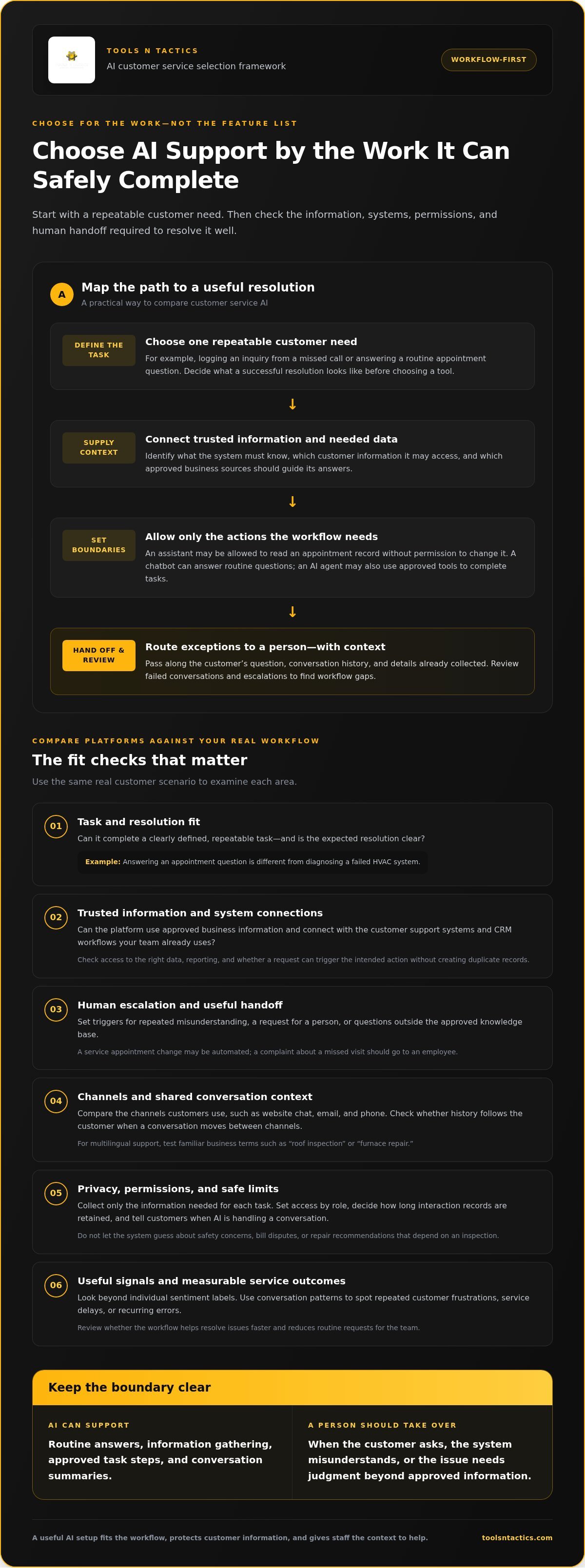
For a Dallas HVAC company, answering appointment questions is different from diagnosing a failed system. Choose technology for a defined service task, the customer data it needs, and the point at which a person should take over.
AI Agents and Service Automation
AI-driven customer service solutions use conversational systems to understand requests, find relevant information, and support service workflows. A chatbot mainly responds in conversation, while an AI agent can use approved tools to complete multiple steps. The distinction matters when a request needs more than an answer, such as recording a service request and routing it to the right team.
Start with one repeatable task, such as logging an inquiry from a missed call, and define what information the system needs. Virtual assistants can also help service agents by summarizing conversations or organizing notes. Quality monitoring can review interactions for recurring errors and coaching opportunities. Set specific permissions: an assistant that can summarize a call should not automatically be able to change customer data.
Chatbots and Self-Service
A chatbot lets customers ask routine questions and get answers from approved business information. A home service company might use one to explain its service area, collect a preferred appointment time, or direct customers to the right request form. This self-service helps customers find basic information without waiting for an employee.
Set clear boundaries for the topics a bot can handle. If a customer raises a safety concern, disputes a bill, or asks for a repair recommendation that depends on an inspection, the system should not guess. Use reliable answer sources, test common ways of phrasing questions, and review failed conversations. The goal is to complete straightforward workflows, not automate every interaction.
Escalation for Complex Issues
Human-agent escalation transfers a conversation to an employee when AI cannot resolve it safely or accurately. Define triggers such as repeated misunderstanding, a customer asking for a person, or a question outside the approved knowledge base. Clear triggers matter because confident but inaccurate answers can frustrate customers and create extra work for staff.
Make the handoff useful by passing along the customer’s question, relevant conversation history, and information already collected. That way, the customer does not have to start over. An appointment change might be automated, for example, while a complaint about a missed visit goes to an employee. Review escalations to check whether the trigger worked and where the workflow needs adjustment.
Privacy, Security, and Compliance
For U.S. businesses, privacy and security planning should account for the customer data collected, how it is used, and which federal or state obligations apply. Set access controls, collect only the information needed for each task, and decide how long interaction records are retained. These steps help protect customer data and align system access with each employee’s role.
Separate what an AI system can understand from what it is allowed to do. It might read an appointment record, for example, but require approval before changing it. Tell customers when AI is handling a conversation, provide a clear path to a person, and review outputs for errors or biased assumptions. Before launch, test exceptional cases and keep records that help teams understand the system’s actions.
AI customer support platform comparisons
Compare platforms by the work they can complete, not by the length of their feature lists. For a Dallas service business, the right fit depends on customer channels, team workflows, and how each system supports resolution.
Predictive Customer Support
Predictive customer support uses customer or operational signals to anticipate a service need and prompt action. For example, an HVAC company could use an incoming appointment-change request to alert its support team before a technician’s schedule is affected. Early outreach can help prevent a small issue from becoming a missed appointment or repeat contact.
Assess which signals the platform can use and what response it can trigger. A useful system might flag repeated questions about a service delay and route those cases for review. Tie each action to a clear workflow, then measure whether it helps resolve the issue faster.
Omnichannel and Multilingual Support
Omnichannel support connects conversations across channels such as website chat, email, and phone. Multilingual support serves customers in more than one language. A customer who starts with a website chatbot and later calls should not have to repeat every detail. Shared context can help agents deliver a more consistent customer support experience.
Compare the channels your customers actually use, then test a sample request on each one. Check whether the platform preserves conversation history and routes requests to the right team. For multilingual service, test common business terms such as “roof inspection” or “furnace repair” to catch unclear answers before launch.
Choosing a Support Tool
A support tool should fit your workflows, data, and team capacity. A standalone platform may suit a business that already manages its own customer support systems. Managed support may suit a team that needs help coordinating setup and ongoing improvement. Either way, map how a new request comes in, who handles it, and what counts as resolution.
Compare systems using a real customer scenario, such as rescheduling a service visit. Check whether the tool can access approved customer data, trigger the right action, and pass exceptions to an employee. Review reporting, permissions, and CRM integration too. A platform that cannot connect to existing workflows may create duplicate records or extra steps.
Before choosing, list your priority use cases and compare each platform against the same criteria: channel coverage, integration, escalation, reporting, and administration. A feature matrix can show whether a standalone tool or managed approach better fits your support team. It also keeps demos focused on customers’ needs, rather than polished features that will not change daily operations.
After launch, track resolution, repeat contact, customer effort, and escalation quality instead of relying on chatbot volume alone. Review a sample of conversations regularly, then adjust the knowledge and workflows when customers encounter the same obstacle. If you’re mapping platform requirements to an existing service process, discuss your customer support workflow with a growth partner.
Customer sentiment analysis and service insights
AI analysis can help identify why customers contact your business, where frustration grows, and which service steps need attention. Organizations with mature AI adoption reported 17% higher customer satisfaction and 38% lower average inbound call handling time.
Sentiment and Intent Analysis
Sentiment analysis estimates the emotional tone of customer interactions, while intent analysis identifies what customers want. Together, they can help a service team distinguish a routine question from a complaint that needs attention. A customer asking about a delayed HVAC appointment, for instance, may also express urgency or frustration. That context can guide routing and help employees address the underlying concern.
Look for patterns across conversations, not just individual labels. If customers repeatedly express frustration about unclear arrival updates, the problem may be communication rather than technician performance. Treat an AI label as a signal to investigate, then compare it with the full conversation and service records. This gives managers useful insight without treating an automated sentiment score as a final judgment.
Voice AI and Customer Sentiment
Voice AI analyzes spoken customer interactions to identify intent, recurring topics, and possible shifts in sentiment. It can help a service team review call patterns without manually listening to every recording. Repeated questions about appointment timing may point to a gap in customer updates, while frequent confusion about service options may signal unclear explanations.
Use voice insights to guide call reviews and coaching. A manager can examine calls flagged for unresolved concerns, then compare the analysis with the employee’s response and the case outcome. Speech recognition can misread names, background noise, or trade terms, so quality checks matter. Use patterns to improve service, rather than judging an employee based on one call.
Customer Data and Predictive Insights
Predictive analytics uses customer data and interaction history to identify emerging needs or possible service problems. For example, repeated calls after appointment changes may show that the rescheduling process needs clearer follow-up. Teams can use this insight to adjust messages or workflows before the same issue affects more customer interactions.
Connect analysis to trusted business information, such as service records and approved customer notes. Then compare predicted patterns with actual outcomes. If an alert identifies customers who may need an update, track whether timely outreach reduces confusion. Limit access to relevant data, and make the reason for each automated action clear to employees reviewing the case.
Analytics and Quality Monitoring
Analytics summarizes customer interactions across channels, while quality monitoring checks whether responses follow service standards. Together, they can show where processes break down and where employees may need coaching. A dashboard might reveal repeated questions about warranty coverage or frequent transfers between teams. These patterns can point to missing information or an unclear handoff.
Connect service measures to customer outcomes. AI customer service can reduce operational costs by up to 30%. Track efficiency alongside satisfaction and interaction quality, then review the cases behind any change. This helps leaders tell the difference between faster replies and resolved customer needs. If a process improves on paper but customers keep contacting the business about the same issue, investigate the workflow before expanding automation.
Integrating and scaling AI customer service tools
A service platform helps only when it connects customer questions with accurate business information and useful next steps. An appointment inquiry, for example, may require customer context, scheduling details, and a clear path to an employee.
CRM and Help Desk Connections
CRM and help desk integrations connect customer records, support cases, and approved business information so an AI tool can respond with relevant context. This matters when a customer contacts a company more than once and expects the team to know their history.
Map the information each workflow needs. A CRM may hold contact details, while a ticketing system tracks an unresolved issue. An AI tool could use those records to summarize a case or route it to the right team. Limit access to the data and actions required for the task.
Test the connection with a sample customer journey. Confirm that a new inquiry creates the right record, updates appear in the system employees use, and duplicate entries are avoided. Clear ownership of customer data helps prevent conflicting records from undermining the customer experience.
Omnichannel Integration
Omnichannel integration connects digital and voice interactions so customer context can move between channels. This matters when someone starts with a website chat and later calls about the same service request.
Check whether the platform preserves the conversation summary, intent, and relevant sentiment when a request moves between channels. A customer who reports a missed appointment by chat, for example, should not need to repeat that detail to a phone agent. Consistent context can help the team respond faster and reduce repeated questions.
Plan how each channel enters the workflow. Website chat, email, and voice may need different routing rules, even when they share customer records. Test common cases and exceptions in each channel, including requests that begin online but need employee follow-up.
Scaling AI Service Tools
Scaling means expanding AI across more workflows or channels while keeping permissions, knowledge, and service quality under control. A workflow that handles appointment questions, for example, may not be ready to process billing changes.
Start with one defined process and monitor its results before adding another. Review whether answers use trusted information, approved actions are completed correctly, and exceptions reach employees. Expand the system’s autonomy only after the team understands its performance and how to manage errors.
Build flexibility into the integration plan. As the business adds channels or changes its CRM, workflows should retain clear data ownership and escalation paths. Test updates in a controlled setting, document what changed, and review customer interactions after each expansion. This keeps operational insights useful without turning growth into a tangle of disconnected tools.
AI customer service companies and tools
Compare customer service tools by the jobs they complete, the channels they support, and the context they use. For a Dallas roofing company, answering a service-area question is different from routing a storm-damage request.
Compare Tool Types, Not Just Feature Lists
A chatbot tool focuses on written conversations, such as answering website questions or collecting contact details. A voice-focused system handles spoken requests, while a broader customer service platform may coordinate several channels and workflows. These categories overlap, so compare what each tool can actually do in your process.
A plumbing company, for example, might use a chatbot to collect a customer’s issue and preferred appointment window. A connected service platform could then pass that information into a customer record for staff follow-up. The useful distinction is whether a tool only generates responses or also supports an approved next action.
Some companies sell software that businesses configure themselves; others provide implementation and ongoing management. The first approach gives your team direct control, while the second can help when staff lack time to build workflows. Before deciding, compare who owns setup, knowledge updates, testing, and performance reviews.
Test Real Customer Conversations
Use the same customer requests to compare platforms. Include a routine question, an incomplete request, and a case that needs an employee. For a roofing contractor, these might be “Do you serve my neighborhood?”, “I need someone to inspect my roof,” and “I have an active leak.”
Check whether each system gives an accurate answer, asks for useful details, and routes the complex request with its context intact. Review the complete conversation, not just the first response. A polished opening means little if the customer must repeat information or the request reaches the wrong team.
- Channels: Test the website chat, voice, or email paths your customers use.
- Knowledge: Check whether answers reflect approved service details and policies.
- Actions: Confirm whether the tool can complete a defined task or only suggest one.
- Handoffs: See whether employees receive the request and conversation history.
- Reporting: Review how the platform shows unresolved requests and response quality.
Choose for Fit and Accountability
Choose a system that fits your current workflow, not the one with the longest feature list. A small service team may need reliable intake and routing before adding complex automation. Assign someone to review answers, update business information, and correct failed conversations.
Set a baseline before launch, then track resolution, repeat requests, and escalation quality. If the tool answers more questions but customers still call back, the workflow needs attention. Compare the same service task over time, and expand only when the process remains clear for customers and employees.
If you’re defining requirements for an AI customer service setup, discuss your customer service workflow and the tasks you want it to support.
Tools N Tactics | Local SEO & Digital Marketing Solutions: Growth Partner Program
Tools N Tactics | Local SEO & Digital Marketing Solutions helps service businesses connect customer-facing systems with a broader growth plan through its Growth Partner Program. If AI customer service is your next step, consider how it fits alongside visibility, lead conversion, and customer trust.
The Visibility Engine, Conversion Engine, and Authority Engine address different parts of that structure. Together, they can align how customers find your business, take action, and build confidence in your services. This matters when adding automation to a customer journey that already relies on search visibility and clear conversion paths.
Turn to the program when disconnected marketing systems make it harder to track how customer inquiries become qualified leads. Contact Tools N Tactics to discuss your growth goals and how the right engines may fit your business.
Build customer service into your next growth step
AI should support the way your business earns and maintains customer trust, not operate as a disconnected tool. As your service needs change, treat customer experience as part of your growth system: make it easy for people to find your business, take the next step, and receive a consistent response.
Tools N Tactics | Local SEO & Digital Marketing Solutions connects this planning through its Growth Partner Program, including the Visibility Engine and Conversion Engine. These offerings address how customers discover a business and how effectively its digital experience turns interest into action. This broader view can help you fit AI-driven customer service solutions into the customer journey instead of treating automation as a standalone fix.
Start by identifying the service workflow you want to improve and the customer outcome it should support. Then decide how customer service should connect with visibility and conversion goals.
Talk with Tools N Tactics about your growth goals and the right next step for your business.
Frequently Asked Questions
Can small businesses effectively implement AI in their customer service operations?
Yes, small businesses can use AI effectively by starting with a task that already follows a clear process. A roofing company serving Plano and Frisco, for example, could use a chatbot to collect service-area and inspection requests while staff handle estimates. Keep the first workflow narrow, and assign someone to review answers and missed requests. This makes it easier to catch problems before extending automation to more customer interactions.
How does AI handle complex customer service issues?
AI can gather details and organize context, but complex cases often need staff judgment. A customer disputing an invoice may need an employee to review the service record, explain the charge, and resolve an exception. Set clear limits on the actions AI can take, and make the next step visible to the customer. If an answer depends on judgment or a policy exception, route the case to an employee.
How should enterprises start with AI customer service?
Enterprises should begin with a defined customer service process, a trusted information source, and an accountable owner. For example, a company could pilot AI on appointment confirmations before applying it to billing questions. Include operations, customer service, security, and data teams in planning. Give each group a clear role in reviewing knowledge, permissions, outcomes, and exceptions before expanding the system to other departments or customer channels.
What is the difference between an AI chatbot and an AI agent?
An AI chatbot primarily holds a conversation, while an AI agent can use approved tools to carry out tasks. A chatbot might explain how to request a service appointment. An agent could collect the required details and enter an approved request into a connected system. The practical difference is what actions the system is permitted to take, not how natural its replies sound. Define permissions before connecting either tool to business records.
What are the main types of AI customer service tools, including chatbots, voice agents, and agent assist?
The main types include chatbots for written conversations, voice agents for spoken calls, and agent-assist tools that support employees during service work. A home service company serving Celina or Princeton might use chat to answer basic service questions, voice AI to capture incoming requests, and agent assist to surface relevant notes during a call. Choose based on the channel and task, then consider how each tool fits the team’s process.
What are the best AI customer service platforms in the United States in 2026?
There isn’t one best platform for every U.S. business in 2026. The right fit depends on the customer channels you use, the systems you need connected, and the tasks AI should handle. A business serving Dallas, Melissa, or Sherman can compare platforms by testing the same local service request in each one. Include how each tool handles exceptions and presents results to managers.
How do leading AI customer service solutions compare on features, integrations, and ease of use?
Compare platforms using the same practical test, not a vendor’s feature list. Check whether staff can update approved answers, customer records connect to tools they already use, and managers can review unresolved cases. Ease of use also depends on whether employees understand the system’s limits. A brief staff walkthrough using a real customer scenario can reveal confusing screens or extra work.
How much do AI customer service platforms cost, including per-agent and usage-based pricing?
Platform pricing may be per-agent, usage-based, or a combination, so the total depends on the setup. Key factors include staff seats, conversation volume, channels, system integrations, and implementation support. Compare what each plan includes, how usage is counted, and whether additional features affect billing. For a business operating across North Texas, estimate expected workflows and volume before comparing quotes, then assess the full operating cost rather than the starting plan alone.