
What if the lead you lose is a good prospect who called while your team was on a job? For service businesses, inquiries can arrive through calls, website forms, chat, and referrals. When each one lands in a different place, tracking gets messy and follow-up can fall behind. An AI powered lead management system should solve that problem, not add another disconnected tool.
It’s reasonable to expect AI to organize incoming leads and support faster responses. But automation only helps when it fits how your business works. A system that scores inquiries without clear rules, or sends messages that don’t reflect your services, can create noise instead of useful opportunities. Human judgment still matters when a prospect needs a nuanced answer or a team member must decide what to do next.
This buying guide helps you compare systems using practical criteria: how they capture leads, route them, support qualification, and connect follow-up to your CRM process. You’ll also learn which routine tasks are good candidates for automation, where oversight belongs, and how to choose next steps that match your lead sources and team capacity. The goal is a reliable process, not AI for its own sake.
Key Takeaways
- Separate lead management from lead generation so you can pinpoint where inquiries are being missed or delayed.
- Evaluate an AI powered lead management system by its ability to capture, organize, qualify, route, and follow up on leads within your existing CRM and channels.
- Compare manual processes, basic automation, and AI-supported workflows based on your team’s needs, visibility, and capacity to review exceptions.
- Map your current process, identify the gaps, then pilot and review targeted improvements before expanding automation.
- Connect lead handling to visibility, conversion, and authority efforts for a more coordinated approach to sustainable growth.
Why an AI-Powered Lead Management System Matters for Service Businesses
A homeowner in Dallas submits a request for an air-conditioning repair after the office has closed. The inquiry lands in a website inbox, but the person responsible for checking it is out on a job the next morning. The details sit unread while the customer waits. The issue isn’t a lack of interest. It’s a gap between receiving an opportunity and acting on it.
An AI powered lead management system connects tools and workflows that help a business handle prospects from first inquiry through follow-up. It can bring information from different channels into an organized process, help teams decide what needs attention, and trigger agreed next steps. For a foundational overview, see Lead Management.
Lead management is not the same as lead generation. Lead generation attracts potential customers through visibility, referrals, and other outreach. Lead management handles the opportunities that come in. A business can attract inquiries through search and its website, but without clear ownership and follow-up, those opportunities may stall. More inquiries don’t automatically create a smoother operation.
What does an AI-powered lead management system do?
Think of the CRM as the organized record: it stores and arranges customer and inquiry information. AI and automation can support that record by organizing incoming details, helping with qualification, and starting follow-up based on rules the business sets. For example, a form submission can be recorded, assigned to the right team member, and queued for a response.
The workflow is the operating plan, not the decision-maker. A system can surface relevant details or carry out routine steps, but a person still needs to use business judgment when a request is unclear, urgent, or outside normal service. Tools N Tactics connects CRM processes, lead routing, and follow-up through its Automation Engine.
When does lead management become a business bottleneck?
Informal lead handling can work when the volume is manageable and one person knows where every inquiry goes. As sources and team members multiply, the process can strain: duplicate records appear, ownership becomes unclear, and employees follow different response steps. The customer may have to repeat information, while the team spends time sorting out who replied or what was promised.
- Scattered records: Calls, forms, and messages are tracked in separate places.
- Unclear ownership: No one knows who should respond or take the next step.
- Uneven follow-up: Some inquiries receive a timely response, while others are overlooked.
These gaps affect customer experience and team efficiency. A larger flow of inquiries can expose weaknesses that were easy to overlook when the process was informal. Before adding AI, map how a lead moves today, from the first message to the next action. That gives the system a clear process to support instead of automating confusion.
Which AI Lead Management Capabilities Should You Evaluate?
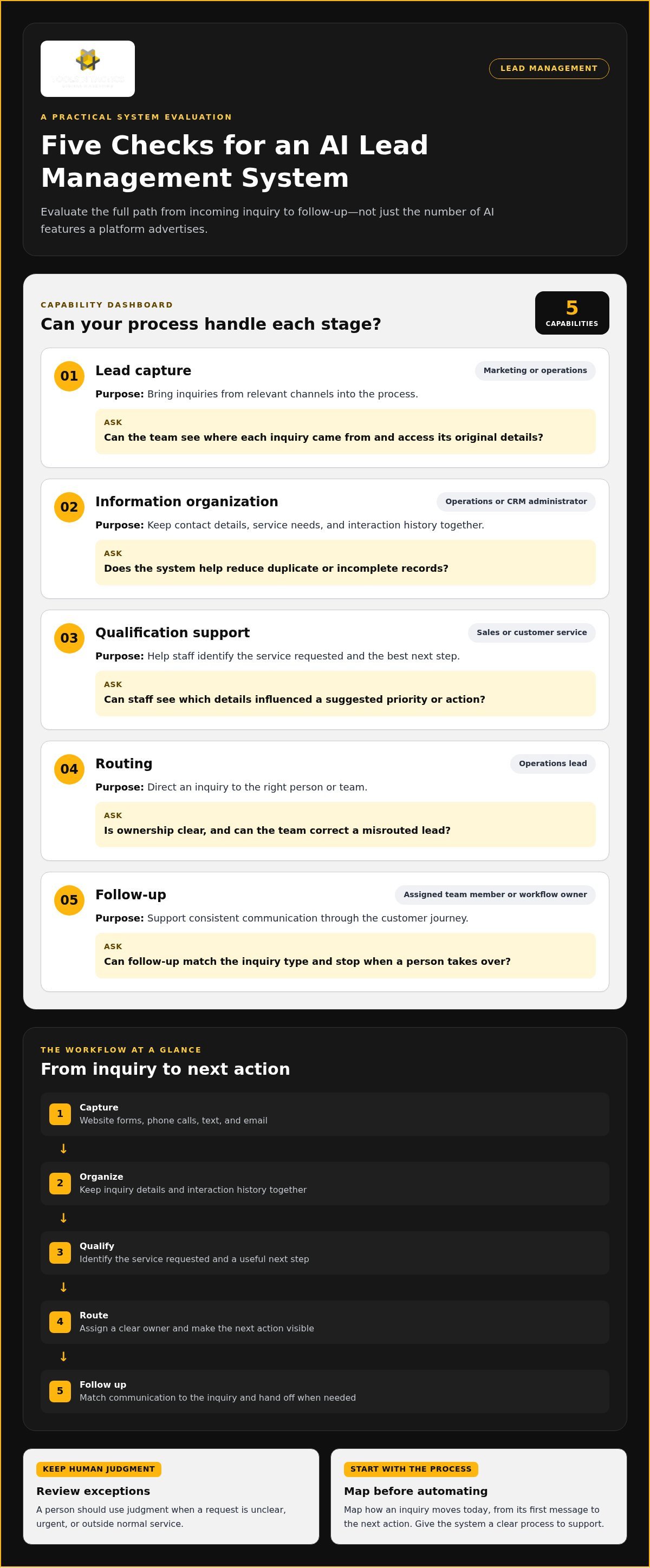
Compare capabilities one by one, not by how many AI features a platform advertises. A useful AI powered lead management system should support the path from inquiry to next action. It should also fit the channels your team uses, such as website forms, phone calls, text, and email.
Capability: Lead capture
Business purpose: Bring inquiries from relevant channels into the process.
Owner: Marketing or operations.
Evaluation question: Can the team see where each inquiry came from and access its original details?
Capability: Information organization
Business purpose: Keep contact details, service needs, and interaction history together.
Owner: Operations or CRM administrator.
Evaluation question: Does the system help reduce duplicate or incomplete records?
Capability: Qualification support
Business purpose: Help staff identify the service requested and the best next step.
Owner: Sales or customer service.
Evaluation question: Can staff see which details influenced a suggested priority or action?
Capability: Routing
Business purpose: Direct an inquiry to the right person or team.
Owner: Operations lead.
Evaluation question: Is ownership clear, and can the team correct a misrouted lead?
Capability: Follow-up
Business purpose: Support consistent communication through the customer journey.
Owner: Assigned team member or workflow owner.
Evaluation question: Can follow-up match the inquiry type and stop when a person takes over?
Which workflow features matter most to a service business?
Start with routing that names an owner and makes the next action visible. Then assess SMS and email follow-up against real customer journeys, from an estimate request to a service question. AI agents and chatbots can help handle incoming inquiries, but they’re components, not the whole system. IBM’s overview of How AI Lead Generation Works describes AI’s role in finding and assessing prospects. Service teams should also examine what happens after an inquiry is captured.
How should you assess integrations, data, and oversight?
Map where each lead detail starts and where staff need to see it. Test whether information reaches the CRM and follow-up channels without forcing employees to re-enter it. Ask how staff can review, correct, or override an AI-supported recommendation, and whether they can understand what informed it.
Useful automation makes the next step clear and reviewable. A black box makes decisions without showing the team why. That distinction matters when a request needs context, such as a roofing inquiry that describes damage but leaves out the property location. Your team should be able to check the details and decide how to respond.
Tools N Tactics’ AI and CRM automation services connect lead routing and follow-up workflows. Discuss your lead workflow as a practical next step.
Will AI Fix Lead Management? Compare the System, Not the Hype
AI won’t fix unclear ownership, weak handoffs, or incomplete lead records. It can make a sound process easier to repeat, but it can also repeat mistakes faster when instructions or information are poor. Before choosing an AI powered lead management system, check whether the workflow is clear enough to support.
Different approaches fit different needs. Manual handling gives people direct control, but records and follow-up can depend on individual habits. Basic automation follows fixed rules, such as assigning a web form by service type. AI-supported workflows can help interpret or prioritize information that doesn’t fit a simple rule, but staff need a way to review the result.
Manual handling
Best fit: A manageable flow of inquiries and a clear owner.
Visibility: Depends on how consistently staff record activity.
Oversight: People control each step, but consistency can vary.
Basic automation
Best fit: Repeated steps with clear conditions, such as routing by service type.
Visibility: Rules and assigned actions can be documented.
Oversight: Staff handle exceptions and update rules when the process changes.
AI-supported workflows
Best fit: Varied inquiries that require help organizing or prioritizing details.
Visibility: Most useful when the team can see the information behind a recommendation.
Oversight: People review decisions and take over when context matters.
Fixed rules are often enough when the next step is predictable. For example, a request for a specific service can go to the team that handles it. AI-supported prioritization may help when inquiries vary in wording or include details staff need to sort before deciding who should respond. It should assist that decision, not make it impossible to inspect.
Is your lead process ready for AI?
Write down where leads come from, who owns each type, what response steps follow, and how staff record outcomes. Look for missing contact details, inconsistent service labels, or unclear handoffs. If employees disagree about what should happen next, simplify the process first. Automation needs reliable inputs and rules to produce actions the team can trust.
Process clarity: If ownership or response steps are unclear, define them before automating.
Lead volume: If staff handle inquiries consistently, manual processes may be enough. If routine tasks crowd out other work, automate repeatable steps.
Channel complexity: If inquiries arrive in several places, prioritize a process that brings them into view and assigns responsibility.
Team capacity: If someone can review exceptions, AI support may fit. If no one owns oversight, start with simpler rules.
Where should human judgment remain in the workflow?
Keep people involved in sensitive conversations, complex qualification, and recommendations that depend on customer context. Set review points for AI-supported priorities, messages, and routing. Give staff a clear escalation path so they can pause an automated step, correct the record, or take over directly when a request falls outside the usual process.
Use this framework to identify gaps before selecting more technology. If you want help assessing how your current process could support automation, discuss your workflow through a lead management consultation.
How to Choose and Roll Out a Lead Management System
Choose a system by tracing a real inquiry through your business, not by starting with a feature list. A practical rollout follows a simple sequence: map the current workflow, identify gaps, select capabilities that address them, pilot one workflow, then review what happened. This keeps the setup grounded in how your team handles leads day to day.
What should you map before selecting a system?
List each lead source, the details staff need, the current handoffs, and who owns each next step. Mark where information gets entered more than once or disappears between channels. Then separate must-haves, such as clear assignment and visible follow-up status, from features that sound useful but don’t solve a current problem.
- Map the workflow. Follow an inquiry from its source through assignment, response, and recorded outcome. Include calls and referrals as well as web forms.
- Define the gaps. Identify where staff wait for information, repeat data entry, or lack clarity about who should act next.
- Select capabilities. Match each gap to a practical need, such as CRM organization, lead routing, or follow-up reminders. Avoid adding features without a clear purpose.
- Pilot one workflow. Start with a defined inquiry type and let the team test it before applying the process more broadly.
- Review and refine. Compare the intended process with actual lead records and staff experience. Adjust rules when the evidence shows a handoff or message needs work.
For example, a Dallas contractor could start with a website request for a roof inspection. The inquiry enters the CRM with its source and submitted details. A routing rule assigns it to the appropriate team member, who reviews the request and takes ownership. A planned follow-up message can acknowledge the inquiry, while a staff member handles questions that need judgment. Designing those messages around the customer journey is central to automated lead follow-up for service businesses.
How can you introduce automation without disrupting the team?
Before launch, explain what the workflow does, who is responsible, and how staff can check lead status. Test it with representative inquiries, including incomplete requests and cases that need human attention. Define an escalation path so employees can take over rather than forcing an unusual situation through a standard response.
Keep measurement focused. Track lead source, response status, conversion, and engagement so the team can see whether inquiries are moving through the process. Review records with the people who handle leads. If requests are often misrouted or follow-up stops at the wrong point, use that evidence to revise the workflow instead of adding automation blindly.
If you’re ready to map a lead process and plan a practical rollout, discuss your lead management workflow with Tools N Tactics.
How Tools N Tactics Connect AI Lead Management to Growth
An AI powered lead management system can make inquiry handling more consistent, but it can’t guarantee growth on its own. Lead management works best as part of a connected business system: people need to find your services, understand why to trust your business, take a clear next step, and receive thoughtful follow-up. If one part is disconnected, the whole process can lose momentum.
Tools N Tactics’ Growth Partner Program brings visibility, conversion, authority, and automation work together. Lead handling is part of a broader growth plan, not just a standalone software purchase. For example, an HVAC company in North Texas can attract local searchers, give them a clear way to request service on its website, build trust through useful content and reputation management, then route inquiries into a CRM process with planned follow-up. The same connected approach can support businesses in Plano, Dallas, Celina, Princeton, Melissa, Sherman, and Frisco.
The website is an important part of that path. The Conversion Engine includes web development, conversion rate optimization, user experience optimization, analytics, and funnels. Once a request arrives, a connected lead workflow can help the team organize, assign, and follow up on it. Visibility brings potential customers to the door; conversion and lead management help the business handle the opportunity.
What does an integrated lead-management partnership look like?
The Automation Engine brings together AI agents, lead nurturing, CRM, and workflow automation. Tools N Tactics connects lead routing and follow-up with the channels and processes a business uses, while the team retains responsibility for decisions that need personal judgment. Clear reporting, monthly strategy reviews, and ongoing data-backed optimization help identify where a workflow needs adjustment as real inquiries move through it.
For a roofing contractor, that could mean reviewing whether website inquiries reach the right person and whether the team can see follow-up status. For a professional service firm, it may mean checking that a new inquiry is recorded and routed to fit its intake process. The workflow should reflect the business, not force every team into the same template.
What should you prepare before discussing your lead system?
A short operational snapshot makes the conversation more useful. Bring your business goals, target audience, website URL, and relevant marketing assets. Note where inquiries come from, what happens after they arrive, who handles each step, and where handoffs regularly break down. Include the questions your team often needs answered before it can respond well.
- Goals: Describe what you want the lead process to support, such as clearer ownership or more consistent follow-up.
- Current workflow: List lead sources, response steps, and the tools your team uses.
- Friction points: Point out delays, repeated data entry, or unclear handoffs.
With that picture in hand, Tools N Tactics can help connect lead handling to your broader growth priorities and identify a practical next step. Talk with Tools N Tactics about your business goals and current lead-handling friction.
Make Your Next Lead-Handling Improvement Count
The right next step doesn’t have to be a full system change. Choose one friction point your team can clearly describe, such as uncertainty about who owns a new inquiry. Decide what a better handoff should look like and how you’ll know whether it’s working. This gives your AI powered lead management system a practical purpose tied to your team’s daily work.
Tools N Tactics can help turn that goal into a workable plan shaped around your business process and priorities. The focus is on building a process your team can use and improve, not adding automation for its own sake.
Ready to identify a practical next step for your lead workflow? Talk with Tools N Tactics about your lead management system.
Frequently Asked Questions
What is an AI-powered lead management system?
An AI powered lead management system combines customer records with tools that help staff handle inquiries after they arrive. Lead generation brings prospective customers to a business; lead management supports what happens next. For example, the system can keep a request’s service type, assigned owner, and current status together, giving an employee context before responding instead of making them reconstruct it from scattered notes.
Can AI qualify and route leads for a service business?
Yes. AI can suggest a category or direct an inquiry based on details a customer provides. First, decide which details matter for your business. A property-management request, for example, may need review by someone who handles commercial work. Staff should be able to correct a wrong category, and uncertain cases should go to a person rather than treating an AI suggestion as a confirmed fit.
Does an AI lead management system need an existing CRM?
No. A business might currently track inquiries in a CRM, a shared inbox, or another record-keeping tool. Design the workflow around where staff look for customer history and how they’ll avoid competing records. If there’s no CRM, first decide what customer information the team needs to retain and how it will stay usable. Adopting software just because it includes AI isn’t a process plan.
How can a small business tell if its lead process is ready for AI?
Test the process with recent inquiries from different channels. For each one, can someone find its source, owner, next action, and outcome in the records? Note where details are missing or depend on one employee’s memory. If staff can follow the same basic path and keep records usable, they have a clearer starting point for testing automation. Missing information points to process work first.
Can AI handle lead follow-up without a human?
AI can handle routine messages or reminders within boundaries set by the business, but people should remain available for situations involving empathy, negotiation, or exceptions. A customer disputing an estimate, for example, shouldn’t receive a generic sequence meant for a new inquiry. Set a stop condition for automated messages and a clear handoff path so an employee can take over with the conversation context intact.
What metrics should you track in an AI lead management system?
Track lead source, current status, conversion, and engagement, and define each measure consistently. Comparing how inquiries from different sources progress can reveal patterns. A status review can show which records have gone without a recorded next step. Separate counts from rates and use a consistent review period. These measures help investigate workflow performance, but they don’t prove that AI caused a change.
How long does it take to set up an AI-powered lead management system?
Setup time depends on the project’s scope, the workflow being changed, and the systems that need to work together. A project start isn’t the same as completion. The team may still need to agree on rules, test real cases, and prepare staff to use the process. Set milestones around those tasks rather than relying on one date. There’s no standard completion timeline for every business.
Is an AI-powered lead management system useful for contractors?
Yes, if it fits how the contractor handles work. A remodeling company could sort requests by project type, such as kitchen renovation or exterior repair, then direct each to the person who reviews that work. The team can record whether a request needs an estimate, more details, or a manual reply. This is useful when the workflow reflects real job categories and team responsibilities, not a generic sales pipeline.